1 പ്രധാനപ്പെട്ട സുരക്ഷാ വിവരങ്ങൾ
Please read this entire manual carefully before assembling or operating the JOROTO F20PRO Folding Treadmill. Retain this manual for future reference. Failure to follow these instructions could result in injury or damage to the product.
- ഏതെങ്കിലും വ്യായാമ പരിപാടി ആരംഭിക്കുന്നതിന് മുമ്പ് എല്ലായ്പ്പോഴും ഒരു ഡോക്ടറുമായി കൂടിയാലോചിക്കുക.
- ഓപ്പറേഷൻ സമയത്ത് ട്രെഡ്മില്ലിൽ നിന്ന് കുട്ടികളെയും വളർത്തുമൃഗങ്ങളെയും അകറ്റി നിർത്തുക.
- Place the treadmill on a flat, stable surface with adequate clearance around it (at least 2 meters behind and 0.6 meters on each side).
- Ensure the safety key is properly attached before starting the treadmill. In case of emergency, pull the safety key to stop the machine immediately.
- ഉചിതമായ കായിക പാദരക്ഷകളും വസ്ത്രങ്ങളും ധരിക്കുക.
- Do not use the treadmill if it is damaged or malfunctioning.
- Maximum user weight capacity is 130 kg (286 lbs). Do not exceed this limit.
- Unplug the treadmill from the power outlet when not in use, before cleaning, or before performing maintenance.

Image 1.1: The JOROTO F20PRO Treadmill in use, demonstrating its suitability for home fitness.
2. ഉൽപ്പന്നം കഴിഞ്ഞുview
The JOROTO F20PRO is a compact and powerful folding treadmill designed for home use, offering a range of features to support your fitness journey.
പ്രധാന സവിശേഷതകൾ:
- Powerful 2.5 HP Motor: Provides consistent power for walking, jogging, and running with a low noise level (below 45 dB).
- ക്രമീകരിക്കാവുന്ന വേഗത: Ranges from 1 to 12 KM/H (0.6 to 7.5 MPH) to suit various fitness levels and workout intensities.
- 8% Manual Incline: Manually adjustable incline to intensify workouts and increase calorie burn.
- വൈഡ് റണ്ണിംഗ് ബെൽറ്റ്: A 40 cm (16-inch) wide running surface with a 6-layer anti-slip belt for stable and comfortable exercise.
- സംയോജിത ഹാൻഡിലുകൾ: Provides essential stability and safety during use.
- LED Display with Bluetooth: Clearly shows time, speed, distance, and calories. Connects to fitness apps via Bluetooth for detailed workout analysis.
- മടക്കാവുന്ന ഡിസൈൻ: Vertical folding mechanism and integrated transport wheels for easy storage and repositioning.
- കരുത്തുറ്റ നിർമ്മാണം: Reinforced running deck and integrated cushioning system support users up to 130 kg (286 lbs).

Image 2.1: The powerful and quiet 2.5 HP motor, designed for consistent performance.
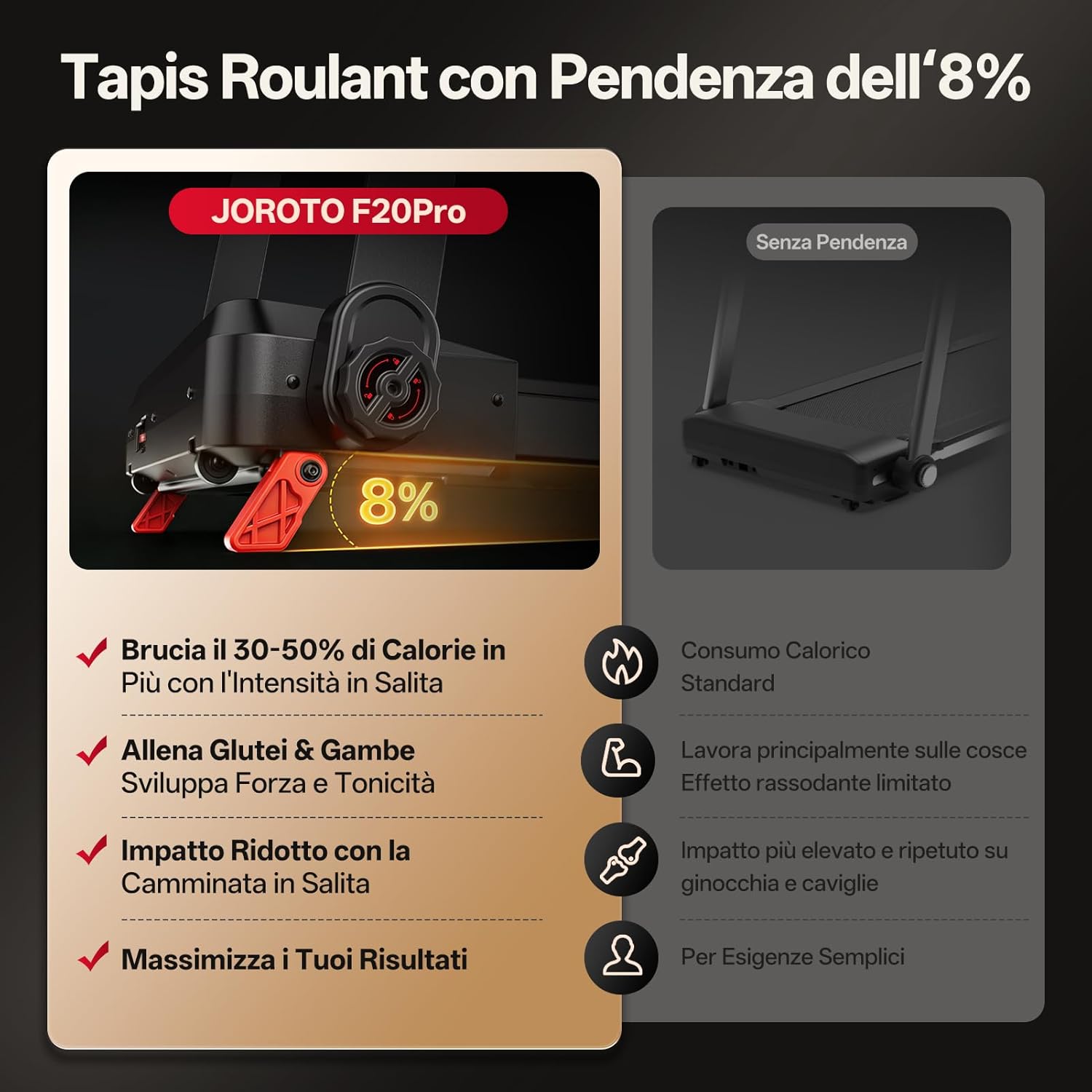
Image 2.2: The 8% manual incline feature, enhancing calorie burn and muscle engagement.
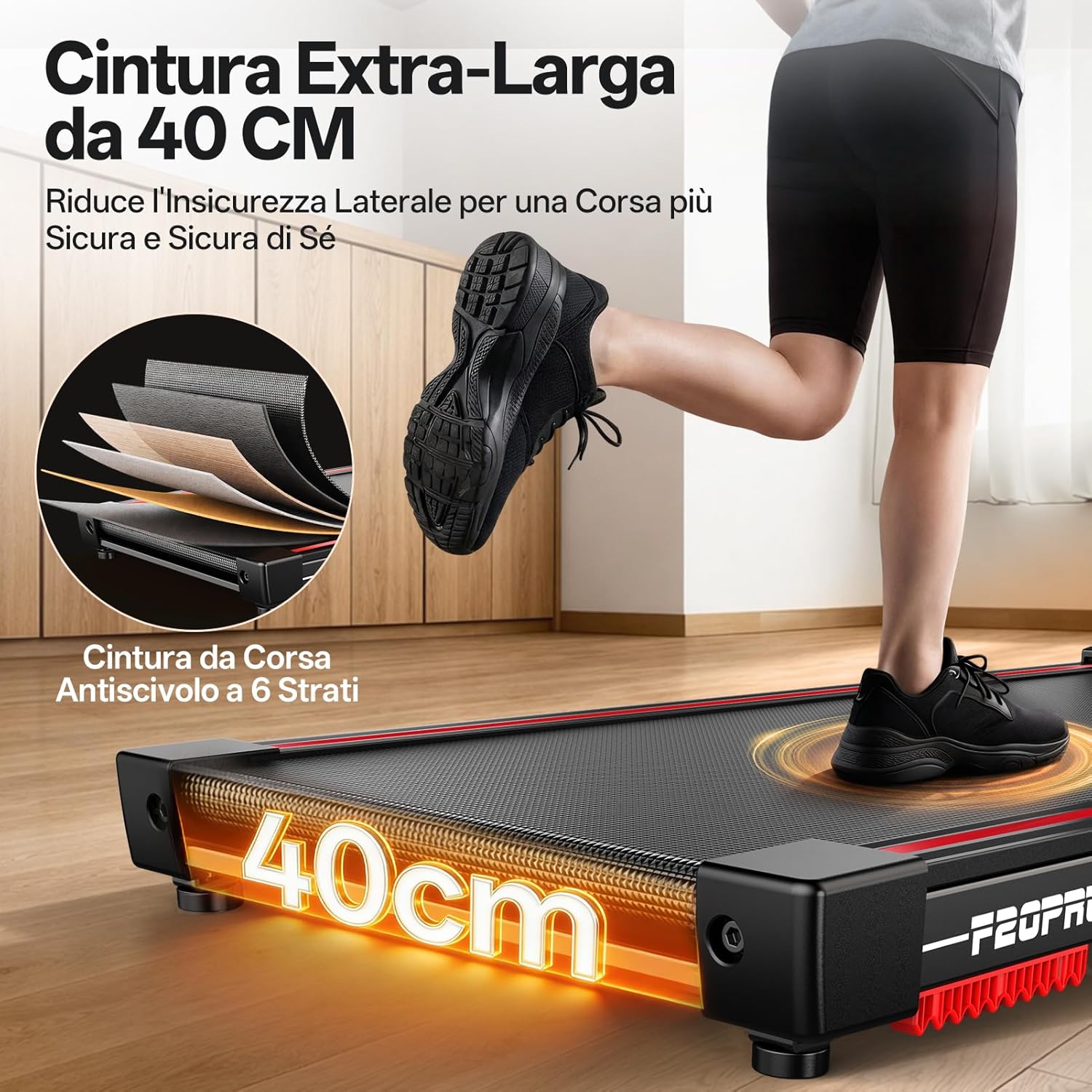
Image 2.3: The 40 cm extra-wide, 6-layer anti-slip running belt for enhanced safety and comfort.

Image 2.4: The robust construction supports users up to 130 kg (286 lbs).
3. സജ്ജീകരണവും അസംബ്ലിയും
The JOROTO F20PRO treadmill is designed for quick and straightforward assembly. Please follow these steps carefully.
- അൺപാക്ക് ചെയ്യുന്നു: Carefully remove all components from the packaging. Ensure all parts listed in the packing list (refer to the separate packing list document) are present.
- പ്ലേസ്മെൻ്റ്: Choose a suitable location for your treadmill. Ensure it is on a level surface and has sufficient clear space around it for safe operation and folding.
- തുറക്കുന്നത്:
- Gently lift the running deck from its folded position.
- Lower the running deck slowly until it locks into the flat operating position. Ensure it is securely locked before use.
- ഹാൻഡിൽബാർ അസംബ്ലി (ആവശ്യമെങ്കിൽ): Attach the handlebars to the main frame using the provided screws and tools. Ensure they are tightened securely.
- പവർ കണക്ഷൻ: ഗ്രൗണ്ടഡ് ഇലക്ട്രിക്കൽ ഔട്ട്ലെറ്റിലേക്ക് പവർ കോർഡ് പ്ലഗ് ചെയ്യുക.
- സുരക്ഷാ കീ: Attach the safety key to the console and clip the other end to your clothing. The treadmill will not operate without the safety key in place.

Image 3.1: The JOROTO F20PRO treadmill demonstrating its compact folding design for easy storage.
4. പ്രവർത്തന നിർദ്ദേശങ്ങൾ
Familiarize yourself with the control panel and functions before beginning your workout.
4.1 കൺട്രോൾ പാനൽ ഓവർview
The LED display shows essential workout metrics. Buttons allow for speed adjustment, start/stop, and mode selection.

Image 4.1: The LED display and control panel, featuring Bluetooth connectivity for fitness apps.
4.2 ഒരു വ്യായാമം ആരംഭിക്കൽ
- Ensure the treadmill is plugged in and the safety key is correctly placed on the console and clipped to your clothing.
- അമർത്തുക ആരംഭിക്കുക button. The belt will begin to move at a low speed (e.g., 1 KM/H).
- Gradually increase the speed using the വേഗത + button to your desired pace.
- To adjust the incline, manually lift the rear of the treadmill and adjust the support mechanism to the desired 8% incline level. Ensure it is securely locked before continuing your workout.
4.3 വേഗതയും ചരിവും ക്രമീകരിക്കൽ
- വേഗത: ഉപയോഗിക്കുക വേഗത + ഒപ്പം വേഗത - buttons on the console to increase or decrease the running belt speed. The speed range is 1-12 KM/H.
- ചരിവ്: The incline is manually adjustable up to 8%. To change the incline, stop the treadmill, carefully lift the rear of the running deck, and reposition the incline support to the desired level. Ensure it is stable before resuming your workout.
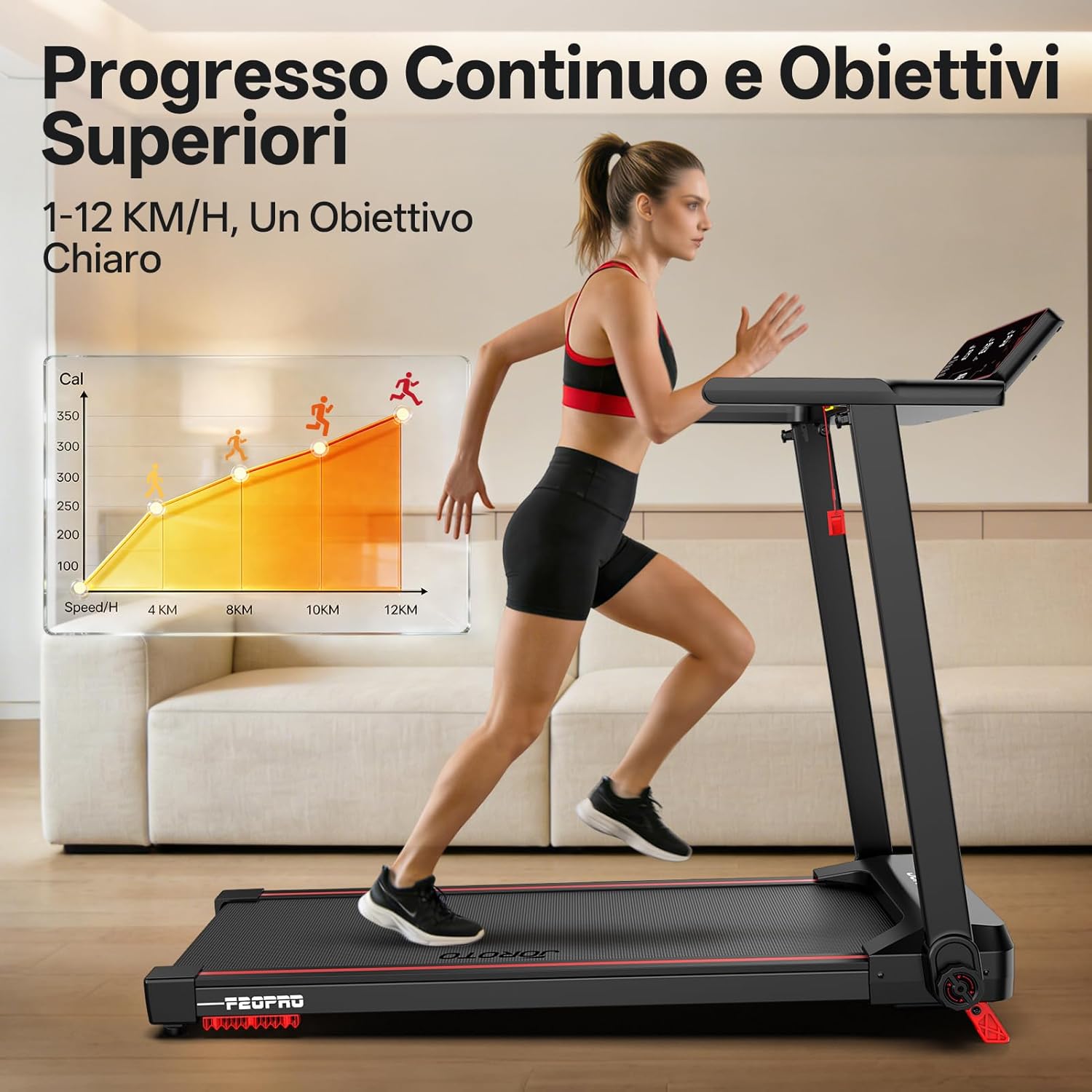
Image 4.2: Visual representation of speed progression from 1 KM/H to 12 KM/H.
4.4 വ്യായാമം നിർത്തൽ
- അമർത്തുക നിർത്തുക ക്രമേണ വേഗത കുറയ്ക്കാനും ട്രെഡ്മിൽ ബെൽറ്റ് നിർത്താനും ബട്ടൺ അമർത്തുക.
- Alternatively, pull the safety key from the console for an immediate emergency stop.
4.5 ബ്ലൂടൂത്തും ആപ്പ് കണക്റ്റിവിറ്റിയും
The JOROTO F20PRO treadmill can connect to compatible fitness applications via Bluetooth for enhanced tracking and workout programs.
- Download the recommended fitness app (e.g., Kinomap, FTMS compatible apps) from your device's app store.
- നിങ്ങളുടെ സ്മാർട്ട്ഫോണിലോ ടാബ്ലെറ്റിലോ ബ്ലൂടൂത്ത് പ്രവർത്തനക്ഷമമാക്കിയിട്ടുണ്ടെന്ന് ഉറപ്പാക്കുക.
- Open the fitness app and follow the in-app instructions to search for and connect to your JOROTO F20PRO treadmill.
- Once connected, the app will display real-time workout data and allow control over certain treadmill functions.
5. പരിപാലനം
Regular maintenance ensures the longevity and optimal performance of your JOROTO F20PRO treadmill.
- വൃത്തിയാക്കൽ:
- After each use, wipe down the console and other surfaces with a damp വിയർപ്പും പൊടിയും നീക്കം ചെയ്യാൻ തുണി ഉപയോഗിക്കുക. ഉരച്ചിലുകൾ ഉള്ള ക്ലീനറുകൾ ഒഴിവാക്കുക.
- Periodically vacuum underneath the treadmill to prevent dust buildup from affecting motor performance.
- ബെൽറ്റ് ലൂബ്രിക്കേഷൻ: The running belt requires periodic lubrication to reduce friction and extend its lifespan. Refer to the separate lubrication guide or contact customer support for specific instructions and recommended lubricant.
- ബെൽറ്റ് ടെൻഷനും അലൈൻമെന്റും: Over time, the running belt may require adjustment for tension or alignment. If the belt slips or drifts to one side, refer to the troubleshooting section or contact customer support for guidance.
- പവർ കോർഡ് പരിശോധന: Regularly inspect the power cord for any damage. If damaged, discontinue use and contact customer support for replacement.
6. പ്രശ്നപരിഹാരം
If you encounter any issues with your JOROTO F20PRO treadmill, refer to the common problems and solutions below. If the problem persists, contact customer support.
| പ്രശ്നം | സാധ്യമായ കാരണം | പരിഹാരം |
|---|---|---|
| ട്രെഡ്മിൽ സ്റ്റാർട്ട് ആകുന്നില്ല. |
|
|
| ഓടുമ്പോൾ ബെൽറ്റ് തെന്നി വീഴുകയോ മടി കാണിക്കുകയോ ചെയ്യുന്നു. |
|
|
| റണ്ണിംഗ് ബെൽറ്റ് ഒരു വശത്തേക്ക് നീങ്ങുന്നു. |
|
|
| പ്രവർത്തന സമയത്ത് അസാധാരണമായ ശബ്ദം. |
|
|
7 സ്പെസിഫിക്കേഷനുകൾ
| മോഡൽ: | F20PRO |
| മോട്ടോർ പവർ: | 2.5 Horsepower (PS) |
| വേഗത പരിധി: | മണിക്കൂറിൽ 1 - 12 കി.മീ. |
| ചരിവ്: | 8% മാനുവൽ ഇൻക്ലൈൻ |
| റണ്ണിംഗ് ബെൽറ്റ് വീതി: | 40 സെ.മീ (16 ഇഞ്ച്) |
| പരമാവധി ഉപയോക്തൃ ഭാരം: | 130 കി.ഗ്രാം (286 പൗണ്ട്) |
| ഉൽപ്പന്ന അളവുകൾ (വിരിച്ചത്): | 120 cm (L) x 61 cm (W) x 104 cm (H) |
| ഉൽപ്പന്ന അളവുകൾ (മടക്കിയത്): | Approximately 13 cm (Thickness) x 61 cm (W) x 120 cm (H) |
| ഉൽപ്പന്ന ഭാരം: | 25 കി.ഗ്രാം |
| മെറ്റീരിയൽ: | സ്റ്റീൽ അലോയ് |
| ഊർജ്ജ സ്രോതസ്സ്: | വയർഡ് ഇലക്ട്രിക് |
| Display Metrics: | Speed, Distance, Time, Calories Burned |
| കണക്റ്റിവിറ്റി: | Bluetooth (App Support) |
8. വാറൻ്റിയും പിന്തുണയും
JOROTO is committed to providing reliable products and excellent customer service.
- വാറൻ്റി: The JOROTO F20PRO treadmill comes with a comprehensive 2-year warranty on main components. This warranty covers defects in materials and workmanship under normal use.
- ഉപഭോക്തൃ പിന്തുണ: For any questions, technical assistance, warranty claims, or to order replacement parts, please contact JOROTO customer support. Our dedicated team is available to provide reliable assistance.
- ബന്ധപ്പെടാനുള്ള വിവരങ്ങൾ: Please refer to the contact details provided on the JOROTO official webസൈറ്റ് അല്ലെങ്കിൽ നിങ്ങളുടെ വാങ്ങൽ ഡോക്യുമെന്റേഷൻ.


