1. ആമുഖം
This manual provides essential information for setting up, operating, maintaining, and troubleshooting your FUNYET 15.6-inch Laptop Computer, Model NY-12. Please read this manual thoroughly before using your device to ensure proper function and longevity.
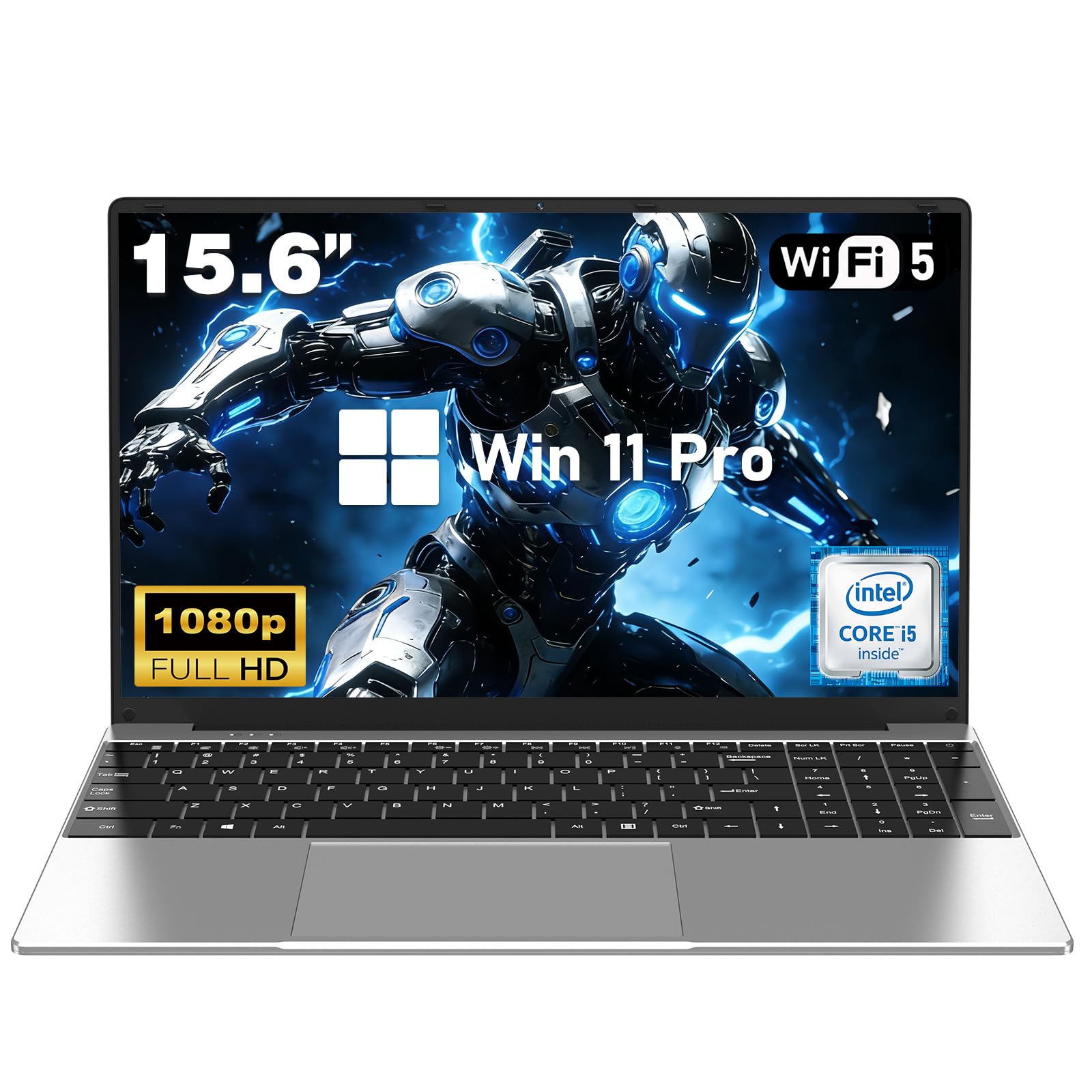
Figure 1.1: The FUNYET 15.6-inch Laptop Computer.
2. സജ്ജീകരണം
2.1 ലാപ്ടോപ്പ് അൺപാക്ക് ചെയ്യുന്നു
പാക്കേജിംഗിൽ നിന്ന് എല്ലാ ഘടകങ്ങളും ശ്രദ്ധാപൂർവ്വം നീക്കം ചെയ്യുക. ഇനിപ്പറയുന്ന ഇനങ്ങൾ ഉണ്ടെന്ന് ഉറപ്പാക്കുക:
- FUNYET Laptop Computer
- പവർ അഡാപ്റ്റർ
- ഉപയോക്തൃ മാനുവൽ (ഈ പ്രമാണം)
2.2 പ്രാരംഭ പവർ ഓണും ചാർജിംഗും
Connect the power adapter to the laptop's DC 19V/3.42A port and then to a power outlet. The laptop may have a partial charge, but it is recommended to fully charge it before first use. Press the power button to turn on the laptop. Follow the on-screen instructions for the initial Windows 11 Pro setup.

Figure 2.1: Laptop displaying the Windows 11 Pro interface during initial setup.
2.3 പെരിഫറലുകൾ ബന്ധിപ്പിക്കുന്നു
ബാഹ്യ ഉപകരണങ്ങൾ ബന്ധിപ്പിക്കുന്നതിനായി നിങ്ങളുടെ ലാപ്ടോപ്പിൽ വിവിധ പോർട്ടുകൾ സജ്ജീകരിച്ചിരിക്കുന്നു:
- USB 3.0 പോർട്ടുകൾ: Two ports are available for connecting USB devices such as mice, keyboards, or external storage drives.
- മിനി HDMI: Connect an external display or projector using a Mini HDMI cable.
- 3.5 എംഎം ഹെഡ്ഫോൺ ജാക്ക്: ഹെഡ്ഫോണുകളിലേക്കോ ബാഹ്യ സ്പീക്കറുകളിലേക്കോ ഉള്ള ഓഡിയോ ഔട്ട്പുട്ടിനായി.
- ടിഎഫ് കാർഡ് സ്ലോട്ട്: Insert a TF (MicroSD) card for additional storage.

ചിത്രം 2.2: ഓവർview of the laptop's multi-functional interface ports.
2.4 നെറ്റ്വർക്ക് കണക്ഷൻ
The laptop supports wireless connectivity:
- Wi-Fi 5 (802.11ac): To connect to a wireless network, go to Windows Settings > Network & Internet > Wi-Fi, turn Wi-Fi on, and select your desired network.
- ബ്ലൂടൂത്ത് 4.2: To pair Bluetooth devices, go to Windows Settings > Bluetooth & devices, turn Bluetooth on, and select 'Add device'.
3. പ്രവർത്തന നിർദ്ദേശങ്ങൾ
3.1 അടിസ്ഥാന പ്രവർത്തനം
Your laptop runs on Windows 11 Pro, providing a familiar and intuitive user experience. The full-size backlit keyboard enhances usability in various lighting conditions, and the integrated touchpad offers precise navigation.

Figure 3.1: The full-size backlit keyboard with numeric keypad for comfortable typing.
3.2 ഡിസ്പ്ലേ സവിശേഷതകൾ
The laptop features a 15.6-inch Full HD (1920x1080) IPS display. This screen technology provides wide viewing angles and accurate color reproduction. The display is designed to restore true color essence and protect eyesight.

Figure 3.2: The 15.6-inch Full HD IPS display for clear visuals.
3.3 പ്രോസസ്സറും പ്രകടനവും
Powered by an Intel Core i5-7Y54 processor with a maximum turbo frequency of 3.2GHz, this laptop is designed for smooth, lag-free performance in everyday tasks. Its dual-core, quad-thread architecture and 7W low-power design ensure efficient operation and quiet cooling.

Figure 3.3: Details of the Intel Core i5-7Y54 processor.
3.4 മെമ്മറിയും സംഭരണവും
The laptop is equipped with 16GB of RAM and a 1TB high-speed SSD. This configuration allows for efficient multitasking and provides ampനിങ്ങളുടെ സംഭരണം fileകൾ, ആപ്ലിക്കേഷനുകൾ, മീഡിയ എന്നിവ.
3.5 ബാറ്ററി മാനേജ്മെൻ്റ്
The integrated 5000mAh (38.5Wh) battery provides approximately 5 hours of usage on a single charge, with up to 48 hours of low standby power consumption. For optimal battery life, avoid fully discharging the battery frequently and store the laptop in a cool, dry place when not in use for extended periods.

Figure 3.4: Illustration of the laptop's 5000mAh battery capacity.
3.6 180-degree Lay-Flat Hinge
The laptop features a 180-degree lay-flat hinge, allowing the screen to open completely flat. This design facilitates versatile usage scenarios, such as sharing content with others or collaborating in meetings.

Figure 3.5: The laptop's 180-degree lay-flat hinge.
4. പരിപാലനം
4.1 ലാപ്ടോപ്പ് വൃത്തിയാക്കൽ
To clean the laptop, use a soft, lint-free cloth. For the screen, use a specialized screen cleaner. Avoid using harsh chemicals or abrasive materials. Ensure the laptop is powered off and unplugged before cleaning.
4.2 സോഫ്റ്റ്വെയർ അപ്ഡേറ്റുകൾ
Regularly check for and install Windows updates to ensure your system has the latest security patches and performance improvements. Go to Windows Settings > Windows Update to manage updates.
4.3 സ്റ്റോറേജ് മാനേജ്മെൻ്റ്
ആനുകാലികമായി റീview your stored files and uninstall unused applications to free up space on your 1TB SSD. This helps maintain optimal system performance.
5. പ്രശ്നപരിഹാരം
If you encounter issues with your laptop, refer to the following common solutions:
- ശക്തിയില്ല: Ensure the power adapter is securely connected to both the laptop and a working power outlet. Check if the power outlet is functional.
- ഡിസ്പ്ലേ പ്രശ്നങ്ങൾ: If the screen is blank, try connecting an external monitor via Mini HDMI to check if the issue is with the laptop's display or the graphics output.
- കീബോർഡ്/ടച്ച്പാഡ് പ്രതികരിക്കുന്നില്ല: Restart the laptop. If the issue persists, ensure no external devices are interfering. For the touchpad, check Windows settings for any disabled features.
- മന്ദഗതിയിലുള്ള പ്രകടനം: Close unnecessary applications, check for malware, and ensure sufficient free storage space.
- കണക്റ്റിവിറ്റി പ്രശ്നങ്ങൾ (വൈ-ഫൈ/ബ്ലൂടൂത്ത്): Ensure Wi-Fi and Bluetooth are enabled in Windows settings. Try restarting your router or re-pairing Bluetooth devices.
For further assistance, please contact FUNYET customer support.
6 സ്പെസിഫിക്കേഷനുകൾ
| ഫീച്ചർ | വിശദാംശങ്ങൾ |
|---|---|
| ബ്രാൻഡ് | FUNYET |
| മോഡലിൻ്റെ പേര് | NY-12 |
| സ്ക്രീൻ വലിപ്പം | 15.6 ഇഞ്ച് |
| സ്ക്രീൻ റെസല്യൂഷൻ | 1920 x 1080 പിക്സലുകൾ (ഫുൾ എച്ച്ഡി) |
| പ്രോസസ്സർ | Intel Core i5-7Y54 (1.6 GHz, up to 3.2 GHz Turbo) |
| റാം | 16 GB DDR4 |
| ഹാർഡ് ഡ്രൈവ് | 1 ടിബി എസ്എസ്ഡി |
| ഗ്രാഫിക്സ് കോപ്രൊസസർ | ഇൻ്റൽ എച്ച്ഡി ഗ്രാഫിക്സ് |
| ഓപ്പറേറ്റിംഗ് സിസ്റ്റം | വിൻഡോസ് 11 പ്രോ |
| വയർലെസ് തരം | 802.11a/b/g/n/ac (വൈ-ഫൈ 5) |
| ബ്ലൂടൂത്ത് | ബ്ലൂടൂത്ത് 4.2 |
| USB 3.0 പോർട്ടുകൾ | 2 |
| വീഡിയോ ഔട്ട്പുട്ട് | മിനി HDMI |
| പ്രത്യേക ഫീച്ചർ | ബാക്ക്ലൈറ്റ് കീബോർഡ് |
| ഇനത്തിൻ്റെ ഭാരം | 3.52 പൗണ്ട് (ഏകദേശം 1.6 കിലോഗ്രാം) |
| ഉൽപ്പന്ന അളവുകൾ | 14.1 x 0.8 x 9.1 ഇഞ്ച് |
| ബാറ്ററി | 5000mAh (38.5Wh) |
7. വാറൻ്റിയും പിന്തുണയും
7.1 ഉൽപ്പന്ന വാറന്റി
Your FUNYET laptop comes with a 2 വർഷത്തെ ഔദ്യോഗിക വാറന്റി. This warranty covers manufacturing defects and ensures free repair services for eligible issues. Additionally, we offer 180 days of free exchange for product-related concerns.
7.2 ഉപഭോക്തൃ പിന്തുണ
For any questions, technical assistance, or warranty claims, please contact FUNYET customer support. Our professional team is available 24/7 to provide prompt and efficient assistance.
- ഫോൺ: +1 800-986-9631 (Phone support available per business day, 4 AM - 10 PM PT)
- ഇമെയിൽ: funyetstore@outlook.com (Replies within 24 hours)

Figure 7.1: FUNYET customer support details.
8. Official Product Video Guide
ഒരു വിഷ്വൽ ഓവറിനായി ഔദ്യോഗിക ഉൽപ്പന്ന വീഡിയോ കാണുകview of the FUNYET Windows 11 Pro Laptop, highlighting its key features and design.
Video 8.1: Official FUNYET Windows 11 Pro Laptop overview. This video showcases the laptop's design, features, and performance capabilities.


