1. ആമുഖം
This manual provides detailed instructions for the IINE Retro Pocket Game Controller, Model L1241. This wireless gamepad is designed for multi-platform compatibility, offering precise control and a compact form factor for gaming on the go. Please read this manual thoroughly before using the product to ensure proper operation and to maximize your gaming experience.
2. ഉൽപ്പന്നം കഴിഞ്ഞുview ഫീച്ചറുകളും
The IINE Retro Pocket Game Controller combines classic design with modern technology, featuring Hall Effect joysticks for drift-free precision and a high 1000Hz response rate. Its mini portable design makes it ideal for travel and various gaming setups.
പ്രധാന സവിശേഷതകൾ:
- Retro, Pocket-Sized & Drift-Free Design: Enjoy classic gaming with a compact, mini controller. Recessed Hall Effect joysticks prevent drift, ensuring precise control.
- വിശാലമായ അനുയോജ്യത: Supports Switch (1 & 2), Steam Deck, PC, Android, iOS, tablets, and in-car gaming setups.
- Immersive Gaming Features: Built-in 6-axis gyroscope for motion control, adjustable vibration for tactile feedback, and a wake-up function for Switch consoles.
- Customizable D-Pad & Controls: Easily switch between 4-direction and 8-direction D-Pad modes. Customize button mapping to suit your play style.
- Compact, Lightweight & Long Battery Life: Measures 12.4×6.5×2cm (4.88×2.56×0.79 in) and weighs 83g (0.18 lbs). Powered by a 600mAh rechargeable battery, offering up to 15 hours of playtime.

ചിത്രം: കഴിഞ്ഞുview of the IINE Retro Pocket Game Controller's main features, highlighting its compact design, Hall Effect joysticks, battery capacity, customizable buttons, and broad platform compatibility.
3. സജ്ജീകരണവും ജോടിയാക്കലും
3.1 പ്രാരംഭ ജോടിയാക്കൽ
To pair the controller with your device:
- കൺട്രോളർ ചാർജ്ജ് ചെയ്തിട്ടുണ്ടെന്ന് ഉറപ്പാക്കുക.
- ഹോം ബട്ടൺ അമർത്തി കൺട്രോളർ ഓണാക്കുക.
- Activate Bluetooth pairing mode on your device (e.g., Switch, PC, phone).
- On the controller, press and hold the pairing button (often located on the top edge or indicated by a small icon) until the indicator lights flash rapidly.
- Select "IINE Controller" or similar from your device's Bluetooth list to complete pairing.
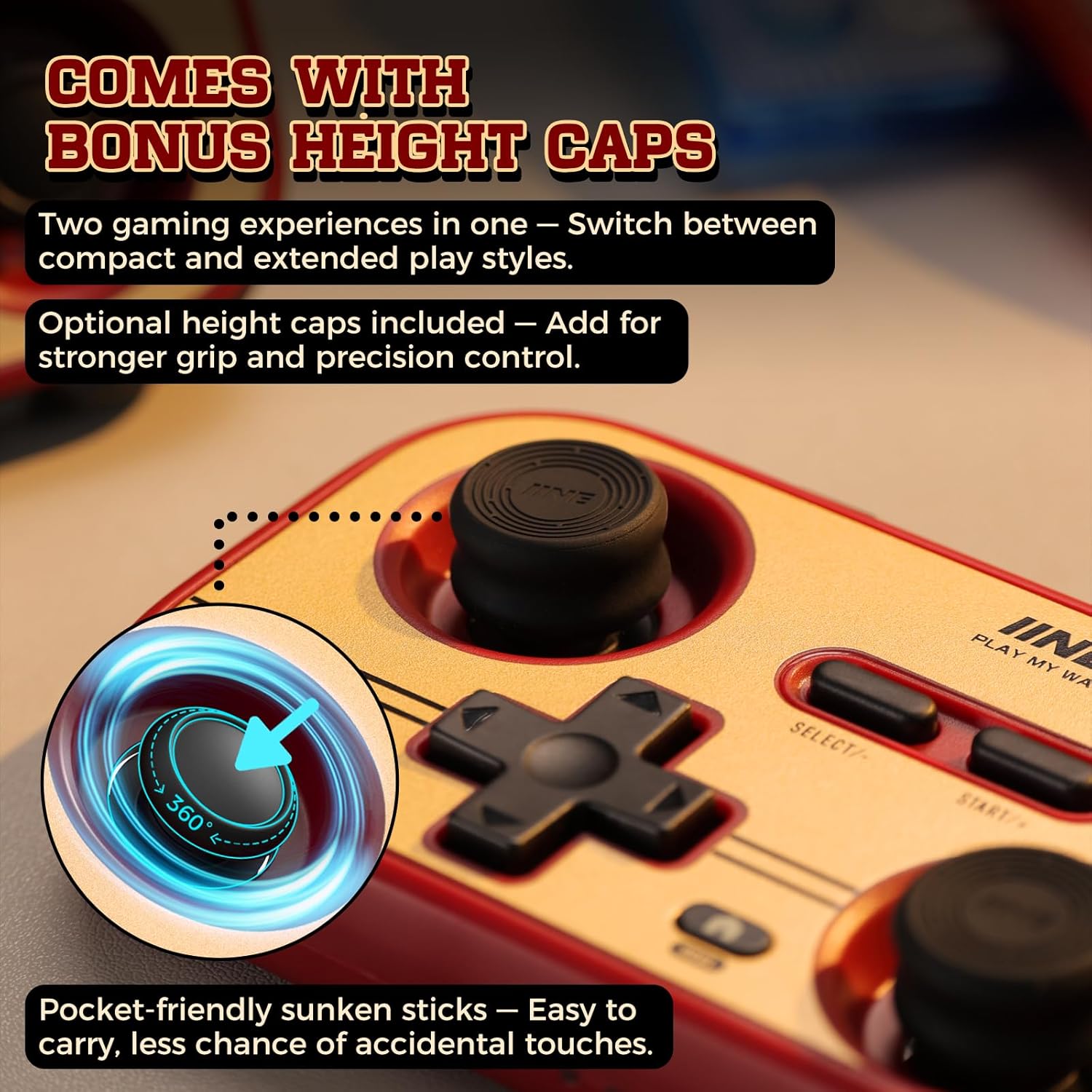
Image: The controller with optional height caps for joysticks, demonstrating the recessed design for portability and precision.
3.2 Wake-Up Function for Nintendo Switch
The controller supports waking up your Nintendo Switch (NS1/NS2) console remotely:
- Ensure the controller is already paired with your Switch.
- Press the Home button on the controller to wake up the console.
- For initial setup of the wake-up function on NS2, you may need to connect the controller via USB-C cable to the Switch dock, then remove and reinsert a Joy-Con. This process typically only needs to be done once per console.

Image: Demonstrating the one-button wake-up function for the Nintendo Switch console using the IINE controller.
Video: This video demonstrates the IINE Pocket Controller in Retro Brick Red, showcasing its recessed Hall Effect joysticks, compatibility with extended thumbstick caps, one-button wake-up for NS1/NS2, 6-axis gyro motion control, easy pairing with mobile devices, and ultra-slim portable design. (Source: IINE Brand Store)
4. പ്രവർത്തന നിർദ്ദേശങ്ങൾ
4.1 അടിസ്ഥാന നിയന്ത്രണങ്ങൾ
- ജോയ്സ്റ്റിക്കുകൾ: Use the left and right Hall Effect joysticks for precise analog movement and camera control.
- ഡി-പാഡ്: For directional input in games.
- ആക്ഷൻ ബട്ടണുകൾ (A, B, X, Y): Perform in-game actions.
- Shoulder Buttons (L, R, ZL, ZR): Additional action inputs.
- SELECT/- and START/+: Menu navigation and in-game functions.
- ഹോം ബട്ടണ്: Access system menus or wake up the console.
4.2 6-Axis Gyro Motion Control
The controller features a built-in 6-axis gyroscope for motion-sensitive games. Tilt and rotate the controller to control in-game movements where supported.

Image: A user engaging in a racing game, utilizing the 6-axis gyro motion control feature of the IINE controller for immersive gameplay.
4.3 ടർബോ ഫംഗ്ഷൻ
The Turbo function allows for rapid, repeated button presses without continuous manual input. This can be configured for manual, auto, or clean turbo modes, with adjustable speeds (5, 12, or 20 times per second).
Video: This video highlights the Retro Brick Red Multi-Platform Pocket Controller, demonstrating its 6-axis motion control, recessed joysticks for smooth handling, and the Turbo mode feature to reduce finger fatigue during gameplay. (Source: IINE Brand Store)
5. ഇഷ്ടാനുസൃതമാക്കൽ
5.1 D-Pad Modes and Button Mapping
The controller allows you to switch between 4-direction and 8-direction D-Pad modes. You can also customize button mapping to reassign functions to different buttons, adapting the controller to your preferred play style or specific game requirements.
5.2 Adjustable Vibration and Dead Zone
Adjust the intensity of the controller's vibration feedback for a personalized immersive experience. The dead zone of the joysticks can also be adjusted to fine-tune responsiveness and prevent unintended inputs.

ചിത്രം: വിശദമായത് view of the controller's advanced customization options, such as adjustable rumble, dead zone settings, and the ability to swap joystick and D-pad functions.
5.3 IINE App Customization
Further customization options are available through the official IINE app, compatible with both mobile (iOS/Android) and PC platforms. ഇതിനായി തിരയുക "IINE controller" or "IINE gamepad" in your device's app store to download and access advanced settings.

Image: Screenshots illustrating the IINE app's interface for customizing controller settings on mobile and PC, including button remapping and dead zone adjustments.
6 അനുയോജ്യത
The IINE Retro Pocket Game Controller is designed for broad compatibility across multiple platforms:
- Nintendo Switch (including Switch 1, Switch 2, and Switch Lite)
- സ്റ്റീം ഡെക്ക്
- പിസി (വിൻഡോസ്)
- iOS devices (iPhone, iPad)
- Android devices (smartphones, tablets)
- Supports in-car gaming setups

Image: Demonstrating various use scenarios for the controller, including mobile gaming, use with PS Remote Play, and as a page-flipping device for reading.
7. ബാറ്ററിയും ചാർജിംഗും
The controller is equipped with a 600mAh rechargeable battery, providing up to 15 hours of playtime on a single charge. To charge the controller, connect it to a power source using a USB-C cable (included). The indicator lights will show charging status and battery level.
8. പരിപാലനം
- മൃദുവായതും ഉണങ്ങിയതുമായ തുണി ഉപയോഗിച്ച് തുടച്ച് കൺട്രോളർ വൃത്തിയായി സൂക്ഷിക്കുക.
- കൺട്രോളറെ തീവ്രമായ താപനില, ഈർപ്പം അല്ലെങ്കിൽ നേരിട്ടുള്ള സൂര്യപ്രകാശം എന്നിവയിൽ തുറന്നുകാട്ടുന്നത് ഒഴിവാക്കുക.
- Do not disassemble the controller, as this may void the warranty and cause damage.
- Store the controller in a safe place when not in use to prevent physical damage.
9. പ്രശ്നപരിഹാരം
9.1 കണക്ഷൻ പ്രശ്നങ്ങൾ
- കൺട്രോളർ ജോടിയാക്കുന്നില്ല: Ensure the controller is in pairing mode (indicator lights flashing rapidly) and your device's Bluetooth is enabled and searching. Try restarting both the controller and your device.
- ഇടവിട്ടുള്ള കണക്ഷൻ: Ensure there are no obstructions between the controller and your device. Move closer to the device. Check for other wireless interference.
9.2 Input Issues (e.g., Drift)
- Joystick drift: The controller features Hall Effect joysticks designed to prevent drift. If you experience drift, try recalibrating the joysticks through the IINE app or your device's controller settings.
- ബട്ടണുകൾ പ്രതികരിക്കുന്നില്ല: Ensure the controller is fully charged. If the issue persists, try resetting the controller (refer to the IINE app or manufacturer's webനിർദ്ദിഷ്ട പുനഃസജ്ജീകരണ നിർദ്ദേശങ്ങൾക്കുള്ള സൈറ്റ്).
9.3 വൈദ്യുതി പ്രശ്നങ്ങൾ
- കൺട്രോളർ ഓണാക്കുന്നില്ല: Ensure the battery is charged. Connect the controller to a power source and allow it to charge for at least 30 minutes before attempting to turn it on again.
- ബാറ്ററി ഹോൾഡിംഗ് ചാർജ് ഇല്ല: If the battery life significantly decreases over time, it may indicate battery degradation. Contact customer support for assistance.
10 സ്പെസിഫിക്കേഷനുകൾ
| മോഡൽ നമ്പർ | L1241 |
| അളവുകൾ | 12.4 x 6.5 x 2 സെ.മീ (4.88 x 2.56 x 0.79 ഇഞ്ച്) |
| ഭാരം | 83 ഗ്രാം (3.2 ഔൺസ്) |
| ബാറ്ററി ശേഷി | 600mAh |
| പ്രതികരണ നിരക്ക് | 1000Hz |
| കണക്റ്റിവിറ്റി | വയർലെസ് (ബ്ലൂടൂത്ത്) |
| അനുയോജ്യത | Switch (1/2/Lite), Steam Deck, PC, iOS, Android |
11. വാറൻ്റിയും പിന്തുണയും
For warranty information, technical support, or further assistance, please refer to the official IINE website or contact their customer service directly. Details can typically be found on the product packaging or the manufacturer's official online channels.


