1. ആമുഖം
The Havit MS966SE is a high-performance tri-mode gaming mouse designed for versatility, precision, and comfort. It features a PixArt PMW3325 optical sensor, offering exceptional tracking accuracy and adjustable DPI settings up to 10,000. With its tri-mode connectivity, you can seamlessly switch between 2.4GHz wireless, Bluetooth 5.3, and USB-C wired modes to suit your gaming or work environment. The lightweight and ergonomic design ensures comfortable use during extended sessions, complemented by dynamic RGB lighting for a personalized aesthetic.

Figure 1: Havit MS966SE Gaming Mouse with USB-C cable.
2. സജ്ജീകരണം
2.1 അൺപാക്കിംഗ്
Carefully remove the mouse and all accessories from the packaging. Ensure all components are present:
- ഹാവിറ്റ് MS966SE ഗെയിമിംഗ് മൗസ്
- USB-C മുതൽ USB-A കേബിൾ വരെ
- 2.4GHz യുഎസ്ബി റിസീവർ
- ഉപയോക്തൃ മാനുവൽ (ഈ പ്രമാണം)
2.2 മൗസ് ബന്ധിപ്പിക്കൽ
The MS966SE offers three connectivity options:
2.2.1 2.4GHz വയർലെസ് മോഡ്
- Insert the 2.4GHz USB receiver into an available USB-A port on your computer.
- Locate the mode switch on the bottom of the mouse and slide it to the 2.4G സ്ഥാനം.
- മൗസ് നിങ്ങളുടെ കമ്പ്യൂട്ടറിലേക്ക് യാന്ത്രികമായി ബന്ധിപ്പിക്കും.
2.2.2 ബ്ലൂടൂത്ത് 5.3 മോഡ്
- Locate the mode switch on the bottom of the mouse and slide it to the BT സ്ഥാനം.
- On your computer or mobile device, open Bluetooth settings and search for new devices.
- Select "Havit MS966SE" from the list of available devices to pair.
2.2.3 USB-C വയേർഡ് മോഡ്
- Connect one end of the provided USB-C cable to the mouse and the other end to an available USB-A port on your computer.
- മൗസ് യാന്ത്രികമായി വയേർഡ് മോഡിലേക്ക് മാറുകയും ചാർജ് ചെയ്യാൻ തുടങ്ങുകയും ചെയ്യും.
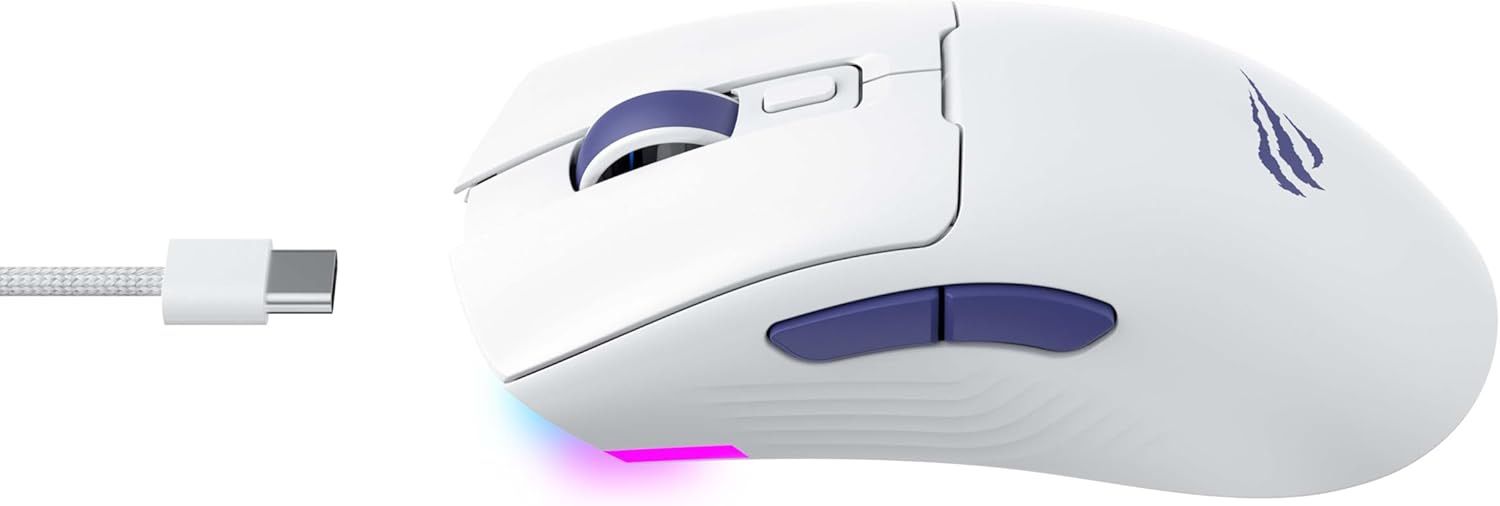
ചിത്രം 2: വശം view of the mouse, highlighting the USB-C port.
2.3 മൗസ് ചാർജ് ചെയ്യുന്നു
To charge the mouse, connect it to your computer using the USB-C cable. The mouse can be used in wired mode while charging. An indicator light on the mouse will show the charging status (refer to the manufacturer's website or product packaging for specific light behaviors).
3. പ്രവർത്തന നിർദ്ദേശങ്ങൾ
3.1 ബട്ടൺ പ്രവർത്തനങ്ങൾ
The Havit MS966SE features several programmable buttons for enhanced control:
- ഇടത് ക്ലിക്ക് ബട്ടൺ: സ്റ്റാൻഡേർഡ് പ്രൈമറി ക്ലിക്ക് ഫംഗ്ഷൻ.
- റൈറ്റ് ക്ലിക്ക് ബട്ടൺ: സ്റ്റാൻഡേർഡ് സെക്കൻഡറി ക്ലിക്ക് ഫംഗ്ഷൻ.
- സ്ക്രോൾ വീൽ: മുകളിലേക്കും താഴേക്കും സ്ക്രോൾ ചെയ്യുന്നു, ഒരു മിഡിൽ ക്ലിക്ക് ബട്ടണായി പ്രവർത്തിക്കുന്നു.
- DPI സൈക്കിൾ ബട്ടൺ: Located behind the scroll wheel, this button cycles through preset DPI sensitivity levels.
- സൈഡ് ബട്ടണുകൾ (മുന്നോട്ട്/പിന്നോട്ട്): സാധാരണയായി നാവിഗേഷനായി ഉപയോഗിക്കുന്നത് web browsers or can be programmed for in-game actions.

Figure 3: Side buttons and ergonomic design.
3.2 ഡിപിഐ അഡ്ജസ്റ്റ്മെന്റ്
The PixArt PMW3325 sensor allows for adjustable DPI settings up to 10,000. Press the DPI cycle button (located behind the scroll wheel) to switch between different sensitivity levels. Each press will cycle to the next preset DPI, allowing you to quickly adapt to various tasks or game scenarios.
3.3 Connectivity Mode Switching
To switch between 2.4GHz wireless, Bluetooth, and wired modes, use the physical switch located on the bottom of the mouse. Ensure the correct mode is selected based on your connection preference.
3.4 RGB ലൈറ്റിംഗ്
The mouse features dynamic RGB lighting. Specific controls for RGB lighting effects, colors, and brightness may be available through dedicated software provided by Havit. Please visit the official Havit website for software downloads and further customization options.
4. പരിപാലനം
4.1 വൃത്തിയാക്കൽ
- വൃത്തിയാക്കുന്നതിനുമുമ്പ് നിങ്ങളുടെ കമ്പ്യൂട്ടറിൽ നിന്ന് മൗസ് വിച്ഛേദിക്കുക.
- മൗസിന്റെ ഉപരിതലം തുടയ്ക്കാൻ മൃദുവായ, ഉണങ്ങിയ, ലിന്റ് രഹിത തുണി ഉപയോഗിക്കുക.
- കഠിനമായ അഴുക്കിന്, ചെറുതായി dampതുണിയിൽ വെള്ളം അല്ലെങ്കിൽ നേരിയ ക്ലീനിംഗ് ലായനി ഉപയോഗിക്കുക. കഠിനമായ രാസവസ്തുക്കൾ ഒഴിവാക്കുക.
- ബട്ടണുകൾക്കും സ്ക്രോൾ വീലിനും ചുറ്റും വൃത്തിയാക്കാൻ ഒരു കോട്ടൺ സ്വാബ് അല്ലെങ്കിൽ കംപ്രസ് ചെയ്ത എയർ ഉപയോഗിക്കുക.
- Do not immerse the mouse in water or any liquid.
4.2 സംഭരണം
When not in use for extended periods, store the mouse in a cool, dry place away from direct sunlight and extreme temperatures. If storing for a long time, ensure the mouse is fully charged to maintain battery health.
5. പ്രശ്നപരിഹാരം
5.1 മൗസ് പ്രതികരിക്കുന്നില്ല
- പവർ പരിശോധിക്കുക: മൗസ് ഓണാക്കിയിട്ടുണ്ടെന്നും ആവശ്യത്തിന് ബാറ്ററി ചാർജ് ഉണ്ടെന്നും ഉറപ്പാക്കുക.
- കണക്റ്റിവിറ്റി പരിശോധിക്കുക:
- വയർഡ് മോഡ്: USB-C കേബിൾ മൗസിലേക്കും കമ്പ്യൂട്ടറിലേക്കും സുരക്ഷിതമായി ബന്ധിപ്പിച്ചിട്ടുണ്ടെന്ന് ഉറപ്പാക്കുക. മറ്റൊരു USB പോർട്ട് പരീക്ഷിക്കുക.
- 2.4GHz വയർലെസ്: Ensure the USB receiver is properly inserted and the mouse is set to 2.4G mode. Try a different USB port for the receiver.
- ബ്ലൂടൂത്ത് മോഡ്: നിങ്ങളുടെ ഉപകരണത്തിൽ Bluetooth പ്രവർത്തനക്ഷമമാക്കിയിട്ടുണ്ടെന്നും മൗസ് ജോടിയാക്കിയിട്ടുണ്ടെന്നും ഉറപ്പാക്കുക. മൗസ് ജോടി വിച്ഛേദിച്ച് വീണ്ടും ജോടിയാക്കാൻ ശ്രമിക്കുക.
- പുനരാരംഭിക്കുക: നിങ്ങളുടെ കമ്പ്യൂട്ടറും മൗസും പുനരാരംഭിക്കുക.
5.2 DPI മാറുന്നില്ല
- നിങ്ങൾ ശരിയായ DPI സൈക്കിൾ ബട്ടൺ അമർത്തുന്നുണ്ടെന്ന് ഉറപ്പാക്കുക.
- If using custom software, check the DPI settings within the software.
5.3 വയർലെസ് മോഡിലെ ലാഗ് അല്ലെങ്കിൽ ഡിസ്കണക്ഷനുകൾ
- ഇടപെടൽ: Move the mouse closer to the receiver/device. Avoid obstacles between the mouse and receiver.
- ബാറ്ററി നില: Low battery can affect wireless performance. Charge the mouse.
- USB പോർട്ട്: Try connecting the 2.4GHz receiver to a different USB port, preferably a USB 2.0 port if available, as some USB 3.0 ports can cause interference.
6 സ്പെസിഫിക്കേഷനുകൾ
| ബ്രാൻഡ് | ഹവിറ്റ് |
| മോഡൽ | MS966SE |
| കണക്റ്റിവിറ്റി ടെക്നോളജി | Tri-Mode: 2.4GHz Wireless, Bluetooth 5.3, USB-C Wired |
| സെൻസർ ടെക്നോളജി | Optical (PixArt PMW3325) |
| ഡിപിഐ ലെവലുകൾ | Up to 10,000 adjustable DPI |
| പ്രത്യേക സവിശേഷതകൾ | Ergonomic Design, Dynamic RGB Lighting |
| അനുയോജ്യമായ ഓപ്പറേറ്റിംഗ് സിസ്റ്റങ്ങൾ | വിൻഡോസ്, മാകോസ്, ലിനക്സ് |
| അനുയോജ്യമായ ഉപകരണങ്ങൾ | Notebook, Personal Computer, Tablet, Smartphone |
| മൗസിൻ്റെ ഭാരം | ഏകദേശം 68 ഗ്രാം |
| ബാറ്ററി തരം | ലിഥിയം-അയൺ |
7. വാറൻ്റിയും പിന്തുണയും
7.1 വാറൻ്റി വിവരങ്ങൾ
This Havit MS966SE Gaming Mouse comes with a 1 വർഷത്തെ നിർമ്മാതാവിൻ്റെ വാറൻ്റി. വാറന്റി ക്ലെയിമുകൾക്കായി നിങ്ങളുടെ വാങ്ങലിന്റെ തെളിവ് സൂക്ഷിക്കുക. സാധാരണ ഉപയോഗത്തിൽ മെറ്റീരിയലുകളിലും വർക്ക്മാൻഷിപ്പിലുമുള്ള വൈകല്യങ്ങൾ വാറന്റി ഉൾക്കൊള്ളുന്നു.
7.2 ഉപഭോക്തൃ പിന്തുണ
For technical assistance, troubleshooting beyond this manual, or warranty inquiries, please contact Havit customer service directly. You can find the most up-to-date contact information and support resources on the official Havit webസൈറ്റ് (www.havit.com).


