ആമുഖം
This manual provides detailed instructions for setting up, operating, maintaining, and troubleshooting your AWOW AiBook 11 Windows 11 Tablet with Keyboard. Please read this manual thoroughly before using your device to ensure proper function and longevity.
ബോക്സിൽ എന്താണുള്ളത്
പാക്കേജിൽ എല്ലാ ഇനങ്ങളും ഉണ്ടെന്ന് ഉറപ്പാക്കുക:
- ടാബ്ലെറ്റ് പി.സി
- വേർപെടുത്താവുന്ന കീബോർഡ്
- 36W PD ചാർജർ
- ഉപയോക്തൃ മാനുവൽ
ഉൽപ്പന്നം കഴിഞ്ഞുview
The AWOW AiBook 11 is a versatile 2-in-1 device designed to function as both a tablet and a mini laptop. It features a 10.1-inch display, an Intel N150 processor, 12GB of RAM, and a 256GB SSD, running on Windows 11.

ചിത്രം: കഴിഞ്ഞുview of the AWOW AiBook 11's key features including display size, processor, storage, RAM, operating system, connectivity, and cameras.
സജ്ജമാക്കുക
1 ഉപകരണം ചാർജ് ചെയ്യുന്നു
Before initial use, fully charge your tablet. Use the provided 36W Power Delivery (PD) charger. A full charge typically takes approximately 3 hours.

Image: The AWOW AiBook 11 tablet connected to a charger, illustrating the 36W PD fast charging capability and battery life indicators.
2. Attaching the Keyboard
The keyboard connects magnetically to the tablet. Align the tablet with the keyboard's connector and allow the magnets to secure it in place. The keyboard also functions as a protective cover and includes an integrated stand.
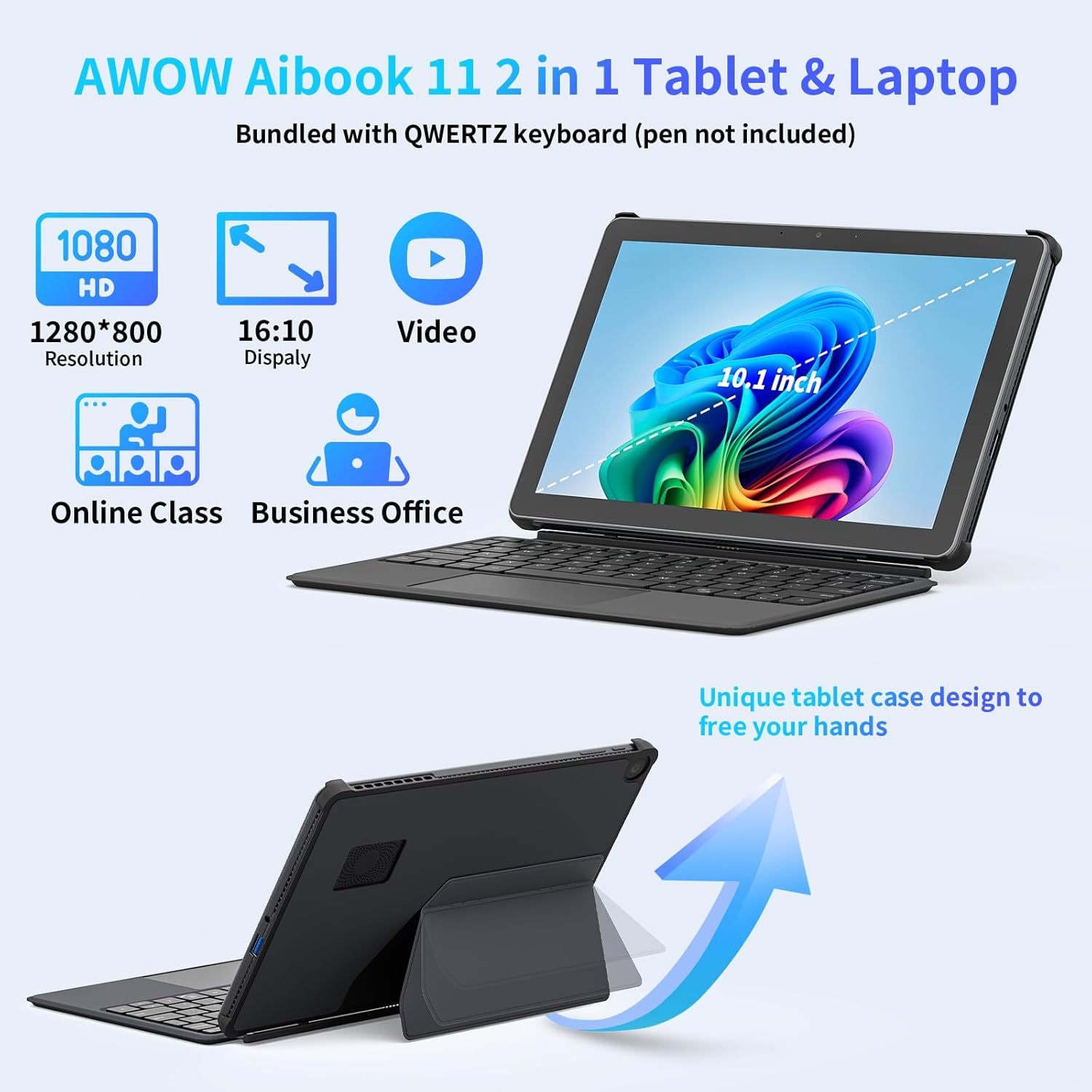
Image: The AWOW AiBook 11 tablet shown with its detachable keyboard and protective cover, highlighting its 2-in-1 functionality.
3. പ്രാരംഭ പവർ ഓണും വിൻഡോസ് സജ്ജീകരണവും
Press and hold the power button located on the side of the tablet until the screen illuminates. Follow the on-screen prompts to complete the Windows 11 initial setup, including language selection, network connection, and user account creation.
നിങ്ങളുടെ ഉപകരണം പ്രവർത്തിപ്പിക്കുന്നു
1. ഉപയോഗ രീതികൾ
The AiBook 11 supports multiple usage modes:
- ടാബ്ലെറ്റ് മോഡ്: Detach the keyboard for a pure tablet experience, ideal for touch navigation and media consumption.
- ലാപ്ടോപ്പ് മോഡ്: Attach the keyboard and use the integrated stand for a traditional laptop setup, suitable for typing and productivity.
- ക്രിയേറ്റീവ് മോഡ്: Adjust the stand to an angled position for drawing or comfortable viewing.

Image: The AWOW AiBook 11 tablet demonstrating its flexibility in laptop, creative, and handheld tablet modes.
2. ഡിസ്പ്ലേ സവിശേഷതകൾ
The device features a 10.1-inch In-Cell Full HD (1920x1080) display. In-Cell technology integrates the touch layer directly into the LCD, resulting in a thinner panel and clear visuals with reduced glare.

Image: A visual comparison illustrating the difference between traditional display layers and the thinner, integrated layers of an In-Cell display.
3. കണക്റ്റിവിറ്റി
The AiBook 11 offers various connectivity options:
- വയർലെസ്: Supports WiFi 6 (802.11ax) for high-speed internet and Bluetooth 5.0 for connecting peripherals.
- തുറമുഖങ്ങൾ: Includes Micro HDMI (4K 60Hz), a full-function Type-C port (4K 144Hz), and a USB 3.0 port. A headphone jack is also available.

Image: The AWOW AiBook 11 tablet connected to two external monitors, demonstrating its capability to extend the display via Type-C and Micro HDMI ports.
4. പ്രകടനവും സംഭരണവും
The tablet is powered by an Intel N150 Quad-Core processor, paired with 12GB of LPDDR5 RAM and a 256GB PCIe 3.0 SSD. This configuration supports efficient multitasking and quick application loading. Storage can be expanded via a TF card slot, supporting up to 512GB.

Image: A diagram showing the benefits of 12GB LPDDR5 RAM and 256GB PCIe 3.0 SSD for multitasking and data access speed.
മെയിൻ്റനൻസ്
1. ഉപകരണം വൃത്തിയാക്കൽ
Use a soft, lint-free cloth to clean the screen and exterior surfaces. For stubborn smudges, slightly dampതുണിയിൽ വെള്ളം അല്ലെങ്കിൽ സ്ക്രീൻ-ക്ലീനിംഗ് ലായനി ഉപയോഗിക്കുക. ഉരച്ചിലുകൾ ഉള്ള വസ്തുക്കളോ കഠിനമായ രാസവസ്തുക്കളോ ഒഴിവാക്കുക.
2. ബാറ്ററി മാനേജ്മെന്റ്
ബാറ്ററി ലൈഫ് വർദ്ധിപ്പിക്കാൻ, ബാറ്ററി ഇടയ്ക്കിടെ പൂർണ്ണമായും ഡിസ്ചാർജ് ചെയ്യുന്നത് ഒഴിവാക്കുക. ബാറ്ററി ലെവൽ കുറവായിരിക്കുമ്പോൾ ഉപകരണം ചാർജ് ചെയ്യുക. ദീർഘനേരം ഉപയോഗിക്കാത്തപ്പോൾ ഉപകരണം തണുത്തതും വരണ്ടതുമായ സ്ഥലത്ത് സൂക്ഷിക്കുക.
3. സോഫ്റ്റ്വെയർ അപ്ഡേറ്റുകൾ
നിങ്ങളുടെ സിസ്റ്റത്തിൽ ഏറ്റവും പുതിയ സുരക്ഷാ പാച്ചുകളും പ്രകടന മെച്ചപ്പെടുത്തലുകളും ഉണ്ടെന്ന് ഉറപ്പാക്കാൻ വിൻഡോസ് അപ്ഡേറ്റുകൾ പതിവായി പരിശോധിച്ച് ഇൻസ്റ്റാൾ ചെയ്യുക. പോകുക ക്രമീകരണങ്ങൾ > വിൻഡോസ് അപ്ഡേറ്റ് അപ്ഡേറ്റുകൾ കൈകാര്യം ചെയ്യാൻ.
4. സംഭരണ വിപുലീകരണം
If additional storage is required, insert a TF (microSD) card into the designated slot. The device supports TF cards up to 512GB.
5. തണുപ്പിക്കൽ സംവിധാനം
The AiBook 11 includes an internal fan system to manage heat and maintain stable CPU performance during operation. Ensure ventilation slots are not obstructed to allow for proper airflow.

Image: A diagram illustrating the internal fan system designed to cool the processor and maintain device stability.
ട്രബിൾഷൂട്ടിംഗ്
- ഉപകരണം പവർ ചെയ്യുന്നില്ല: Ensure the device is charged. Connect the charger and wait a few minutes before attempting to power on again. If the issue persists, perform a hard reset by holding the power button for 10-15 seconds.
- സ്ക്രീൻ പ്രതികരിക്കുന്നില്ല: If the touchscreen is unresponsive, try restarting the device. If using the keyboard, ensure it is properly connected.
- വൈഫൈ/ബ്ലൂടൂത്ത് കണക്റ്റിവിറ്റി പ്രശ്നങ്ങൾ: Check if Wi-Fi or Bluetooth is enabled in Windows settings. Restart the device and your router/Bluetooth accessory. Ensure drivers are up to date via Device Manager.
- Slow Performance or Overheating: Close unnecessary applications running in the background. Ensure ventilation slots are clear. If the device consistently runs warm, reduce intensive tasks.
- കീബോർഡ് പ്രവർത്തിക്കുന്നില്ല: Ensure the magnetic connection is secure. Restart the tablet. If the issue continues, detach and reattach the keyboard.
കൂടുതൽ സഹായത്തിന്, ദയവായി പിന്തുണ വിഭാഗം പരിശോധിക്കുക.
സ്പെസിഫിക്കേഷനുകൾ
| ഫീച്ചർ | സ്പെസിഫിക്കേഷൻ |
|---|---|
| മോഡലിൻ്റെ പേര് | AiBook 11 |
| ഓപ്പറേറ്റിംഗ് സിസ്റ്റം | വിൻഡോസ് 11 |
| സ്ക്രീൻ വലിപ്പം | 10.1 ഇഞ്ച് |
| സ്ക്രീൻ റെസല്യൂഷൻ | 1920x1080 പിക്സലുകൾ |
| പ്രോസസ്സർ | ഇന്റൽ N150 (3.6 GHz വരെ) |
| റാം | 12 GB LPDDR5 |
| സംഭരണം | 256 GB PCIe 3.0 SSD |
| വികസിപ്പിക്കാവുന്ന സംഭരണം | TF Card up to 512 GB |
| ഗ്രാഫിക്സ് കോപ്രൊസസർ | ഇൻ്റൽ UHD ഗ്രാഫിക്സ് |
| വയർലെസ് തരം | 802.11ax (WiFi 6), Bluetooth 5.0 |
| തുറമുഖങ്ങൾ | Micro HDMI, Type-C (Full-function), USB 3.0, Headphone Jack |
| ശരാശരി ബാറ്ററി ലൈഫ് | 7 മണിക്കൂർ |
| ചാർജിംഗ് | PD 36W ഫാസ്റ്റ് ചാർജിംഗ് |
| ഇനത്തിൻ്റെ ഭാരം | 2.5 പൗണ്ട് (ഏകദേശം 1.13 കിലോഗ്രാം) |
| ഉൽപ്പന്ന അളവുകൾ | 9.6 x 0.4 x 6.5 ഇഞ്ച് (ഏകദേശം 24.5 x 1.0 x 16.4 സെ.മീ) |
വാറൻ്റിയും പിന്തുണയും
Your AWOW AiBook 11 Tablet is covered by a manufacturer's warranty. Please refer to the warranty card included in your product packaging for specific terms and conditions. For technical support, troubleshooting assistance, or warranty claims, please visit the official AWOW webസൈറ്റിൽ ബന്ധപ്പെടുക അല്ലെങ്കിൽ അവരുടെ ഉപഭോക്തൃ സേവന വിഭാഗവുമായി ബന്ധപ്പെടുക. കോൺടാക്റ്റ് വിവരങ്ങൾ സാധാരണയായി നിർമ്മാതാവിന്റെ വെബ്സൈറ്റിൽ കാണാം. webസൈറ്റ് അല്ലെങ്കിൽ ഉൽപ്പന്ന ഡോക്യുമെന്റേഷനിൽ.