1. ഉൽപ്പന്നം കഴിഞ്ഞുview
The TCL FLIP 4 5G (T440W) is a compact flip phone designed for essential communication and ease of use. It features dual displays, a tactile keypad, and 5G connectivity for reliable performance.
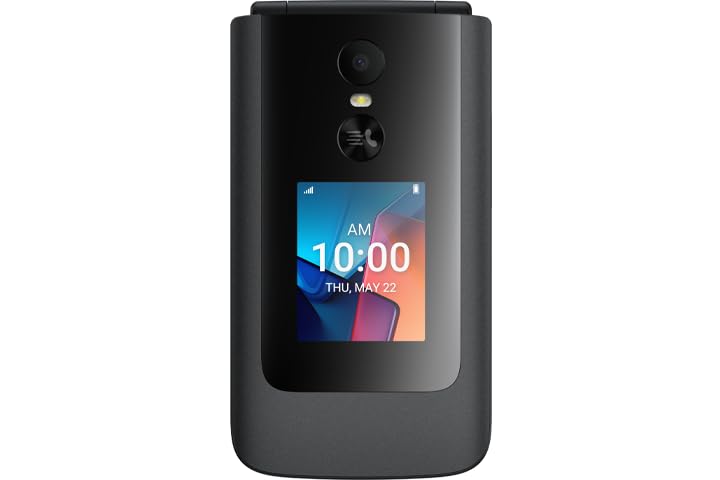
Image: TCL FLIP 4 5G phone in the open position, displaying the internal screen and the physical keypad.
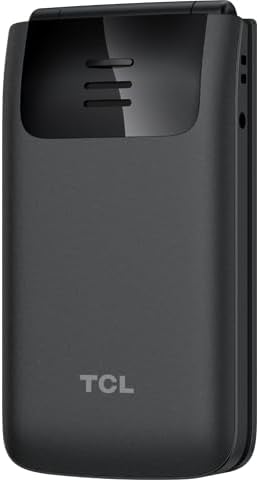
Image: TCL FLIP 4 5G phone in the closed position, showing the external display and the TCL branding on the back.
പ്രധാന സവിശേഷതകൾ:
- ഡ്യുവൽ ഡിസ്പ്ലേകൾ: 1.77-inch external display for notifications and a 3.2-inch internal display.
- Tactile Keypad: Large buttons and dedicated shortcut keys for easy navigation.
- 5G കണക്റ്റിവിറ്റി: Reliable high-speed network access.
- KaiOS Operating System: User-friendly interface with essential applications.
- 5MP ക്യാമറ: ഫോട്ടോകളും വീഡിയോകളും എടുക്കുന്നതിന്.
- HD ശബ്ദം: Enhanced call clarity.
2. ബോക്സിൽ എന്താണുള്ളത്?
ഉൽപ്പന്ന പാക്കേജിംഗിൽ എല്ലാ ഇനങ്ങളും ഉണ്ടെന്ന് ഉറപ്പാക്കുക:
- TCL FLIP 4 5G Phone (T440W)
- ബാറ്ററി
- ചാർജർ
3. സജ്ജീകരണം
3.1. സിം കാർഡും ബാറ്ററിയും ചേർക്കൽ
- Open the Phone: Gently open the phone to access the battery compartment.
- പിൻ കവർ നീക്കം ചെയ്യുക: Locate the notch on the side or bottom of the phone and carefully pry off the back cover.
- സിം കാർഡ് ചേർക്കുക: Locate the SIM card slot. Insert your Nano-SIM card with the gold contacts facing down and the cut corner aligned as shown in the diagram (refer to phone's internal markings).
- ബാറ്ററി ചേർക്കുക: ബാറ്ററി കോൺടാക്റ്റുകൾ ഫോണിന്റെ കോൺടാക്റ്റുകളുമായി വിന്യസിക്കുക, തുടർന്ന് ബാറ്ററി പതുക്കെ അമർത്തുക.
- പിൻ കവർ മാറ്റിസ്ഥാപിക്കുക: പിൻ കവർ വിന്യസിക്കുക, അത് സുരക്ഷിതമായി സ്ഥലത്ത് ക്ലിക്ക് ചെയ്യുന്നതുവരെ അരികുകളിൽ ദൃഡമായി അമർത്തുക.
3.2 ബാറ്ററി ചാർജ് ചെയ്യുന്നു
- ചാർജർ ബന്ധിപ്പിക്കുക: ഒരു പവർ ഔട്ട്ലെറ്റിൽ ചാർജർ പ്ലഗ് ചെയ്യുക.
- ഫോണിലേക്ക് ബന്ധിപ്പിക്കുക: Connect the charger cable to the charging port on the side of the phone.
- ചാർജിംഗ് സൂചകം: The phone will display a charging indicator on both the internal and external screens. Allow the phone to charge fully before first use.
3.3. പവർ ഓൺ/ഓഫ്
- പവർ ഓൺ: അമർത്തിപ്പിടിക്കുക പവർ/എൻഡ് കോൾ button until the phone vibrates and the screen lights up.
- പവർ ഓഫ്: അമർത്തിപ്പിടിക്കുക പവർ/എൻഡ് കോൾ ബട്ടൺ അമർത്തി, സ്ക്രീനിലെ ഓപ്ഷനുകളിൽ നിന്ന് "പവർ ഓഫ്" തിരഞ്ഞെടുക്കുക.
3.4. പ്രാരംഭ സജ്ജീകരണം
Upon first power-on, follow the on-screen prompts to configure basic settings such as language, date and time, and network preferences.
4. പ്രവർത്തന നിർദ്ദേശങ്ങൾ
4.1. അടിസ്ഥാന നാവിഗേഷൻ
- നാവിഗേഷൻ കീ: Use the central navigation key (up, down, left, right) to scroll through menus and options.
- ശരി ബട്ടൺ: മധ്യഭാഗത്ത് അമർത്തുക OK തിരഞ്ഞെടുക്കലുകൾ സ്ഥിരീകരിക്കുന്നതിനുള്ള ബട്ടൺ.
- സോഫ്റ്റ് കീകൾ: The keys directly below the screen (left and right) perform functions indicated by the text above them, which change depending on the context.
- Back/Clear Key: ഉപയോഗിക്കുക തിരികെ key (often indicated by an arrow) to return to the previous screen or delete characters.
4.2. കോളുകൾ ചെയ്യലും സ്വീകരിക്കലും
- ഒരു കോൾ ചെയ്യുന്നു: കീപാഡ് ഉപയോഗിച്ച് ഫോൺ നമ്പർ നൽകി, വിളിക്കൂ button (green handset icon).
- ഒരു കോളിന് മറുപടി നൽകുന്നു: ഫോൺ റിംഗ് ചെയ്യുമ്പോൾ, അമർത്തുക വിളിക്കൂ ബട്ടൺ.
- ഒരു കോൾ അവസാനിപ്പിക്കുന്നു: അമർത്തുക പവർ/എൻഡ് കോൾ button (red handset icon).
4.3. സന്ദേശങ്ങൾ അയയ്ക്കലും സ്വീകരിക്കലും
- ആക്സസ് സന്ദേശങ്ങൾ: Navigate to the "Messages" application from the main menu.
- Compose New Message: Select "New Message" or "Compose" and enter the recipient's number and your message using the keypad.
- സന്ദേശം അയയ്ക്കുക: Press the appropriate soft key to send the message.
4.4. ക്യാമറ ഉപയോഗം
- ക്യാമറ തുറക്കുക: Access the "Camera" application from the main menu or via a shortcut key.
- ഫോട്ടോ എടുക്കുക: നിങ്ങളുടെ ഷോട്ട് ഫ്രെയിം ചെയ്ത് അമർത്തുക OK ക്യാപ്ചർ ചെയ്യാനുള്ള ബട്ടൺ.
- വീഡിയോ റെക്കോർഡ് ചെയ്യുക: Switch to video mode within the camera app and press OK റെക്കോർഡിംഗ് ആരംഭിക്കാൻ / നിർത്താൻ.
4.5. കണക്റ്റിവിറ്റി
- 5G നെറ്റ്വർക്ക്: The phone automatically connects to the available 5G network. Ensure your SIM card supports 5G and your plan includes 5G access.
- വൈഫൈ: To connect to Wi-Fi, go to "Settings" > "Network & Connectivity" > "Wi-Fi". Select an available network and enter the password if required.
5. പരിപാലനം
5.1. ഉപകരണം വൃത്തിയാക്കൽ
- ഫോണിന്റെ സ്ക്രീനും ബോഡിയും വൃത്തിയാക്കാൻ മൃദുവായ, ലിന്റ് രഹിത തുണി ഉപയോഗിക്കുക.
- കഠിനമായ രാസവസ്തുക്കൾ, അബ്രസീവ് ക്ലീനറുകൾ, അല്ലെങ്കിൽ എയറോസോൾ സ്പ്രേകൾ എന്നിവ ഉപയോഗിക്കുന്നത് ഒഴിവാക്കുക.
- Ensure the phone is powered off and unplugged before cleaning.
5.2. ബാറ്ററി പരിചരണം
- Use only the original TCL charger and battery provided with the device.
- ഉയർന്ന താപനിലയിൽ ഫോൺ തുറന്നുവെക്കുന്നത് ഒഴിവാക്കുക.
- ബാറ്ററി പഞ്ചർ ചെയ്യുകയോ, ഡിസ്അസംബ്ലിംഗ് ചെയ്യുകയോ, പരിഷ്കരിക്കുകയോ ചെയ്യരുത്.
5.3. സോഫ്റ്റ്വെയർ അപ്ഡേറ്റുകൾ
Periodically check for software updates to ensure your phone has the latest features and security enhancements. Go to "Settings" > "Device" > "Software Update" to check for and install updates.
6. പ്രശ്നപരിഹാരം
If you encounter issues with your TCL FLIP 4 5G, refer to the following common solutions:
6.1. Phone Not Turning On
- ബാറ്ററി ശരിയായി ചേർത്തിട്ടുണ്ടെന്നും ചാർജ് ചെയ്തിട്ടുണ്ടെന്നും ഉറപ്പാക്കുക.
- Connect the phone to the charger and wait a few minutes before attempting to power on again.
- If the issue persists, perform a soft reset by removing and reinserting the battery, then try powering on.
6.2. മോശം കോൾ നിലവാരം
- നിങ്ങളുടെ നെറ്റ്വർക്ക് സിഗ്നൽ ശക്തി പരിശോധിക്കുക. മികച്ച സ്വീകരണമുള്ള ഒരു സ്ഥലത്തേക്ക് മാറുക.
- മൈക്രോഫോണും സ്പീക്കറും തടസ്സപ്പെട്ടിട്ടില്ലെന്ന് ഉറപ്പാക്കുക.
- ഫോൺ പുനരാരംഭിക്കുക.
6.3. Unable to Connect to Wi-Fi
- Ensure Wi-Fi is enabled on your phone.
- വൈഫൈ പാസ്വേഡ് ശരിയാണോ എന്ന് പരിശോധിക്കുക.
- നിങ്ങളുടെ വൈഫൈ റൂട്ടറും ഫോണും പുനരാരംഭിക്കുക.
7 സ്പെസിഫിക്കേഷനുകൾ
| ഫീച്ചർ | വിശദാംശങ്ങൾ |
|---|---|
| മോഡൽ നമ്പർ | T440W |
| ഓപ്പറേറ്റിംഗ് സിസ്റ്റം | KaiOS |
| Internal Display Size | 3.2 ഇഞ്ച് |
| ബാഹ്യ ഡിസ്പ്ലേ വലുപ്പം | 1.77 ഇഞ്ച് |
| റാം | 2 ജിബി |
| സംഭരണ ശേഷി | 32 ജിബി |
| ക്യാമറ | 5 എം.പി |
| ബാറ്ററി ശേഷി | 3000 mAh |
| കണക്റ്റിവിറ്റി | 5G |
| അളവുകൾ (പാക്കേജ്) | 5 x 3 x 2 ഇഞ്ച് |
| ഭാരം | 6.4 ഔൺസ് |
8. വാറൻ്റിയും പിന്തുണയും
8.1. ഉൽപ്പന്ന വാറൻ്റി
TCL products are covered by a limited manufacturer's warranty. Please refer to the warranty card included in your product packaging or visit the official TCL webനിങ്ങളുടെ പ്രദേശത്തിന് പ്രത്യേകമായുള്ള വിശദമായ വാറന്റി നിബന്ധനകൾക്കും വ്യവസ്ഥകൾക്കും സൈറ്റ് സന്ദർശിക്കുക.
8.2. ഉപഭോക്തൃ പിന്തുണ
For further assistance, technical support, or service inquiries, please contact TCL customer support. You can find contact information on the official TCL webസൈറ്റ് അല്ലെങ്കിൽ നിങ്ങളുടെ ഉപകരണത്തിന്റെ ക്രമീകരണങ്ങളുടെ പിന്തുണ വിഭാഗം വഴി.
ഓൺലൈൻ പിന്തുണ: www.tcl.com/us/en/support (സപ്പോർട്ട്)


