1. ആമുഖം
This manual provides comprehensive instructions for the installation, operation, and maintenance of your EZVIZ HB90x Smart Outdoor Security Camera. Please read this manual carefully before using the product to ensure proper functionality and safety. Keep this manual for future reference.
2 സുരക്ഷാ വിവരങ്ങൾ
- വീഴാതിരിക്കാൻ ക്യാമറ ഒരു സ്ഥിരതയുള്ള സ്ഥലത്ത് സ്ഥാപിച്ചിട്ടുണ്ടെന്ന് ഉറപ്പാക്കുക.
- Use only the specified power adapter and solar panel provided by EZVIZ.
- ഉയർന്ന താപനില, ഈർപ്പം, അല്ലെങ്കിൽ നാശകാരിയായ അന്തരീക്ഷം എന്നിവയിൽ ക്യാമറയെ തുറന്നുകാട്ടരുത്.
- ശക്തമായ വൈദ്യുതകാന്തിക മണ്ഡലങ്ങൾക്ക് സമീപം ക്യാമറ വയ്ക്കുന്നത് ഒഴിവാക്കുക.
- Do not attempt to disassemble or modify the camera. Contact qualified personnel for service.
- ക്യാമറയും അനുബന്ധ ഉപകരണങ്ങളും കുട്ടികൾക്ക് ലഭ്യമാകാതെ സൂക്ഷിക്കുക.
3. പാക്കേജ് ഉള്ളടക്കം
നിങ്ങളുടെ പാക്കേജിൽ എല്ലാ ഇനങ്ങളും ഉണ്ടെന്ന് ഉറപ്പാക്കുക:
- EZVIZ HB90x Surveillance Camera
- Lithium Battery (pre-installed or separate)
- സോളാർ പവർ പാനൽ
- മൗണ്ടിംഗ് ഹാർഡ്വെയർ (സ്ക്രൂകൾ, വാൾ പ്ലഗുകൾ)
- ദ്രുത ആരംഭ ഗൈഡ്
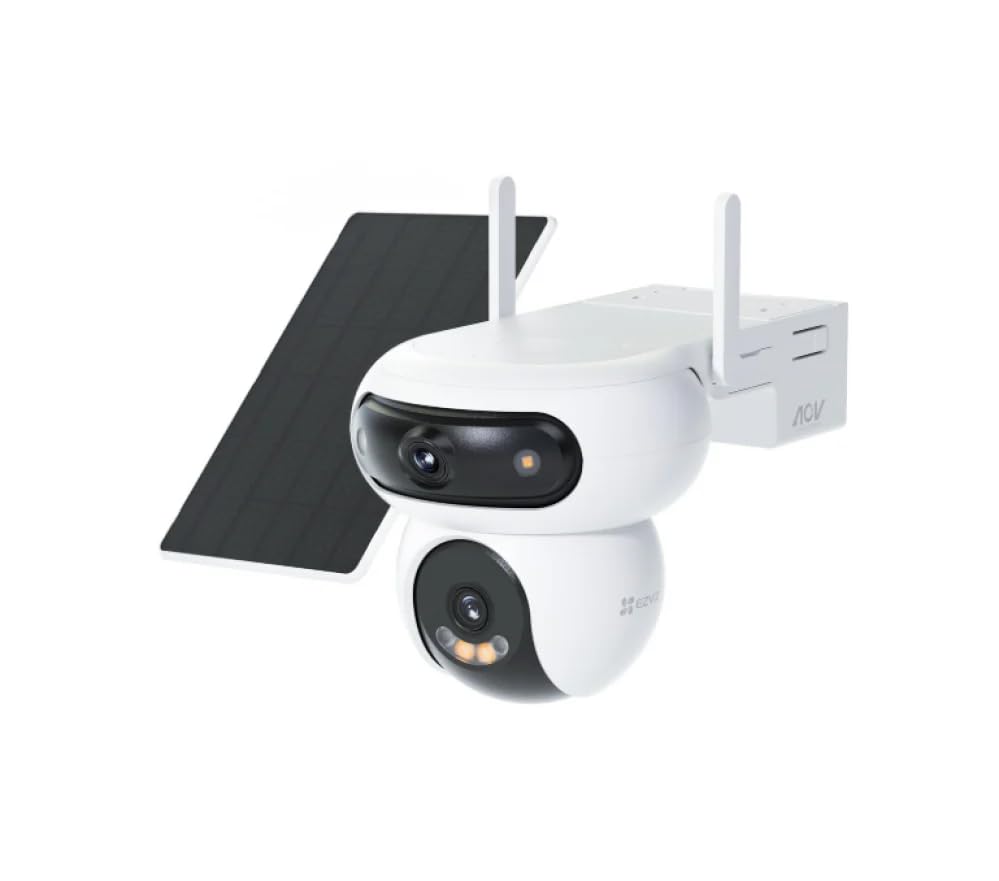
ചിത്രം 1: EZVIZ HB90x Smart Outdoor Security Camera with its solar panel. This image illustrates the main camera unit and the accompanying solar panel, which provides continuous power.
4. ഉൽപ്പന്നം കഴിഞ്ഞുview
The EZVIZ HB90x is an advanced outdoor security camera designed for comprehensive surveillance. Key features include:
- Dual 2K Lenses: Provides high-resolution video capture for detailed monitoring.
- 360° കവറേജ്: വിശാലമായ ഫീൽഡ് വാഗ്ദാനം ചെയ്യുന്നു view, eliminating blind spots.
- 10400 mAh Battery & Solar Panel: Ensures continuous operation with sustainable power.
- 4G കണക്റ്റിവിറ്റി: വൈഫൈ ഇല്ലാതെ സ്വതന്ത്രമായി പ്രവർത്തിക്കുന്നു, വിദൂര സ്ഥലങ്ങൾക്ക് അനുയോജ്യം.
- കളർ നൈറ്റ് വിഷൻ: Delivers clear, full-color images even in low-light conditions.
- സ്മാർട്ട് മോഷൻ ഡിറ്റക്ഷൻ: Intelligent system with instant alerts for detected activity.
- കാലാവസ്ഥയെ പ്രതിരോധിക്കുന്ന ഡിസൈൻ: Durable construction suitable for outdoor use in various weather conditions.
- പ്രാദേശിക സംഭരണം: Supports MicroSD card up to 512GB for local video storage.
5. സജ്ജീകരണം
5.1 പ്രാരംഭ ചാർജിംഗ്
Before first use, ensure the camera's internal battery is fully charged. Connect the solar panel to the camera and place the solar panel in direct sunlight for several hours. Alternatively, you can use a compatible 5V USB power adapter (not included) to charge the camera directly.
5.2 സിം കാർഡ് ഇൻസ്റ്റാളേഷൻ
The HB90x camera utilizes 4G connectivity. Locate the SIM card slot, usually protected by a rubber cover on the camera body. Insert a activated Nano-SIM card into the slot with the gold contacts facing down, ensuring it clicks into place. Close the rubber cover securely to maintain weather resistance.
Note: A Nano-SIM card with an active data plan is required for 4G connectivity.
5.3 മൈക്രോ എസ്ഡി കാർഡ് ഇൻസ്റ്റാളേഷൻ (ഓപ്ഷണൽ)
For local video storage, insert a MicroSD card (up to 512GB, Class 10 or higher recommended) into the designated slot. Ensure the camera is powered off before inserting or removing the MicroSD card. Close the protective cover after installation.
5.4 ആപ്പ് ഇൻസ്റ്റാളേഷനും അക്കൗണ്ട് സൃഷ്ടിയും
- Download the EZVIZ app from the App Store (iOS) or Google Play Store (Android).
- ഒരു EZVIZ അക്കൗണ്ട് സൃഷ്ടിക്കാൻ ആപ്പ് തുറന്ന് സ്ക്രീനിലെ നിർദ്ദേശങ്ങൾ പാലിക്കുക.
- നിങ്ങളുടെ EZVIZ അക്കൗണ്ടിലേക്ക് ലോഗിൻ ചെയ്യുക.
5.5 ആപ്പിലേക്ക് ക്യാമറ ചേർക്കൽ
- In the EZVIZ app, tap the "+" icon on the home screen to add a device.
- Scan the QR code located on the camera body or on the quick start guide.
- Follow the in-app prompts to complete the camera setup. This typically involves confirming the camera's power status and network connection (4G).
5.6 ക്യാമറ മൗണ്ടിംഗ്
The HB90x is designed for wall mounting. Choose a location that provides the desired viewing angle and ensures the solar panel receives adequate direct sunlight throughout the day. Avoid obstructions that might block the camera's view or the solar panel's exposure.
- Use the provided mounting template (if available) to mark the drill holes on the wall.
- ദ്വാരങ്ങൾ തുരന്ന് വാൾ പ്ലഗുകൾ ഇടുക.
- സ്ക്രൂകൾ ഉപയോഗിച്ച് മൗണ്ടിംഗ് ബ്രാക്കറ്റ് ഭിത്തിയിൽ ഉറപ്പിക്കുക.
- Attach the camera to the mounting bracket and adjust its angle.
- Mount the solar panel in a location where it receives maximum sunlight and connect its cable to the camera.
6. ക്യാമറ പ്രവർത്തിപ്പിക്കുക
6.1 തത്സമയം View
Open the EZVIZ app and select your HB90x camera from the device list. The live view interface will display the real-time video feed. You can switch between the dual lenses if supported by the app interface.
6.2 പാൻ, ടിൽറ്റ് നിയന്ത്രണം
തത്സമയം view screen, use the on-screen joystick or swipe gestures to remotely pan (horizontal movement) and tilt (vertical movement) the camera to adjust its viewing angle and utilize the 360° coverage.
6.3 വീഡിയോ റെക്കോർഡിംഗും പ്ലേബാക്കും
- മാനുവൽ റെക്കോർഡിംഗ്: ലൈവിൽ റെക്കോർഡ് ബട്ടൺ ടാപ്പ് ചെയ്യുക view interface to start or stop manual recording. Videos are saved to your phone or the installed MicroSD card.
- ഇവൻ്റ് റെക്കോർഡിംഗ്: The camera automatically records when motion is detected. These recordings are stored on the MicroSD card or EZVIZ CloudPlay (subscription required).
- പ്ലേബാക്ക്: Access recorded videos through the "Playback" or "History" section in the EZVIZ app. Select the date and time to review സംഭവങ്ങൾ.
6.4 മോഷൻ ഡിറ്റക്ഷനും അലേർട്ടുകളും
Configure motion detection settings in the EZVIZ app. You can adjust sensitivity, define detection zones, and set schedules for alerts. When motion is detected, the camera will send instant notifications to your smartphone.
6.5 നൈറ്റ് വിഷൻ
The HB90x features advanced color night vision. In low-light conditions, the camera automatically switches to night vision mode, utilizing its dual LED lamps to provide clear, full-color images up to 30 meters.
7. പരിപാലനം
- വൃത്തിയാക്കൽ: ക്യാമറ ലെൻസുകളും സോളാർ പാനലും പതിവായി മൃദുവായ, ഡി-ടച്ച് ഉപയോഗിച്ച് തുടയ്ക്കുക.amp പൊടിയും അഴുക്കും നീക്കം ചെയ്യാൻ തുണി ഉപയോഗിക്കുക. കഠിനമായ രാസവസ്തുക്കൾ ഉപയോഗിക്കരുത്.
- ഫേംവെയർ അപ്ഡേറ്റുകൾ: Check for and install firmware updates via the EZVIZ app to ensure optimal performance and security.
- ബാറ്ററി ആരോഗ്യം: Monitor the battery level in the app. Ensure the solar panel is clean and positioned to receive maximum sunlight for efficient charging.
- മൈക്രോ എസ്ഡി കാർഡ്: Periodically check the MicroSD card for errors or fill status. Format the card via the app if necessary (this will erase all data).
8. പ്രശ്നപരിഹാരം
| പ്രശ്നം | സാധ്യമായ കാരണം | പരിഹാരം |
|---|---|---|
| ക്യാമറ ഓണാക്കുന്നില്ല. | Low battery or solar panel not charging. | Ensure solar panel is in direct sunlight. Charge the camera using a 5V USB adapter. |
| No 4G connection. | SIM card not inserted correctly, no data plan, or poor signal. | Check SIM card insertion. Verify data plan with your carrier. Relocate camera to an area with better 4G signal. |
| കഴിയില്ല view live feed in app. | No 4G connection, app issue, or camera offline. | Check 4G status. Restart the EZVIZ app. Restart the camera. |
| ചലന കണ്ടെത്തൽ അലേർട്ടുകൾ ലഭിച്ചില്ല. | Detection settings incorrect, app notifications disabled. | Review motion detection settings in the app. Enable notifications for the EZVIZ app in your phone's settings. |
| മോശം രാത്രി കാഴ്ച നിലവാരം. | Dirty lens or external light interference. | Clean the camera lenses. Ensure no strong light sources are directly facing the camera at night. |
9 സ്പെസിഫിക്കേഷനുകൾ
| ഫീച്ചർ | വിശദാംശങ്ങൾ |
|---|---|
| മോഡലിൻ്റെ പേര് | HB90x |
| ബ്രാൻഡ് | EZVIZ |
| മൗണ്ടിംഗ് തരം | മതിൽ മൗണ്ട് |
| വീഡിയോ റെക്കോർഡിംഗ് റെസല്യൂഷൻ | 2560 x 1440 (2K) |
| നിറം | Aura White |
| ഇനങ്ങളുടെ എണ്ണം | 2 (ക്യാമറയും സോളാർ പാനലും) |
| ഉൾപ്പെടുത്തിയ ഘടകങ്ങൾ | Lithium Battery, Surveillance Camera, Mounting Hardware, Solar Power Panel |
| ചാനലുകളുടെ എണ്ണം | 2 (Dual Lens) |
| വയർലെസ് കമ്മ്യൂണിക്കേഷൻ ടെക്നോളജി | 4G |
| ഫോം ഫാക്ടർ | ഡ്യുവൽ ലെൻസ് ഔട്ട്ഡോർ ക്യാമറ |
| ഫലപ്രദമായ വീഡിയോ റെസല്യൂഷൻ | 2560.0 പിക്സലുകൾ |
| Viewing ആംഗിൾ | 360 ഡിഗ്രി |
| നൈറ്റ് വിഷൻ റേഞ്ച് | 30 മീറ്റർ |
| ഫ്രെയിം റേറ്റ് | സെക്കൻഡിൽ 30 ഫ്രെയിമുകൾ |
| മെറ്റീരിയൽ | Water-resistant Metal Plastic |
| വാല്യംtage | 5 വോൾട്ട് |
| ശക്തി | 8 വാട്ട്സ് |
| ഇനത്തിന്റെ അളവുകൾ (L x W x H) | 15 x 15.2 x 25 സെൻ്റീമീറ്റർ |
| ജല പ്രതിരോധ നില | വാട്ടർപ്രൂഫ് |
| ഭാരം | 750 ഗ്രാം |
| പ്രത്യേക സവിശേഷതകൾ | 10400 mAh Rechargeable Battery, 360 Degree Coverage, Solar Power Panel, Night Vision, Waterproof |
| ശുപാർശ ചെയ്യുന്ന ഉപയോഗങ്ങൾ | Outdoor Control, Security Surveillance, Home Surveillance |
| കണക്റ്റിവിറ്റി പ്രോട്ടോക്കോൾ | 4G |
| കൺട്രോളർ തരം | മൊബൈൽ ആപ്ലിക്കേഷൻ |
10. വാറൻ്റി വിവരങ്ങൾ
EZVIZ products come with a limited warranty. For detailed warranty terms and conditions, including coverage period and service procedures, please refer to the warranty card included in your product package. You can also visit the official EZVIZ webഏറ്റവും കാലികമായ വാറൻ്റി വിവരങ്ങൾക്കായുള്ള സൈറ്റ്.
11. ഉപഭോക്തൃ പിന്തുണ
For technical assistance, troubleshooting, or service inquiries, please contact EZVIZ customer support. You can find contact information and frequently asked questions on the official EZVIZ webസൈറ്റ്:
Please have your product model number (HB90x) and purchase information ready when contacting support.


