1. ആമുഖം
The Fairphone Fairbuds XL are over-ear wireless headphones designed for high-quality audio and durability. They feature Active Noise Cancelling (ANC), aptX-HD 24-bit audio, a long-lasting battery, and an IP54 weather-resistant rating. A key aspect of the Fairbuds XL is their modular design, allowing for easy repair and replacement of parts.
This manual provides essential information for setting up, operating, maintaining, and troubleshooting your Fairbuds XL headphones.
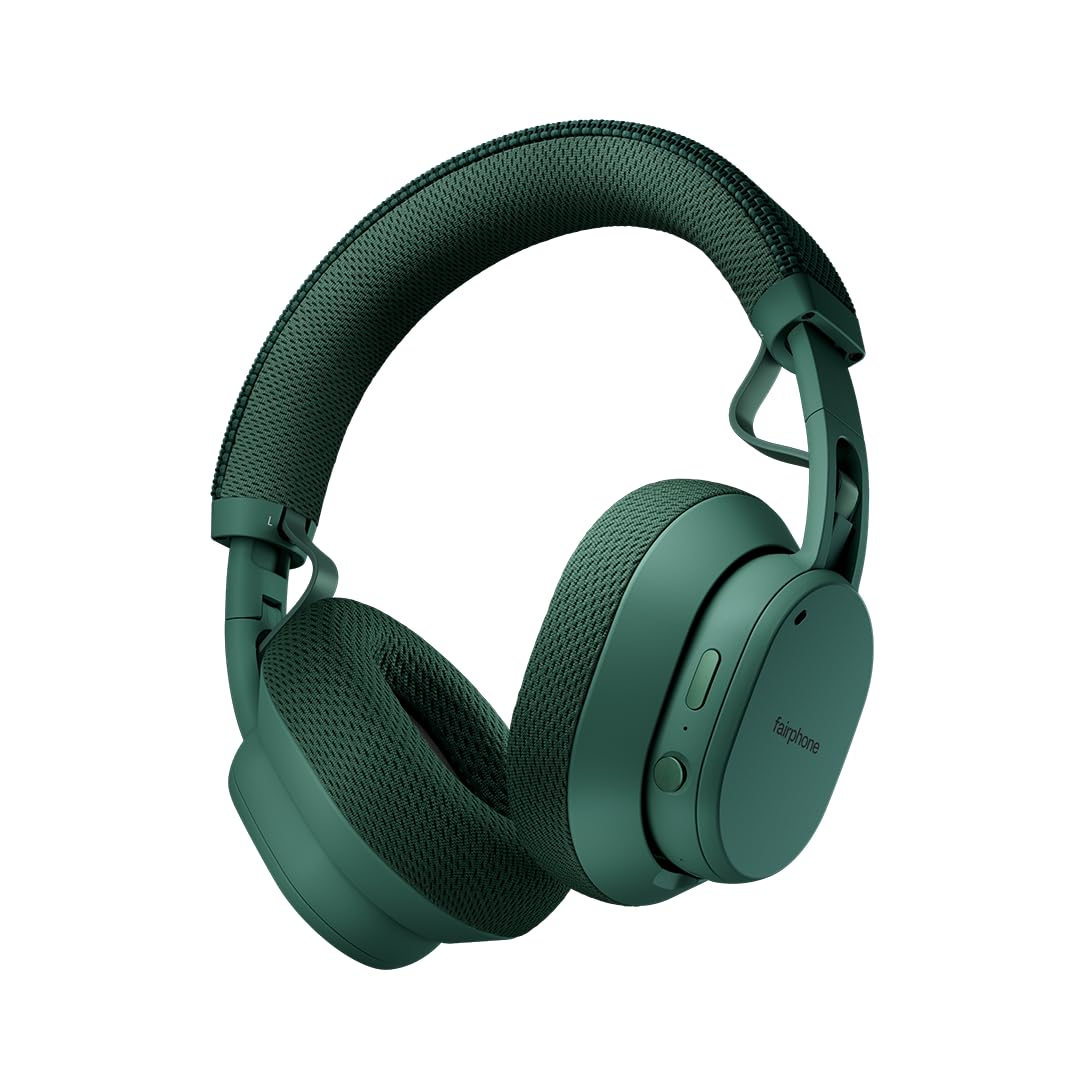
Image: Fairphone Fairbuds XL headphones in Forest Green, showcasinഅവരുടെ മിനുസമാർന്ന ഡിസൈൻ.
വീഡിയോ: ഒരു ഓവർview of the Fairbuds XL headphones, highlighting their main features and design.
2. സജ്ജീകരണം
2.1. ബോക്സിൽ എന്താണുള്ളത്?
Upon unboxing your Fairbuds XL, you should find the following items:
- Fairphone Fairbuds XL Wireless Headphones
- സംരക്ഷണ കേസ്
- ഉപയോക്തൃ മാനുവൽ (ഈ പ്രമാണം)
- USB-C ചാർജിംഗ് കേബിൾ (വ്യക്തമായി പട്ടികപ്പെടുത്തിയിട്ടില്ല, പക്ഷേ ചാർജ് ചെയ്യുന്നതിനായി സൂചിപ്പിച്ചിരിക്കുന്നു)
2.2. ഹെഡ്ഫോണുകൾ ചാർജ് ചെയ്യുന്നു
Before first use, fully charge your Fairbuds XL. Connect the provided USB-C cable to the charging port on the headphones and to a compatible USB power source. The LED indicator will show charging status. A full charge provides up to 30 hours of battery life (26 hours with ANC active).
2.3. പവർ ഓൺ/ഓഫ്
- പവർ ഓണാക്കാൻ: LED ഇൻഡിക്കേറ്റർ പ്രകാശിക്കുന്നത് വരെ പവർ ബട്ടൺ അമർത്തിപ്പിടിക്കുക.
- പവർ ഓഫ് ചെയ്യാൻ: LED ഇൻഡിക്കേറ്റർ ഓഫാകുന്നതുവരെ പവർ ബട്ടൺ അമർത്തിപ്പിടിക്കുക.
2.4. ബ്ലൂടൂത്ത് ജോടിയാക്കൽ
To pair your Fairbuds XL with a device:
- ഹെഡ്ഫോണുകൾ ഓഫാണെന്ന് ഉറപ്പാക്കുക.
- ജോടിയാക്കൽ മോഡ് സൂചിപ്പിക്കുന്ന LED ഇൻഡിക്കേറ്റർ നീലയും ചുവപ്പും നിറങ്ങളിൽ മിന്നുന്നതുവരെ ഏകദേശം 5 സെക്കൻഡ് പവർ ബട്ടൺ അമർത്തിപ്പിടിക്കുക.
- നിങ്ങളുടെ ഉപകരണത്തിൽ (സ്മാർട്ട്ഫോൺ, ലാപ്ടോപ്പ് മുതലായവ), ബ്ലൂടൂത്ത് പ്രവർത്തനക്ഷമമാക്കി ലഭ്യമായ ഉപകരണങ്ങൾക്കായി തിരയുക.
- Select "Fairbuds XL" from the list of found devices.
- Once connected, the LED indicator will show a steady blue light.
2.5. Dual Point Connectivity
The Fairbuds XL support seamless dual point connectivity, allowing you to connect to two devices simultaneously. For example, you can connect to both your laptop and smartphone. To switch between devices, simply play audio on the desired device, and the headphones will automatically switch.
3. ഹെഡ്ഫോണുകൾ പ്രവർത്തിപ്പിക്കൽ

ചിത്രം: ഒരു ക്ലോസ്-അപ്പ് view of the control buttons on the Fairbuds XL ear cup, including the power button and a toggle switch.
3.1. നിയന്ത്രിക്കുന്നുview
The Fairbuds XL feature physical buttons for intuitive control. Refer to the diagram below for button placement (if available in the physical manual) or the image above for a visual reference.
- പവർ ബട്ടൺ: Powers on/off, initiates Bluetooth pairing.
- Toggle Switch/Button: Controls Active Noise Cancelling (ANC) and Ambient Mode.
- വോളിയം കൂട്ടുക/താഴ്ത്തുക: ഓഡിയോ വോളിയം ക്രമീകരിക്കുന്നു.
- മൾട്ടി-ഫംഗ്ഷൻ ബട്ടൺ: Play/pause, skip tracks, answer/end calls.
3.2. Active Noise Cancelling (ANC) and Ambient Mode
The Fairbuds XL offer advanced noise cancellation features:
- ആക്ടീവ് നോയിസ് ക്യാൻസലിംഗ് (ANC): Reduces external noise for an immersive listening experience. Toggle this mode using the dedicated switch/button.
- ആംബിയൻ്റ് മോഡ്: Allows you to hear your surroundings while still enjoying your audio. Toggle this mode using the dedicated switch/button.
3.3. ഓഡിയോ പ്ലേബാക്ക്
- പ്ലേ/താൽക്കാലികമായി നിർത്തുക: മൾട്ടി-ഫംഗ്ഷൻ ബട്ടൺ ഒരിക്കൽ അമർത്തുക.
- അടുത്ത ട്രാക്ക്: മൾട്ടി-ഫംഗ്ഷൻ ബട്ടൺ ഇരട്ട-അമർത്തുക.
- മുമ്പത്തെ ട്രാക്ക്: മൾട്ടി-ഫംഗ്ഷൻ ബട്ടൺ ട്രിപ്പിൾ-അമർത്തുക.
- വോളിയം ക്രമീകരണം: വോളിയം കൂട്ടുക/കുറയ്ക്കുക ബട്ടണുകൾ ഉപയോഗിക്കുക.
3.4. കോൾ പ്രവർത്തനങ്ങൾ
- ഉത്തരം/അവസാന കോൾ: മൾട്ടി-ഫംഗ്ഷൻ ബട്ടൺ ഒരിക്കൽ അമർത്തുക.
- കോൾ നിരസിക്കുക: മൾട്ടി-ഫംഗ്ഷൻ ബട്ടൺ അമർത്തിപ്പിടിക്കുക.
3.5. വയർഡ് കണക്ഷൻ
For a wired audio experience or when the battery is depleted, connect the Fairbuds XL to your device using a USB-C to USB-C cable (not included, but compatible with the charging port). This allows for charge-free listening.
4. പരിപാലനം
The Fairbuds XL are designed for longevity with easily replaceable parts. Regular cleaning and proper care will extend their lifespan.
4.1. വൃത്തിയാക്കൽ
Wipe the headphones with a soft, dry cloth. For stubborn dirt, a slightly damp cloth can be used. Avoid using harsh chemicals or abrasive materials. The IP54 rating provides protection against dust and light splashes, but the headphones are not waterproof.
4.2. ബാറ്ററി മാറ്റിസ്ഥാപിക്കൽ
The 800mAh battery in your Fairbuds XL is designed to be user-replaceable. When the battery's performance degrades after approximately 500 charging cycles, you can replace it with a new one. This process typically involves removing a cover and a few screws.

ചിത്രം: പൊട്ടിത്തെറിച്ച ഒരു view of the Fairbuds XL headphones, showing individual components like the headband, ear cups, speakers, and battery, emphasizing its modular design.
Video: A short demonstration on how to replace the battery in the Fairbuds XL headphones.
4.3. Replacing Other Modular Parts
Beyond the battery, various other components of the Fairbuds XL, such as the individual speakers, ear cups, headband, and speaker-to-speaker cable, can be replaced. These parts are designed for easy removal and installation, often requiring only a single screwdriver. Consult the official Fairphone support website for detailed guides and spare parts availability.
5. പ്രശ്നപരിഹാരം
If you encounter issues with your Fairbuds XL, refer to the following common problems and solutions:
| പ്രശ്നം | സാധ്യമായ കാരണം | പരിഹാരം |
|---|---|---|
| ഹെഡ്ഫോണുകൾ പവർ ഓൺ ചെയ്യുന്നില്ല. | കുറഞ്ഞ ബാറ്ററി. | USB-C കേബിൾ ഉപയോഗിച്ച് ഹെഡ്ഫോണുകൾ ചാർജ് ചെയ്യുക. |
| ബ്ലൂടൂത്ത് വഴി ജോടിയാക്കാൻ കഴിയില്ല. | ഹെഡ്ഫോണുകൾ ജോടിയാക്കൽ മോഡിൽ ഇല്ല; ഉപകരണ ബ്ലൂടൂത്ത് ഓഫാണ്; ഇടപെടൽ. | Ensure headphones are in pairing mode (flashing blue/red LED). Check device Bluetooth settings. Move closer to the device. |
| ശബ്ദമില്ല അല്ലെങ്കിൽ ശബ്ദ നിലവാരം മോശമാണ്. | Volume too low; incorrect audio source; loose connection (wired); out of Bluetooth range. | Increase volume. Verify audio output on your device. Reconnect wired cable. Move closer to the Bluetooth device. |
| ANC ഫലപ്രദമായി പ്രവർത്തിക്കുന്നില്ല. | ANC mode not activated; improper fit. | Ensure ANC is toggled on. Adjust headphones for a snug fit over your ears. |
If the issue persists, please refer to the official Fairphone support resources.
6 സ്പെസിഫിക്കേഷനുകൾ
| ഫീച്ചർ | വിശദാംശങ്ങൾ |
|---|---|
| മോഡലിൻ്റെ പേര് | ഫെയർബഡ്സ് XL |
| ഇനം മോഡൽ നമ്പർ | HEAD-2 |
| കണക്റ്റിവിറ്റി ടെക്നോളജി | വയർലെസ്സ് (ബ്ലൂടൂത്ത് 5.1) |
| ഓഡിയോ ഡ്രൈവർ തരം | ഡൈനാമിക് ഡ്രൈവർ (40mm) |
| ശബ്ദ നിയന്ത്രണം | ആക്ടീവ് നോയ്സ് റദ്ദാക്കൽ, സുതാര്യത മോഡ് |
| ബാറ്ററി ലൈഫ് | 30 മണിക്കൂർ വരെ (ANC ഉപയോഗിച്ച് 26 മണിക്കൂർ) |
| ബാറ്ററി തരം | 1 Lithium Ion battery (included, replaceable) |
| ജല പ്രതിരോധ നില | IP54 (ജല പ്രതിരോധം) |
| ഇനത്തിൻ്റെ ഭാരം | 324 ഗ്രാം (11.4 ഔൺസ്) |
| ഉൽപ്പന്ന അളവുകൾ | 7.68 x 6.89 x 3.07 ഇഞ്ച് |
| മെറ്റീരിയൽ | പ്ലാസ്റ്റിക് |
| നിറം | ഫോറസ്റ്റ് ഗ്രീൻ |
| യു.പി.സി | 850077419072 |
7. വാറൻ്റിയും പിന്തുണയും
Fairphone is committed to product longevity. The Fairbuds XL are designed with repairability in mind, and spare parts are available. The EU Spare Part Availability Duration is 3 Years.
For detailed warranty information, spare parts, and further support, please visit the official Fairphone webസൈറ്റ് അല്ലെങ്കിൽ അവരുടെ ഉപഭോക്തൃ സേവനവുമായി ബന്ധപ്പെടുക.
കൂടുതൽ വിവരങ്ങളും പിന്തുണയും നിങ്ങൾക്ക് ഇവിടെ കണ്ടെത്താനാകും Fairphone Store on Amazon.


