1. ആമുഖവും അവസാനവുംview
The Beelink MINI S12 Pro Mini PC is a compact and powerful computing solution designed for various applications, from home entertainment to office productivity. Featuring the 12th Generation Intel N95 processor, it offers efficient performance in a small form factor.

Figure 1: Key features of the Beelink MINI S12 Pro Mini PC.
പ്രധാന സവിശേഷതകൾ:
- ശക്തമായ പ്രകടനം: Built-in 12th Generation Intel N95 processor (up to 3.40 GHz, 4C/4T) for quiet and compact computing.
- സ്കേലബിളിറ്റി: 12GB LPDDR5 RAM and 256GB M.2 SSD, with support for M.2 2280 NGFF SSD/2.5" SSD expansion up to 2TB.
- 4K@60Hz Dual Screen Display: Intel UHD Graphics supports dual HDMI 4K@60Hz displays for enhanced visual experience and productivity.
- സ്ഥിരതയുള്ള കണക്റ്റിവിറ്റി: Features 1x USB 2.0, 3x USB 3.0 ports, WiFi 2.4G+5G Dual Band, and Bluetooth 4.2.
- കാര്യക്ഷമമായ തണുപ്പിക്കൽ: Silent fan, heat pipe/heat sink, and hard drive cooling cover ensure stable operation.
2. സജ്ജീകരണം
This section guides you through the initial setup of your Beelink MINI S12 Pro Mini PC, including connecting peripherals and installing additional storage.
2.1 Unboxing and Initial Connections
Upon unboxing, ensure all components are present. Connect your monitor(s), keyboard, mouse, and power adapter as shown below.

Figure 2: Front and Rear Interface Design of the Mini PC.
The Mini PC features a variety of ports for seamless connectivity:
- ഫ്രണ്ട് പോർട്ടുകൾ: CLR CMOS button, 2x USB 3.2 Gen2 (10Gbps), Earphone jack, Power button.
- പിൻ തുറമുഖങ്ങൾ: 2x USB 3.2 Gen2 (10Gbps), 2x LAN (2.5G), 2x 4K 60Hz HDMI, DC Power adapter port, Locking slot.
2.2 Hard Drive Installation (HDD/SSD Retrofit)
The Mini PC supports additional 2.5-inch SSD/HDD storage. Follow these steps to install a new drive:
- Power off the Mini PC and disconnect all cables.
- Carefully remove the four screws on the bottom cover.
- Gently open the bottom cover, being mindful of the FPC cable connecting it to the mainboard.
- Slide your 2.5-inch SSD/HDD into the designated slot on the bottom cover.
- Secure the drive using the provided screws.
- Reconnect the FPC cable and reattach the bottom cover, securing it with the four screws.
Video 1: Detailed tutorial on how to replace or install an SSD in your Beelink Mini PC.
After physical installation, if the new hard disk is not displayed, you may need to initialize and format it through Disk Management in Windows. Refer to the video for detailed instructions on how to make the hard disk displayed by the computer.
Video 2: This video demonstrates the unboxing, port overview, and HDD installation process for a Beelink U59 Mini PC, which shares similar installation steps.
3. പ്രവർത്തന നിർദ്ദേശങ്ങൾ
The Beelink MINI S12 Pro comes pre-installed with Windows 11 Home, providing a familiar and user-friendly operating environment.
3.1 പവർ ഓൺ/ഓഫ്
- പവർ ഓണാക്കാൻ: മുൻ പാനലിൽ സ്ഥിതിചെയ്യുന്ന പവർ ബട്ടൺ അമർത്തുക.
- പവർ ഓഫ് ചെയ്യാൻ: Use the Windows Start menu to shut down, or press and hold the power button for a few seconds for a forced shutdown (not recommended for regular use).
3.2 ഡിസ്പ്ലേ കോൺഫിഗറേഷൻ
Utilize the dual HDMI ports to connect up to two 4K@60Hz displays for an expansive workspace. Configure display settings via Windows Display Settings.

Figure 3: Operational features including dual display support and Wake on LAN.
3.3 നെറ്റ്വർക്കും വയർലെസ് കണക്റ്റിവിറ്റിയും
The Mini PC supports both wired and wireless network connections:
- വയർഡ് ലാൻ: Connect an Ethernet cable to one of the 2.5Gbps LAN ports for high-speed internet access.
- Wireless (WiFi 2.4G+5G Dual Band): Connect to your wireless network via the built-in WiFi 6 module. Manage WiFi settings through Windows Network & Internet settings.
- ബ്ലൂടൂത്ത് 4.2: Pair Bluetooth-enabled devices like keyboards, mice, or headphones through Windows Bluetooth & devices settings.
3.4 Wake on LAN / Auto Power On
The device supports Wake on LAN and Auto Power On features. For detailed setup instructions, please visit the official Beelink webസൈറ്റ് അല്ലെങ്കിൽ ഉപഭോക്തൃ സേവനവുമായി ബന്ധപ്പെടുക.
4. പരിപാലനം
പതിവ് അറ്റകുറ്റപ്പണികൾ നിങ്ങളുടെ മിനി പിസിയുടെ മികച്ച പ്രകടനവും ദീർഘായുസ്സും ഉറപ്പാക്കുന്നു.
4.1 സംഭരണ വികസനം
You can expand the storage by adding an M.2 2280 NGFF SSD or a 2.5-inch SSD/HDD (up to 2TB). Refer to Section 2.2 for installation instructions.

Figure 4: Dual SSD High-speed Storage options.
4.2 കൂളിംഗ് സിസ്റ്റം
The Mini PC is equipped with an efficient cooling system including a silent fan, heat pipe/heat sink, and a hard drive cooling cover to prevent overheating and ensure stable performance.

ചിത്രം 5: പൊട്ടിത്തെറിച്ചു view of the Mini PC's internal components.
5. പ്രശ്നപരിഹാരം
If you encounter any issues with your Mini PC, please refer to the following common solutions or contact technical support.
- ഡിസ്പ്ലേ ഇല്ല: Ensure all display cables are securely connected and the monitor is set to the correct input source.
- ശക്തിയില്ല: Verify the power adapter is correctly connected to the Mini PC and a working power outlet.
- മന്ദഗതിയിലുള്ള പ്രകടനം: Check for background applications, update drivers, or consider upgrading RAM/SSD if performance remains consistently low.
- Hard Drive Not Detected: After installing a new drive, ensure it is properly seated and initialized/formatted in Disk Management (refer to Section 2.2).
- Automatic Startup Setup: If you wish to set up automatic startup, please provide the barcode on the bottom of the machine to customer service for the corresponding tutorial files.
6 സ്പെസിഫിക്കേഷനുകൾ
| ഫീച്ചർ | വിവരണം |
|---|---|
| പ്രോസസ്സർ | 12th Generation Intel N95 (up to 3.40 GHz, 4C/4T) |
| റാം | 12GB LPDDR5 |
| ഹാർഡ് ഡ്രൈവ് | 256GB SSD (M.2 2280 NGFF/2.5" SSD expandable up to 2TB) |
| ഗ്രാഫിക്സ് | ഇന്റൽ UHD ഗ്രാഫിക്സ് (4K@60Hz പിന്തുണയ്ക്കുന്നു) |
| ഡിസ്പ്ലേ ഔട്ട്പുട്ട് | 2x HDMI (Dual 4K@60Hz Displays) |
| കണക്റ്റിവിറ്റി | WiFi 2.4G+5G Dual Band (WiFi 6), Bluetooth 4.2, 2x 2.5Gbps LAN |
| USB പോർട്ടുകൾ | 1x USB 2.0, 3x USB 3.0 |
| ഓപ്പറേറ്റിംഗ് സിസ്റ്റം | വിൻഡോസ് 11 ഹോം |
| അളവുകൾ | 8.39 x 5.04 x 2.52 ഇഞ്ച് |
| ഭാരം | 1.45 പൗണ്ട് |
7. ബോക്സിൽ എന്താണുള്ളത്?
The Beelink MINI S12 Pro Mini PC package includes the following items:
- Beelink MINI S12 Pro Mini PC
- പവർ അഡാപ്റ്റർ (12V 3A)
- HDMI കേബിളുകൾ
- മതിൽ ഘടിപ്പിച്ച ബ്രാക്കറ്റ്
- ഇൻസ്റ്റാളേഷനുള്ള സ്ക്രൂകൾ
- ഉപയോക്തൃ മാനുവൽ
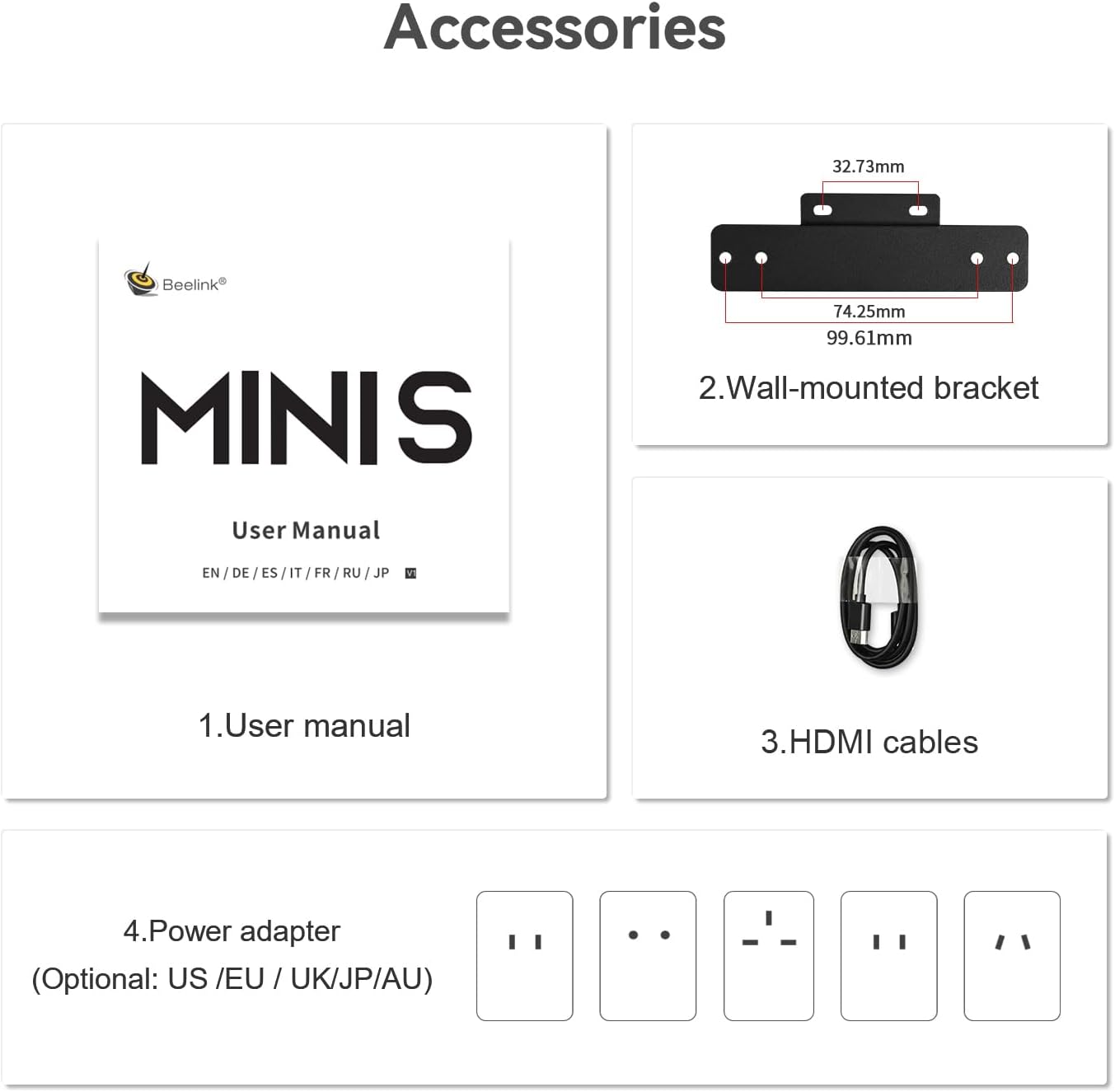
Figure 6: Contents of the Beelink MINI S12 Pro Mini PC package.
8. വാറൻ്റിയും പിന്തുണയും
All Beelink products are FCC, CE, and ROHS certified. We offer a 1-year free warranty and 7 days/24 hours customer service. For any technical issues, please email our customer service team. Lifetime technical assistance is provided.


