ആമുഖം
This manual provides detailed instructions for the AGPTEK A55PL USB C MP3 Player. It covers setup, operation, maintenance, and troubleshooting to ensure optimal use of your device. The A55PL is a versatile music player featuring USB-C connectivity, 64GB storage, FM radio, and voice recording capabilities, powered by a replaceable AAA battery.
പാക്കേജ് ഉള്ളടക്കം
താഴെ ലിസ്റ്റ് ചെയ്തിരിക്കുന്ന എല്ലാ ഇനങ്ങളും നിങ്ങളുടെ പാക്കേജിൽ ഉൾപ്പെടുത്തിയിട്ടുണ്ടെന്ന് ഉറപ്പാക്കുക:
- AGPTEK A55PL MP3 Player
- 64GB TF Card (pre-installed)
- യുഎസ്ബി ചാർജിംഗ് കേബിളിലേക്ക് ടൈപ്പ്-സി
- ഉപയോക്തൃ മാനുവൽ

Image: Contents of the AGPTEK A55PL MP3 Player package, showing the player, USB-C cable, 64GB TF card, and user manual.
ഉൽപ്പന്നം കഴിഞ്ഞുview ഫീച്ചറുകളും
The AGPTEK A55PL MP3 Player is designed for portability and ease of use, offering multiple functionalities in a compact form factor.
പ്രധാന സവിശേഷതകൾ:
- Direct Type-C & Universal USB Connectivity: Connects directly to Type-C phones for file transfer or to laptops/PCs using the included adapter/cable.
- Swappable AAA Batteries: Operates on a single AAA battery (not included), allowing for instant power replacement without needing charging outlets.
- Massive 64GB Storage: Comes with a pre-loaded 64GB TF card, supporting over 13,000 songs and high-fidelity formats like FLAC, APE, and WAV. Functions as a U disk for data transfer.
- Crisp LED Display: Features an energy-efficient LED screen for clear navigation and song title display.
- Voice Recorder & FM Radio: Built-in voice recorder for capturing audio and an FM radio (requires wired headset as antenna) for broadcasts.

ചിത്രം: ഒരു ഓവർview of the AGPTEK A55PL MP3 Player's capabilities, including its Type-C port, music playback, recording, FM radio, and 64GB TF card storage.
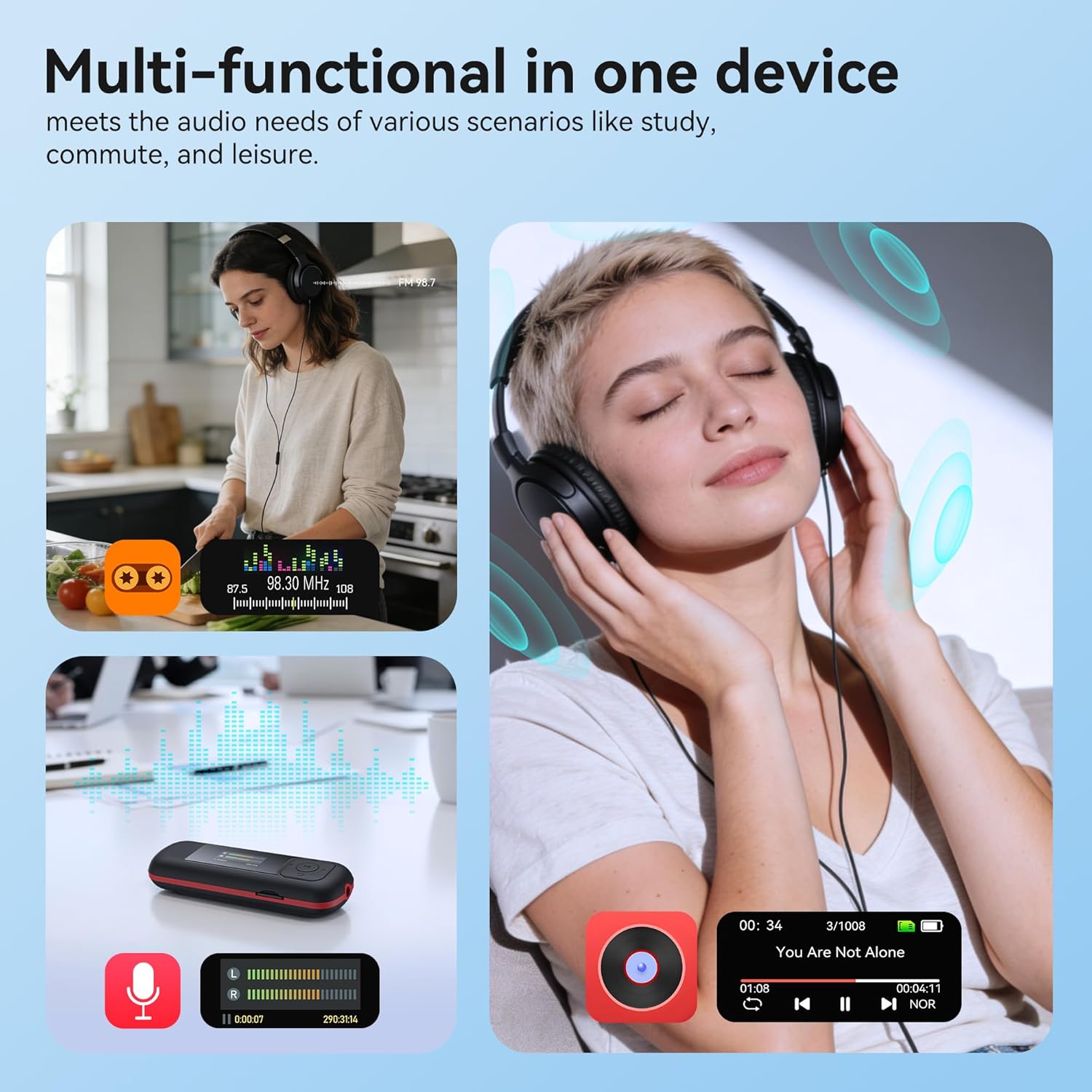
Image: The AGPTEK A55PL MP3 Player showcasing its multi-functional capabilities, including FM radio, voice recording, and music playback, suitable for various scenarios.
സജ്ജമാക്കുക
1. ബാറ്ററി ഇൻസ്റ്റാളേഷൻ
The AGPTEK A55PL uses one AAA battery (not included). Ensure correct polarity when inserting the battery.
- ഉപകരണത്തിന്റെ പിൻഭാഗത്ത് ബാറ്ററി കമ്പാർട്ട്മെന്റ് കവർ കണ്ടെത്തുക.
- Press the center of the cover and slide it forward to unlock and remove.
- Insert one AAA battery, matching the positive (+) and negative (-) terminals with the indicators inside the compartment.
- കവർ സുരക്ഷിതമായി ക്ലിക്കുചെയ്യുന്നത് വരെ അതിൻ്റെ സ്ഥാനത്തേക്ക് തിരികെ സ്ലൈഡ് ചെയ്യുക.

Image: Step-by-step guide for removing the USB cap and installing the AAA battery into the AGPTEK A55PL MP3 Player.
കുറിപ്പ്: USB charging is not supported. The device relies solely on AAA battery power. The battery display on the screen is based on voltage changes at the battery terminal.
2. Initial Connection and File കൈമാറ്റം
You can transfer music and other files to your MP3 player from a computer or a Type-C smartphone.
- കമ്പ്യൂട്ടറുകൾക്കായി: Use the included Type-C to USB cable. Connect the Type-C end to the player and the USB-A end to your computer's USB port. The player will appear as a removable disk.
- For Type-C Phones: Plug the player's Type-C connector directly into your phone's Type-C port. The player will be recognized as external storage. (For iPhones, a Lightning-to-Type-C OTG adapter is needed, not included).

Image: Demonstrates connecting the AGPTEK A55PL MP3 Player to a computer via USB cable and directly to a Type-C smartphone for file കൈമാറ്റം.
പ്രവർത്തന നിർദ്ദേശങ്ങൾ
അടിസ്ഥാന നിയന്ത്രണങ്ങൾ
The player features a simple interface with dedicated buttons for easy navigation.
- പവർ ബട്ടൺ: ഓൺ/ഓഫ് ചെയ്യാൻ അമർത്തിപ്പിടിക്കുക.
- പ്ലേ/താൽക്കാലികമായി നിർത്തുക ബട്ടൺ: സംഗീതം പ്ലേ ചെയ്യാനോ താൽക്കാലികമായി നിർത്താനോ അമർത്തുക.
- നാവിഗേഷൻ ബട്ടണുകൾ (മുകളിലേക്ക്/താഴേക്ക്/ഇടത്/വലത്): മെനുകൾ നാവിഗേറ്റ് ചെയ്യുന്നതിനും ക്രമീകരണങ്ങൾ ക്രമീകരിക്കുന്നതിനും ഉപയോഗിക്കുന്നു.
- വോളിയം ബട്ടണുകൾ (+/-): Dedicated buttons on the side to adjust playback volume.
- മെനു ബട്ടൺ (എം): സന്ദർഭ-സെൻസിറ്റീവ് മെനുകൾ ആക്സസ് ചെയ്യുന്നു.
- തിരികെ/മടങ്ങുക ബട്ടൺ: മുമ്പത്തെ സ്ക്രീനിലേക്കോ മെനുവിലേക്കോ മടങ്ങുന്നു.
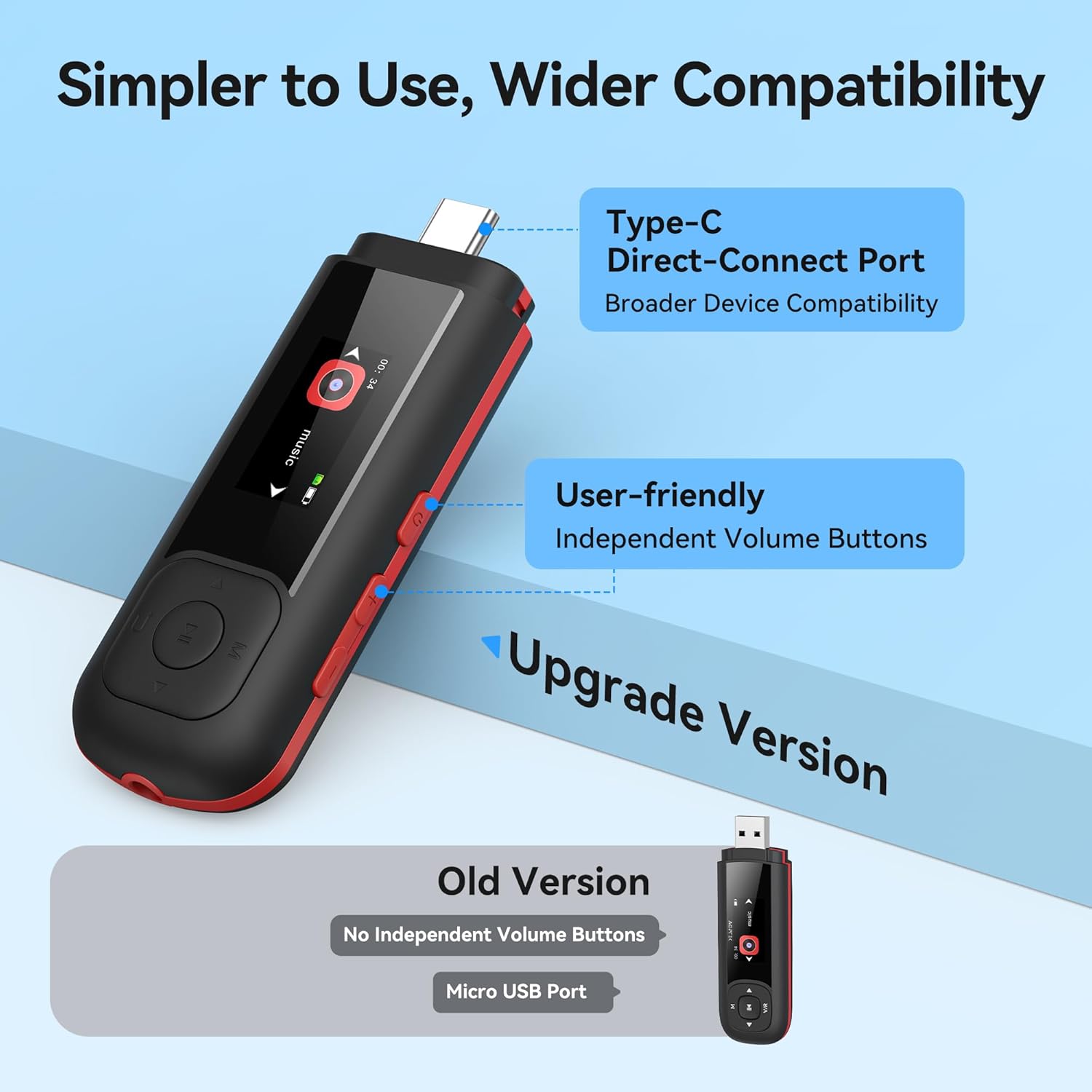
Image: Close-up of the AGPTEK A55PL MP3 Player, showing the Type-C direct-connect port and the independent volume buttons for user-friendly operation.
സംഗീത പ്ലേബാക്ക്
The player supports various audio formats including MP3, WMA, APE, FLAC, and WAV.
- Connect wired headphones to the 3.5mm audio jack.
- Navigate to the "Music" option on the main menu.
- Browse through your music library by artist, album, or folder.
- പ്ലേബാക്ക് ആരംഭിക്കാൻ ഒരു ഗാനം തിരഞ്ഞെടുക്കുക.
- Use the Play/Pause button to control playback and the volume buttons to adjust sound levels.

Image: A person enjoying music through headphones, highlighting the AGPTEK A55PL MP3 Player's support for multi-format lossless audio quality.

Image: Illustrates the different playback modes available on the AGPTEK A55PL MP3 Player, including Folder Mode and Music Mode with options like repeat, shuffle, and play in order.
എഫ്എം റേഡിയോ
To use the FM radio function, a wired headset must be connected as it acts as the antenna.
- Connect your wired headphones.
- Navigate to the "FM Radio" option from the main menu.
- Use the navigation buttons to scan for stations or manually tune to a frequency.

Image: A user enjoying FM radio on the AGPTEK A55PL MP3 Player, emphasizing that wired headphones are required to function as an antenna.
വോയ്സ് റെക്കോർഡർ
The built-in voice recorder allows you to capture audio on the go.
- Navigate to the "Recorder" option from the main menu.
- Select "Start Recording" to begin.
- Press the Play/Pause button to stop and save the recording.
- Recordings can be accessed and played back from the "Recordings" list.

Image: The AGPTEK A55PL MP3 Player showing its portable recorder function, ready for effortless on-the-go audio capture.
Custom Playlists
You can create and manage custom playlists by connecting the player to a computer.
- Connect the MP3 player to your computer using the Type-C to USB cable.
- Access the player's storage as a removable disk.
- നിങ്ങളുടെ സംഗീതം സംഘടിപ്പിക്കുക files into folders or create M3U playlist fileനേരിട്ട് ഉപകരണത്തിൽ.
- The player supports up to 3 built-in customizable playlists.

Image: Demonstrates how to create and edit custom playlists by connecting the AGPTEK A55PL MP3 Player to a computer via USB.
മെയിൻ്റനൻസ്
- വൃത്തിയാക്കൽ: ഉപകരണം വൃത്തിയാക്കാൻ മൃദുവായതും ഉണങ്ങിയതുമായ തുണി ഉപയോഗിക്കുക. ലിക്വിഡ് ക്ലീനറുകളോ ലായകങ്ങളോ ഉപയോഗിക്കുന്നത് ഒഴിവാക്കുക.
- സംഭരണം: നേരിട്ടുള്ള സൂര്യപ്രകാശവും കടുത്ത താപനിലയും ഏൽക്കാത്ത തണുത്തതും വരണ്ടതുമായ സ്ഥലത്ത് പ്ലെയർ സൂക്ഷിക്കുക.
- ബാറ്ററി കെയർ: Remove the AAA battery if the device will not be used for an extended period to prevent leakage.
- ഡാറ്റ ബാക്കപ്പ്: പതിവായി ബാക്കപ്പ് ചെയ്യുന്നത് പ്രധാനമാണ് files from the player to a computer to prevent data loss.
ട്രബിൾഷൂട്ടിംഗ്
ഉപകരണം ഓണാക്കുന്നില്ല
- Ensure the AAA battery is inserted correctly with the correct polarity.
- AAA ബാറ്ററി പുതിയ ഒന്ന് ഉപയോഗിച്ച് മാറ്റിസ്ഥാപിക്കുക.
- കുറച്ച് സെക്കൻഡ് നേരത്തേക്ക് പവർ ബട്ടൺ അമർത്തിപ്പിടിക്കുക.
കൈമാറാൻ കഴിയില്ല Files
- Verify the Type-C to USB cable is securely connected to both the player and the computer/phone.
- നിങ്ങളുടെ കമ്പ്യൂട്ടറിൽ മറ്റൊരു USB പോർട്ട് പരീക്ഷിക്കുക.
- Ensure your computer's operating system recognizes external storage devices.
- For phones, ensure the phone supports OTG (On-The-Go) functionality for external storage.
പ്ലേബാക്ക് സമയത്ത് ശബ്ദമില്ല
- Check if wired headphones are properly plugged into the 3.5mm audio jack.
- വോളിയം ഏറ്റവും കുറഞ്ഞതോ നിശബ്ദമോ ആയി സജ്ജീകരിച്ചിട്ടില്ലെന്ന് ഉറപ്പാക്കുക.
- Test with a different pair of headphones to rule out headphone issues.
- Verify the audio files are not corrupted and are in a supported format (MP3, WMA, APE, FLAC, WAV).
എഫ്എം റേഡിയോ പ്രവർത്തിക്കുന്നില്ല
- Confirm that wired headphones are connected, as they serve as the antenna.
- Try scanning for stations again in an open area.
സ്പെസിഫിക്കേഷനുകൾ
| ഫീച്ചർ | വിശദാംശങ്ങൾ |
|---|---|
| മോഡലിൻ്റെ പേര് | A55PL |
| ബ്രാൻഡ് | AGPTEK |
| മെമ്മറി സ്റ്റോറേജ് കപ്പാസിറ്റി | 64 GB (via TF Card) |
| കണക്റ്റിവിറ്റി ടെക്നോളജി | USB Type-C, Aux (3.5mm) |
| പ്രത്യേക സവിശേഷതകൾ | FM Radio, Voice Recorder, Replaceable AAA Battery |
| നിറം | കറുപ്പ് |
| സ്ക്രീൻ വലിപ്പം | 0.96 Inches (LED) |
| അനുയോജ്യമായ ഉപകരണങ്ങൾ | Headphones, Computers, Type-C Smartphones |
| മീഡിയ തരം | മൈക്രോ എസ്.ഡി |
| ഇനത്തിൻ്റെ ഭാരം | 3.87 ഔൺസ് |
| പാക്കേജ് അളവുകൾ | 6.57 x 5.12 x 0.94 ഇഞ്ച് |
വാറൻ്റിയും പിന്തുണയും
For warranty information and technical support, please refer to the official AGPTEK webസൈറ്റിൽ ബന്ധപ്പെടുകയോ അവരുടെ ഉപഭോക്തൃ സേവനവുമായി ബന്ധപ്പെടുകയോ ചെയ്യുക. ഏതെങ്കിലും വാറന്റി ക്ലെയിമുകൾക്ക് വാങ്ങിയതിന്റെ തെളിവായി നിങ്ങളുടെ വാങ്ങൽ രസീത് സൂക്ഷിക്കുക.
ഓൺലൈൻ പിന്തുണ: സന്ദർശിക്കുക AGPTEK Store on Amazon ഉൽപ്പന്ന വിവരങ്ങൾക്കും പിന്തുണാ ഉറവിടങ്ങൾക്കും.