1. ആമുഖം
This manual provides essential information for the safe and efficient operation, maintenance, and troubleshooting of your Ovsuqu Fiber Welder Machine FW-2000W (3000W model). This versatile 4-in-1 machine integrates welding, cleaning, cutting, and soldering functionalities, designed for various metal fabrication tasks. Please read this manual thoroughly before operating the equipment.

Figure 1: Ovsuqu Fiber Welder Machine (3000W model) with double wire feeder.

Figure 2: The machine's four primary functions: welding, cleaning, cutting, and weld seam cleaning.
2 സുരക്ഷാ വിവരങ്ങൾ
Operating laser welding equipment requires strict adherence to safety protocols to prevent injury. Always wear appropriate Personal Protective Equipment (PPE) including laser safety glasses (OD7 level), welding masks, and gloves. Ensure the work area is well-ventilated and free from flammable materials. Never look directly into the laser beam.
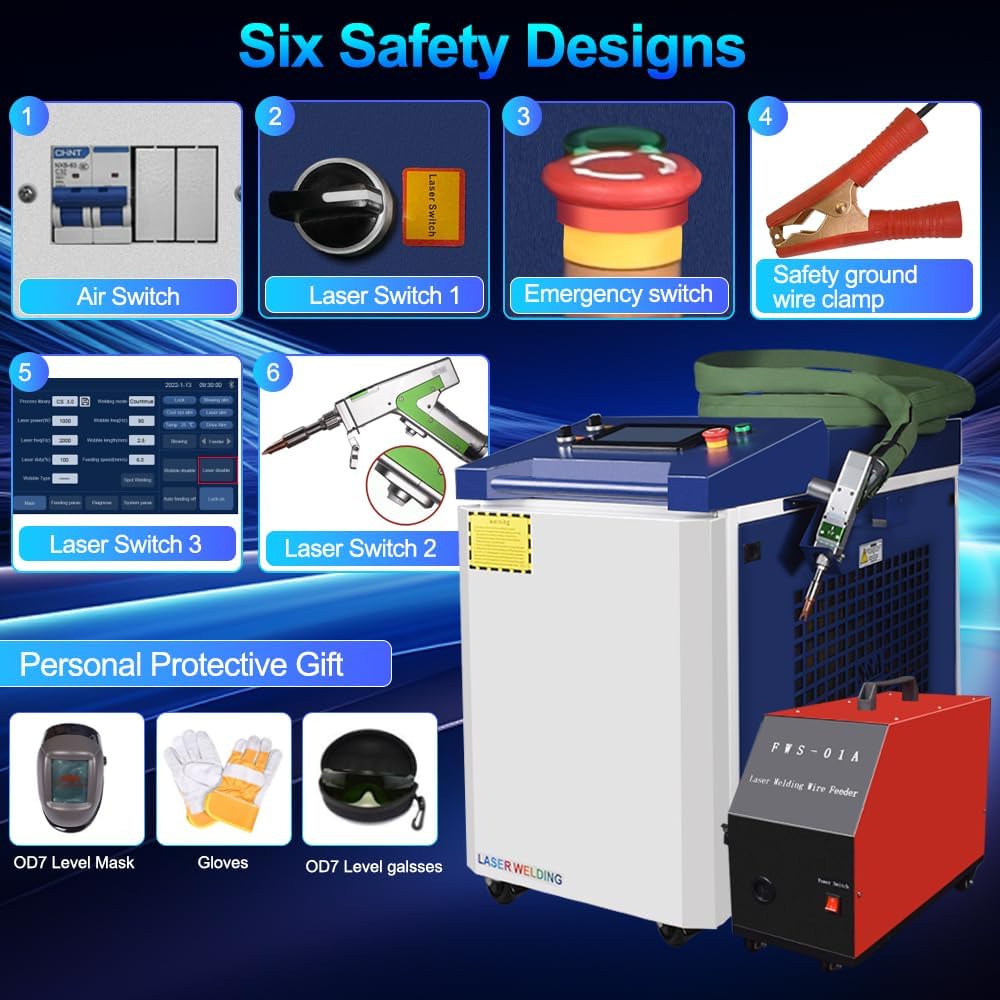
Figure 3: Key safety features of the machine, including multiple laser switches, an emergency stop button, and a safety ground wire clamp.
The machine is equipped with multiple safety mechanisms, including an air switch, laser switches, and an emergency stop button. Always ensure these are functional before operation. Proper grounding is essential for electrical safety.
3. ഉൽപ്പന്നം കഴിഞ്ഞുview
The Ovsuqu Fiber Welder Machine is a compact and portable unit featuring a Raycus 3000W laser source. It is designed for precision work on various metals including steel, stainless steel, copper, aluminum, gold, and silver. The system includes a handheld laser gun and an automated double wire feeder for enhanced welding capabilities.
3.1 പ്രധാന ഘടകങ്ങൾ
- പ്രധാന യൂണിറ്റ്: Houses the laser source, control system, and S&A water tank for cooling.
- Handheld Laser Gun: Lightweight and flexible, capable of welding, cleaning, and cutting.
- Automated Double Wire Feeder (FWS-02A): Provides stable and efficient wire feeding for stronger welds, especially useful for larger gaps.
- നിയന്ത്രണ പാനൽ: Intuitive touch screen interface for setting parameters and selecting modes.

ചിത്രം 4: ഓവർview of the Ovsuqu Fiber Welder Machine and its primary accessories.
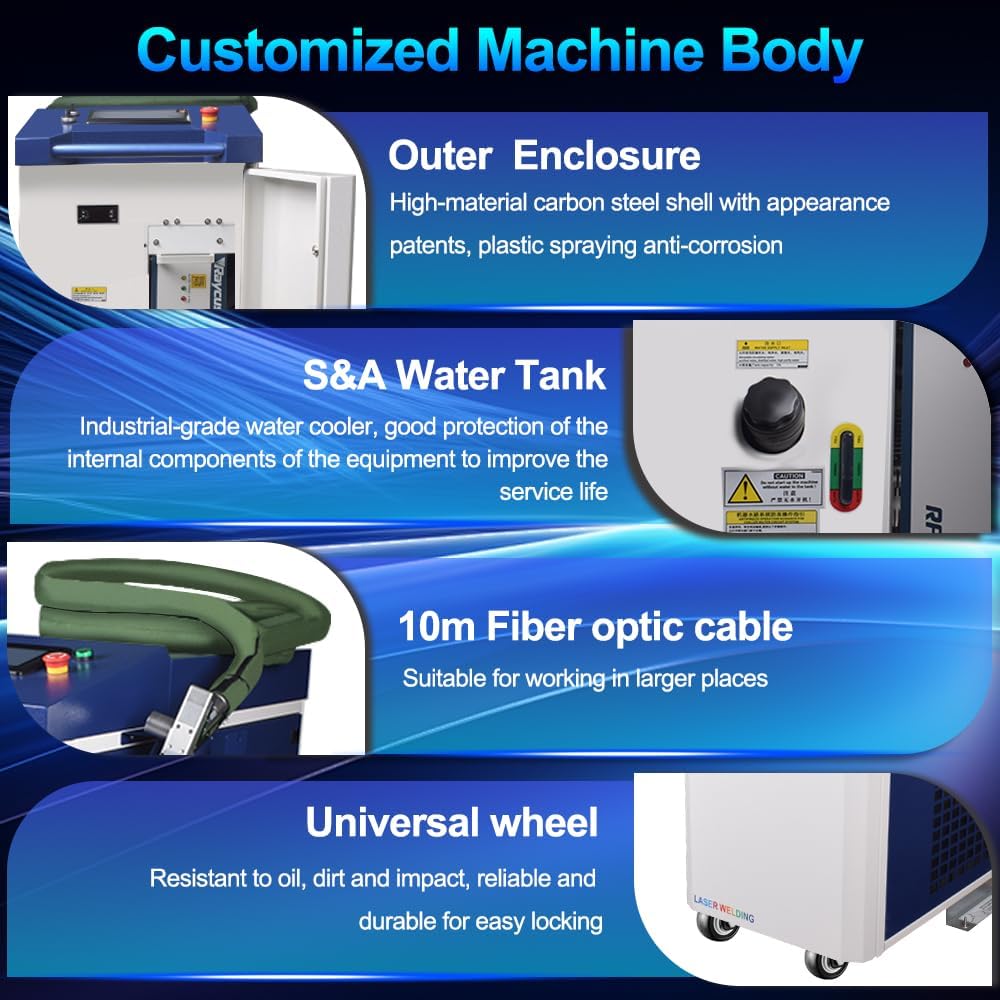
ചിത്രം 5: വിശദമായി view of the machine's robust outer enclosure, S&A water tank, 10-meter fiber optic cable, and universal wheels for mobility.
4. സജ്ജീകരണ നിർദ്ദേശങ്ങൾ
Follow these steps for initial setup of your fiber welder machine:
- Water Cooler Filling: Ensure the S&A water tank is filled with distilled or deionized water to the appropriate level. This is crucial for cooling the laser source.
- Connect Protective Gas: Attach the protective gas cylinder (e.g., Argon for aluminum welding) to the machine's gas inlet. Ensure all connections are secure and leak-free.
- Connect Wire Feeder Cables: Connect the power cable and signal cable from the automated wire feeder to the corresponding ports on the main unit.
- Lay Out Welding Wire: Open the wire feeder compartment, install the welding wire spool, and thread the wire through the feeder mechanism. Adjust tension as needed.
- പവർ ഓൺ: Turn the main power switch to 'ON'. The control panel will initialize.
- സിസ്റ്റം പരിശോധന: Perform a system check via the control panel to ensure all components are recognized and functioning correctly.
Video 1: Demonstrates the simple installation steps for the 4-in-1 laser welding machine, including water filling, gas connection, and wire feeder setup.

Figure 6: Details of the FWS-02A Double Wire Feeder, including wire weight capacity, wire core diameter, and feeding speed.
5. പ്രവർത്തന നിർദ്ദേശങ്ങൾ
The Ovsuqu Fiber Welder Machine offers multiple functionalities accessible via the touch control panel.
5.1 ഓപ്പറേറ്റിംഗ് മോഡുകൾ തിരഞ്ഞെടുക്കൽ
From the main interface, select your desired function: Welding, Cleaning, Cutting, or Soldering. Each mode has specific parameters that can be adjusted for optimal results.
5.2 വെൽഡിംഗ് പ്രവർത്തനം
The laser welding gun supports 7 distinct welding modes, allowing for various joint types such as butt welding, lap welding, overlap welding, tee welding, nail welding, and plug welding. Adjust laser power, frequency, and duty cycle as per material and thickness requirements. The automated double wire feeder ensures consistent material delivery for strong, clean welds.

Figure 7: The handheld laser gun, illustrating its welding and cleaning capabilities with various modes.
5.3 ക്ലീനിംഗ് ഓപ്പറേഷൻ
The laser cleaning gun offers 9 cleaning modes for effective surface restoration and rust removal. This non-contact cleaning method minimizes material damage. Select the appropriate mode based on the type and extent of surface contamination.
5.4 Cutting and Soldering
The machine is also capable of precise cutting and soldering. Adjust parameters on the control panel according to the material and desired outcome. The lightweight handheld gun (0.72KG) allows for comfortable and precise manipulation during these tasks.

ചിത്രം 8: വിഷ്വൽ എക്സ്amples of the machine's performance in welding, cleaning, cutting, and weld seam cleaning applications.
Video 2: A demonstration of the laser welding machine's capabilities in welding, cutting, and cleaning various materials.
6. പരിപാലനം
Regular maintenance ensures the longevity and optimal performance of your Ovsuqu Fiber Welder Machine.
- പ്രതിദിന ശുചീകരണം: Keep the laser gun and work area clean from dust and debris.
- Water Cooler Check: Periodically check the water level and quality in the S&A water tank. Replace water as recommended by the manufacturer to prevent algae buildup and ensure efficient cooling.
- കേബിൾ പരിശോധന: Inspect all power, signal, and fiber optic cables for any signs of wear or damage. Replace damaged cables immediately.
- ഉപഭോഗവസ്തുക്കൾ ഇല്ല: The laser source is designed for a long lifespan (100,000 hours) and requires no consumables, minimizing maintenance efforts.
7. പ്രശ്നപരിഹാരം
If you encounter issues with your machine, refer to the following general troubleshooting steps:
- ശക്തിയില്ല: Check all power connections, the main power switch, and the emergency stop button. Ensure the key switch is in the 'ON' position.
- ലേസർ ഔട്ട്പുട്ട് ഇല്ല: Verify that the laser safety switches are engaged and the system is not in an alarm state. Check laser parameters on the control panel.
- വെൽഡിംഗ് ഗുണനിലവാരം മോശമാണ്: Adjust welding parameters (power, speed, wire feed rate) according to the material. Ensure the protective gas flow is adequate and the nozzle is clean.
- വയർ ഫീഡിംഗ് പ്രശ്നങ്ങൾ: Check for tangled wire, correct wire spool installation, and proper tension in the wire feeder mechanism.
- സിസ്റ്റം അലാറങ്ങൾ: Consult the control panel for specific alarm codes and refer to the detailed user manual for resolution.
For complex issues or if problems persist, contact Ovsuqu's professional engineering support team.
8 സ്പെസിഫിക്കേഷനുകൾ
Key specifications for the Ovsuqu Fiber Welder Machine FW-2000W (3000W model):

Figure 9: Detailed optical and general characteristics of the Raycus laser source for different power configurations.
| ഫീച്ചർ | സ്പെസിഫിക്കേഷൻ |
|---|---|
| മോഡൽ നമ്പർ | FW-2000W (3000W Configuration) |
| നിർമ്മാതാവ് | ഒവ്സുകു |
| നാമമാത്ര ഔട്ട്പുട്ട് പവർ | 3000W |
| Power Adjust Range | 10-100% |
| എമിഷൻ തരംഗദൈർഘ്യം | 1080± 5 nm |
| ഔട്ട്പുട്ട് പവർ അസ്ഥിരത | <± 1.5% |
| മോഡുലേഷൻ ഫ്രീക്വൻസി | 1-5000 Hz |
| ഡ്യൂട്ടി സൈക്കിൾ ശ്രേണി | 1-100% |
| ഫൈബർ കോർ വ്യാസം | 50 (with 100, 200 options) |
| Beam Quality (M2) | 1.5-2 |
| ഡെലിവറി കേബിൾ ദൈർഘ്യം | 20 മീറ്റർ |
| ഓപ്പറേറ്റിംഗ് വോളിയംtage | 380±10%V AC/50/60Hz |
| നിയന്ത്രണ മോഡ് | RS-232/AD/Ethernet |
| പരമാവധി. വൈദ്യുതി ഉപഭോഗം | <6.5 kW |
| തണുപ്പിക്കൽ രീതി | വാട്ടർ കൂളിംഗ് |
| ഉൾപ്പെടുത്തിയ ഘടകങ്ങൾ | Machine and other accessories |
9. വാറൻ്റിയും പിന്തുണയും
Ovsuqu is committed to providing excellent customer service and support for your fiber welder machine.
- വാറൻ്റി: The machine comes with a two-year warranty.
- Laser Source Lifespan: The laser source has an estimated lifespan of 100,000 hours.
- പരിപാലനം: The machine is designed for free maintenance with no consumables required.
- സാങ്കേതിക സഹായം: Professional engineers are available to support you within 24 hours for any operational issues.
- വിഭവങ്ങൾ: Comprehensive installation videos, detailed user manuals, and accessory warranties are provided.
- വിദൂര സഹായം: Lifetime remote assistance is available.
For any inquiries or support, please contact Ovsuqu customer service.


