ആമുഖം
This manual provides detailed instructions for the safe and effective use of your NBD 8K 64MP Digital Camera, model NBD-EU-S110-QT. Please read this manual thoroughly before operating the camera and retain it for future reference.
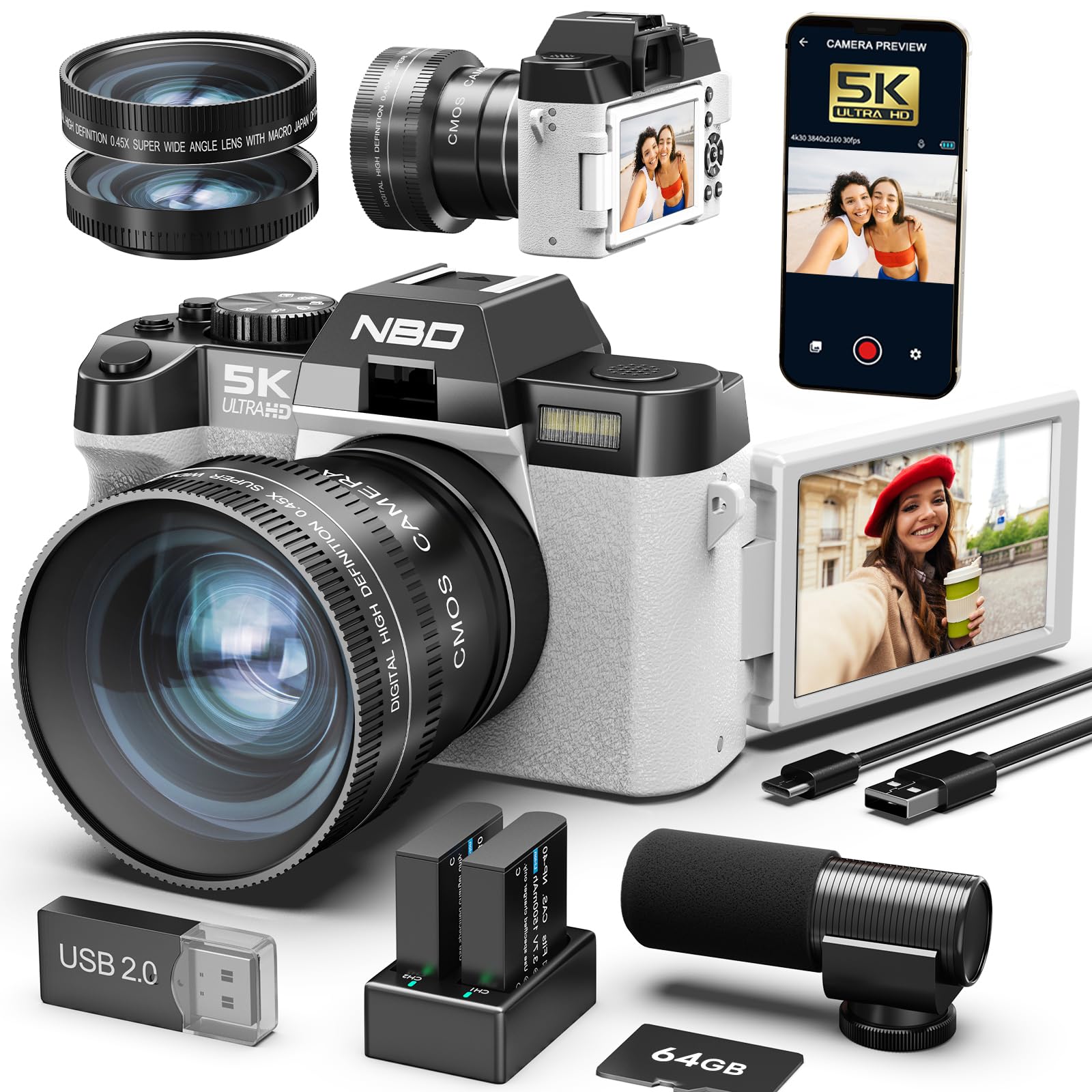
Image: The NBD 8K 64MP Digital Camera, showcasing its compact design and attached lens.
1. സജ്ജീകരണം
1.1 അൺബോക്സിംഗും പാക്കേജ് ഉള്ളടക്കങ്ങളും
പെട്ടിയിൽ നിന്ന് എല്ലാ ഇനങ്ങളും ശ്രദ്ധാപൂർവ്വം അൺപാക്ക് ചെയ്യുക. ഇനിപ്പറയുന്ന ഘടകങ്ങൾ ഉണ്ടെന്ന് ഉറപ്പാക്കുക:
- NBD 8K 64MP Digital Camera Body
- Wide-angle/Macro Lens (52mm)
- ബാഹ്യ മൈക്രോഫോൺ
- 64 ജിബി മെമ്മറി കാർഡ്
- 2 x റീചാർജ് ചെയ്യാവുന്ന ബാറ്ററികൾ
- യുഎസ്ബി ചാർജിംഗ് കേബിൾ
- ഉപയോക്തൃ മാനുവൽ (ഈ പ്രമാണം)
- ക്യാമറ സ്ട്രാപ്പ്
1.2 ബാറ്ററി ഇൻസ്റ്റാളേഷൻ
- ക്യാമറയുടെ അടിയിൽ ബാറ്ററി കമ്പാർട്ട്മെന്റ് കവർ കണ്ടെത്തുക.
- കവർ തുറക്കാൻ ലാച്ച് സ്ലൈഡ് ചെയ്യുക.
- Insert a fully charged battery into the compartment, ensuring the correct orientation as indicated by the polarity markings.
- ബാറ്ററി കമ്പാർട്ട്മെന്റ് കവർ ശരിയായി ക്ലിക്കു ചെയ്യുന്നത് വരെ സുരക്ഷിതമായി അടയ്ക്കുക.
- Note: Fully charge both batteries before first use.
Image description: A diagram showing the battery compartment and how to insert the battery with correct polarity.
1.3 മെമ്മറി കാർഡ് ഇൻസ്റ്റലേഷൻ
- Open the memory card slot cover, usually located on the side or near the battery compartment.
- Insert the 64GB memory card with the metal contacts facing the front of the camera until it clicks into place.
- മെമ്മറി കാർഡ് സ്ലോട്ട് കവർ അടയ്ക്കുക.
- Important: Ensure the camera is powered off before inserting or removing the memory card.
Image description: A diagram illustrating the correct insertion of the memory card into its slot.
1.4 ലെൻസ് അറ്റാച്ച്മെന്റ്
The camera comes with a 52mm wide-angle/macro lens. To attach it:
- Remove the protective cap from the camera lens mount and the rear cap from the wide-angle/macro lens.
- Align the mounting marks on the lens with those on the camera body.
- ലെൻസ് ഘടികാരദിശയിൽ ഉറപ്പിക്കുന്നത് വരെ സൌമ്യമായി തിരിക്കുക.
Image description: A visual guide demonstrating how to align and twist the lens onto the camera body.
1.5 External Microphone Connection
Connect the external microphone to the designated microphone input jack on the camera body for enhanced audio recording quality.
Image description: An illustration showing the microphone jack location and how to plug in the external microphone.
2. ക്യാമറ പ്രവർത്തിപ്പിക്കുക
2.1 പവർ ഓൺ/ഓഫ്
അമർത്തിപ്പിടിക്കുക ശക്തി button located on the top of the camera for approximately 2 seconds to turn the camera on or off.
2.2 അടിസ്ഥാന നിയന്ത്രണങ്ങൾ
- ഷട്ടർ ബട്ടൺ: Press halfway to focus, press fully to capture a photo or start/stop video recording.
- സൂം ലിവർ: Use to adjust the 16x digital zoom. Push towards 'W' for wide-angle, 'T' for telephoto.
- മോഡ് ഡയൽ: Rotate to select different shooting modes (e.g., Photo, Video, Playback).
- നാവിഗേഷൻ ബട്ടണുകൾ: Use the directional pad to navigate menus and settings.
- OK/SET Button: മെനുകളിലെ തിരഞ്ഞെടുപ്പുകൾ സ്ഥിരീകരിക്കുന്നു.
Image description: An annotated diagram highlighting the location of the power button, shutter button, zoom lever, mode dial, and navigation buttons on the camera body.
2.3 Using the 180° Rotatable IPS Screen
The 3.0-inch IPS screen can be rotated 180 degrees. This feature is particularly useful for:
- സെൽഫികൾ: Rotate the screen forward to easily compose self-portraits.
- വ്ലോഗിംഗ്: Monitor your recording while filming yourself.
- Low/High Angle Shots: Adjust the screen for comfortable viewing when shooting from difficult angles.
Image description: A series of images demonstrating the screen rotating to different positions for various shooting scenarios.
2.4 ഫോട്ടോ, വീഡിയോ റെക്കോർഡിംഗ്
2.4.1 Capturing Photos
- Turn the Mode Dial to the ഫോട്ടോ ഐക്കൺ.
- Frame your shot using the IPS screen.
- Press the Shutter button halfway to activate autofocus. The focus frame will turn green when focus is achieved.
- Press the Shutter button fully to capture the image.
2.4.2 വീഡിയോ റെക്കോർഡിംഗ്
- Turn the Mode Dial to the വീഡിയോ ഐക്കൺ.
- Frame your scene.
- Press the Shutter button fully to start recording. A red indicator will appear on the screen.
- Press the Shutter button fully again to stop recording.
- Note: The camera supports 8K video resolution. Ensure sufficient memory card space.
2.5 അഡ്വാൻസ്ഡ് ഷൂട്ടിംഗ് മോഡുകളും സവിശേഷതകളും
- ഓട്ടോഫോക്കസ് (AF): The camera features rapid autofocus to ensure sharp images.
- ഇമേജ് സ്റ്റെബിലൈസേഷൻ: ക്യാമറ കുലുക്കം മൂലമുണ്ടാകുന്ന മങ്ങൽ കുറയ്ക്കാൻ സഹായിക്കുന്നു.
- സമയദൈർഘ്യം: Capture a series of images over time and combine them into a video. Access this mode via the menu.
- സ്ലോ മോഷൻ: Record video at a higher frame rate for slow-motion playback. Access this mode via the menu.
- Digital Zoom (16x): Use the zoom lever to magnify your subject. Note that digital zoom can reduce image quality at higher magnifications.
2.6 WiFi Connectivity and App Control
The camera features built-in WiFi for seamless connectivity with your smartphone or tablet.
- Download the official NBD camera app from your device's app store.
- On the camera, navigate to the വൈഫൈ ക്രമീകരണങ്ങൾ in the menu and enable WiFi.
- On your smartphone, connect to the camera's WiFi network (SSID and password will be displayed on the camera screen).
- Open the NBD app to remotely control the camera, view live feed, transfer photos/videos, and adjust settings.
Image description: Screenshots of the camera's WiFi settings menu and the NBD app interface on a smartphone.
3. പരിപാലനം
3.1 ക്യാമറ വൃത്തിയാക്കൽ
- ക്യാമറ ബോഡി: ക്യാമറ ബോഡി തുടയ്ക്കാൻ മൃദുവായതും ഉണങ്ങിയതുമായ തുണി ഉപയോഗിക്കുക. കഠിനമായ അഴുക്കിന്, ചെറുതായി dampതുണിയിൽ വെള്ളം ഒഴിക്കുക. കഠിനമായ രാസവസ്തുക്കൾ ഒഴിവാക്കുക.
- ലെൻസ്: Use a lens brush or a blower to remove dust. For smudges, use a specialized lens cleaning solution and a microfiber lens cloth. Never touch the lens surface with your fingers.
- സ്ക്രീൻ: Gently wipe the IPS screen with a soft, lint-free cloth.
3.2 ബാറ്ററി കെയർ
- Always use the provided charger and cables.
- ബാറ്ററികൾ തീവ്രമായ താപനിലയിൽ തുറന്നുകാട്ടുന്നത് ഒഴിവാക്കുക.
- If the camera will not be used for an extended period, remove the batteries and store them in a cool, dry place.
3.3 സംഭരണം
Store the camera in a dry, dust-free environment, away from direct sunlight and extreme temperatures. Use a camera bag for protection during transport.
4. പ്രശ്നപരിഹാരം
| പ്രശ്നം | സാധ്യമായ കാരണം | പരിഹാരം |
|---|---|---|
| ക്യാമറ പവർ ഓൺ ചെയ്യുന്നില്ല. | ബാറ്ററി തീർന്നു അല്ലെങ്കിൽ തെറ്റായി ചേർത്തിരിക്കുന്നു. | ബാറ്ററി പൂർണ്ണമായും ചാർജ് ചെയ്യുക. ബാറ്ററി ശരിയായി വീണ്ടും ചേർക്കുക. |
| ചിത്രങ്ങൾ അവ്യക്തമാണ്. | തെറ്റായ ഫോക്കസ്, ക്യാമറ കുലുക്കം, അല്ലെങ്കിൽ വൃത്തികെട്ട ലെൻസ്. | Ensure autofocus is engaged. Hold the camera steady or use a tripod. Clean the lens. |
| മെമ്മറി കാർഡ് പിശക്. | കാർഡ് നിറഞ്ഞിരിക്കുന്നു, കേടായിരിക്കുന്നു, അല്ലെങ്കിൽ തെറ്റായി ചേർത്തിരിക്കുന്നു. | അനാവശ്യമായി ഇല്ലാതാക്കുക files or use a new card. Format the card (this will erase all data). Reinsert the card. |
| വൈഫൈ കണക്ഷൻ പരാജയപ്പെടുന്നു. | Incorrect password, camera WiFi disabled, or app issue. | Verify WiFi password. Ensure camera WiFi is enabled. Restart the camera and your smart device. Reinstall the app if necessary. |
| മോശം ഓഡിയോ നിലവാരം. | External microphone not connected properly or faulty. | Ensure the external microphone is securely plugged in. Test with another microphone if available. |
5 സ്പെസിഫിക്കേഷനുകൾ
| ഫീച്ചർ | വിശദാംശങ്ങൾ |
|---|---|
| മോഡൽ നമ്പർ | NBD-EU-S110-QT |
| ഇമേജ് സെൻസർ | CMOS, 1/2.3 inch |
| ചിത്ര മിഴിവ് | 64 Megapixels (MP) maximum |
| വീഡിയോ റെസല്യൂഷൻ | 8K |
| ഡിജിറ്റൽ സൂം | 16x |
| ഡിസ്പ്ലേ സ്ക്രീൻ | 3.0 inch IPS, 180° Rotatable |
| കണക്റ്റിവിറ്റി | വൈഫൈ |
| ലെൻസ് തരം | 52mm Wide-angle/Macro |
| പിന്തുണച്ചു File ഫോർമാറ്റുകൾ | MOV (Video), JPG (Photo) |
| ഷട്ടർ സ്പീഡ് | 1/3 മുതൽ 1/2000 സെക്കൻഡ് വരെ |
| എക്സ്പോഷർ നിയന്ത്രണം | ഓട്ടോമാറ്റിക്, മാനുവൽ |
| അളവുകൾ (L x W x H) | 12.6 x 11 x 8.2 സെ.മീ |
| ഭാരം | 442 ഗ്രാം |
6. ഉപഭോക്തൃ പിന്തുണ
For further assistance, technical support, or warranty inquiries, please contact NBD customer service through the official webസൈറ്റ് അല്ലെങ്കിൽ നിങ്ങളുടെ വാങ്ങൽ ഡോക്യുമെന്റേഷനോടൊപ്പം നൽകിയിരിക്കുന്ന ബന്ധപ്പെടാനുള്ള വിവരങ്ങൾ.
You can also visit the NBD store on Amazon for product information and updates: NBD Amazon Store


