1. ആമുഖം
This manual provides essential information for the proper use and care of your Lenovo Tab Plus 12.1-inch AI-enhanced tablet, Model ZAG70922US. Designed for students, this tablet offers a large display and intelligent features to support educational and productivity tasks. Please read this manual thoroughly before using your device to ensure optimal performance and longevity.
2. ബോക്സിൽ എന്താണുള്ളത്?
നിങ്ങളുടെ ഉൽപ്പന്ന പാക്കേജിംഗിൽ എല്ലാ ഇനങ്ങളും ഉണ്ടെന്ന് ഉറപ്പാക്കുക:
- Lenovo Tab Plus 12.1-inch Tablet (Model ZAG70922US)
- ടാബ് പെൻ
- ചാർജിംഗ് കേബിൾ
- പവർ അഡാപ്റ്റർ
- ദ്രുത ആരംഭ ഗൈഡ്
- സുരക്ഷയും വാറന്റി വിവരങ്ങളും
3. ഉൽപ്പന്നം കഴിഞ്ഞുview
The Lenovo Tab Plus features a 12.1-inch 2.5K IPS display, an AI-enhanced processor, and runs on Android 15. It is designed for portability and functionality, making it suitable for extended study sessions and various educational activities.
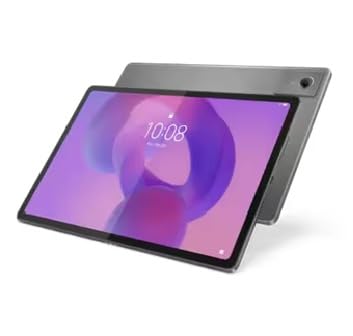
Image: Lenovo Tab Plus tablet shown with its detachable keyboard cover and stylus pen.

Image: The Lenovo Tab Plus tablet, keyboard, and pen arranged to show multiple components.
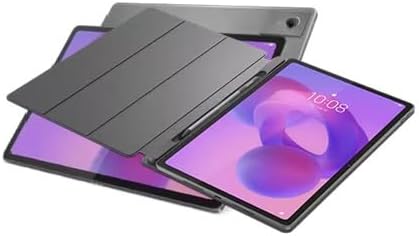
Image: The Lenovo Tab Plus tablet with its protective cover, showcasing അതിന്റെ മിനുസമാർന്ന ഡിസൈൻ.

Image: The Lenovo Tab Plus tablet positioned in stand mode with the keyboard attached, ready for use.
4. സജ്ജീകരണം
4.1 പ്രാരംഭ ചാർജിംഗ്
Before first use, fully charge your tablet. Connect the charging cable to the tablet's USB-C port and the power adapter to a wall outlet. The battery indicator will show charging status.
4.2 പവർ ഓൺ/ഓഫ്
- പവർ ഓണാക്കാൻ: ലെനോവോ ലോഗോ ദൃശ്യമാകുന്നതുവരെ പവർ ബട്ടൺ അമർത്തിപ്പിടിക്കുക.
- പവർ ഓഫ് ചെയ്യാൻ: പവർ ബട്ടൺ അമർത്തിപ്പിടിക്കുക, തുടർന്ന് സ്ക്രീനിലെ ഓപ്ഷനുകളിൽ നിന്ന് 'പവർ ഓഫ്' തിരഞ്ഞെടുക്കുക.
4.3 ആദ്യ തവണ സജ്ജീകരണം
ആദ്യമായി പവർ-ഓൺ ചെയ്യുമ്പോൾ, സ്ക്രീനിലെ നിർദ്ദേശങ്ങൾ പാലിക്കുക:
- നിങ്ങളുടെ ഭാഷ തിരഞ്ഞെടുക്കുക.
- ഒരു Wi-Fi നെറ്റ്വർക്കിലേക്ക് കണക്റ്റുചെയ്യുക.
- നിങ്ങളുടെ Google അക്കൗണ്ട് ഉപയോഗിച്ച് സൈൻ ഇൻ ചെയ്യുക അല്ലെങ്കിൽ പുതിയൊരെണ്ണം സൃഷ്ടിക്കുക.
- Set up security features (PIN, pattern, fingerprint).
- Review നിബന്ധനകളും വ്യവസ്ഥകളും അംഗീകരിക്കുക.
5. പ്രവർത്തന നിർദ്ദേശങ്ങൾ
5.1 നാവിഗേഷൻ
സ്പർശന ആംഗ്യങ്ങൾ ഉപയോഗിച്ച് നിങ്ങളുടെ ടാബ്ലെറ്റ് നാവിഗേറ്റ് ചെയ്യുക:
- ടാപ്പ് ചെയ്യുക: ഒരു ഇനം തിരഞ്ഞെടുക്കുക.
- സ്വൈപ്പ്: Scroll through screens or content.
- പിഞ്ച്: സൂം ഇൻ അല്ലെങ്കിൽ ഔട്ട് ചെയ്യുക.
- ലോംഗ് പ്രസ്സ്: സന്ദർഭോചിത മെനുകൾ ആക്സസ് ചെയ്യുക അല്ലെങ്കിൽ ഐക്കണുകൾ നീക്കുക.
5.2 Using the Tab Pen
The included Tab Pen allows for precise input, note-taking, and drawing. Simply touch the pen to the screen to activate its functions. Specific app functionalities may vary.
5.3 AI-Enhanced Features
The tablet's AI capabilities optimize performance and adapt to your usage patterns. This includes intelligent resource management for smoother multitasking and enhanced learning experiences. Specific AI features may be integrated into system settings or compatible applications.
5.4 കണക്റ്റിംഗ് ആക്സസറികൾ
You can connect various accessories via Bluetooth (e.g., headphones, external keyboards) or the USB-C port (e.g., external drives, hubs).
6. പരിപാലനം
6.1 ടാബ്ലെറ്റ് വൃത്തിയാക്കൽ
മൃദുവായ, ലിൻ്റ് രഹിത തുണി ഉപയോഗിക്കുകampവെള്ളം അല്ലെങ്കിൽ ഇലക്ട്രോണിക്സിനായി പ്രത്യേകം രൂപകൽപ്പന ചെയ്ത സ്ക്രീൻ ക്ലീനർ ഉപയോഗിച്ച് നനയ്ക്കുക. കഠിനമായ രാസവസ്തുക്കളോ ഉരച്ചിലുകളോ ഉള്ള വസ്തുക്കൾ ഒഴിവാക്കുക.
6.2 സോഫ്റ്റ്വെയർ അപ്ഡേറ്റുകൾ
നിങ്ങളുടെ ടാബ്ലെറ്റിൽ ഏറ്റവും പുതിയ സവിശേഷതകൾ, സുരക്ഷാ പാച്ചുകൾ, പ്രകടന മെച്ചപ്പെടുത്തലുകൾ എന്നിവ ഉറപ്പാക്കാൻ സിസ്റ്റം അപ്ഡേറ്റുകൾ പതിവായി പരിശോധിച്ച് ഇൻസ്റ്റാൾ ചെയ്യുക. പോകുക ക്രമീകരണങ്ങൾ > സിസ്റ്റം > സിസ്റ്റം അപ്ഡേറ്റ്.
6.3 ബാറ്ററി കെയർ
ബാറ്ററി ആയുസ്സ് വർദ്ധിപ്പിക്കാൻ:
- തീവ്രമായ താപനില ഒഴിവാക്കുക.
- ബാറ്ററി ഇടയ്ക്കിടെ പൂർണ്ണമായും ഡിസ്ചാർജ് ചെയ്യാൻ അനുവദിക്കരുത്.
- ഒറിജിനൽ ചാർജറും കേബിളും ഉപയോഗിക്കുക.
7. പ്രശ്നപരിഹാരം
നിങ്ങൾ നേരിട്ടേക്കാവുന്ന പൊതുവായ പ്രശ്നങ്ങളെ ഈ വിഭാഗം അഭിസംബോധന ചെയ്യുന്നു.
7.1 ടാബ്ലെറ്റ് ഓണാകുന്നില്ല
- ബാറ്ററി ചാർജ്ജ് ചെയ്തിട്ടുണ്ടെന്ന് ഉറപ്പാക്കുക. ചാർജർ കണക്റ്റ് ചെയ്ത് വീണ്ടും പവർ ചെയ്യാൻ ശ്രമിക്കുന്നതിന് മുമ്പ് കുറച്ച് മിനിറ്റ് കാത്തിരിക്കുക.
- നിർബന്ധിതമായി റീബൂട്ട് ചെയ്യുന്നതിന് പവർ ബട്ടൺ കുറഞ്ഞത് 10-15 സെക്കൻഡ് അമർത്തിപ്പിടിക്കുക.
7.2 വൈഫൈ കണക്ഷൻ പ്രശ്നങ്ങൾ
- നിങ്ങളുടെ വൈഫൈ റൂട്ടറും ടാബ്ലെറ്റും പുനരാരംഭിക്കുക.
- വൈഫൈ ക്രമീകരണങ്ങളിൽ നെറ്റ്വർക്ക് മറന്ന് വീണ്ടും കണക്റ്റുചെയ്യുക.
- നിങ്ങൾ വൈഫൈ സിഗ്നലിന്റെ പരിധിയിലാണെന്ന് ഉറപ്പാക്കുക.
7.3 ആപ്പുകൾ ക്രാഷാകുകയോ മരവിപ്പിക്കുകയോ ചെയ്യുന്നു
- ആപ്പ് അടച്ച് വീണ്ടും തുറക്കുക.
- ആപ്പിന്റെ കാഷെയും ഡാറ്റയും മായ്ക്കുക ക്രമീകരണങ്ങൾ > ആപ്പുകൾ.
- ആപ്പ് അതിന്റെ ഏറ്റവും പുതിയ പതിപ്പിലേക്ക് അപ്ഡേറ്റ് ചെയ്തിട്ടുണ്ടെന്ന് ഉറപ്പാക്കുക.
- ടാബ്ലെറ്റ് പുനരാരംഭിക്കുക.
8 സ്പെസിഫിക്കേഷനുകൾ
Key technical specifications for the Lenovo Tab Plus Model ZAG70922US:
| ഫീച്ചർ | സ്പെസിഫിക്കേഷൻ |
|---|---|
| മോഡലിൻ്റെ പേര് | ZAG70922US |
| ഡിസ്പ്ലേ വലിപ്പം | 12.1 ഇഞ്ച് |
| സ്ക്രീൻ റെസല്യൂഷൻ | 2560 x 1600 പിക്സലുകൾ (2.5K) |
| ഓപ്പറേറ്റിംഗ് സിസ്റ്റം | ആൻഡ്രോയിഡ് 15 |
| പ്രോസസ്സർ ബ്രാൻഡ് | മീഡിയടെക് |
| പ്രോസസ്സർ വേഗത | 2.4 GHz |
| മെമ്മറി (റാം) | 8 GB LPDDR4X |
| സംഭരണം (ഫ്ലാഷ് മെമ്മറി) | 128 ജിബി യുഎഫ്എസ് 2.2 |
| ഗ്രാഫിക്സ് കോപ്രൊസസർ | സംയോജിത ഗ്രാഫിക്സ് |
| വയർലെസ് തരം | 802.11ac, 802.11ax |
| പിൻഭാഗം Webക്യാം റെസല്യൂഷൻ | 13 എം.പി |
| ഇനത്തിൻ്റെ ഭാരം | 1.5 പൗണ്ട് |
| ഉൽപ്പന്ന അളവുകൾ (LxWxH) | 10.98 x 0.25 x 7.13 ഇഞ്ച് |
| നിറം | ചാരനിറം |
| ബാറ്ററികൾ | 1 നിലവാരമില്ലാത്ത ബാറ്ററി (ഉൾപ്പെടുത്തിയിരിക്കുന്നു) |
9. വാറൻ്റി വിവരങ്ങൾ
Your Lenovo Tab Plus tablet is covered by a manufacturer's warranty. Please refer to the 'Safety and Warranty Information' document included in your product packaging for full details on warranty terms and conditions.
9.1 റിട്ടേൺ പോളിസി
Most new, unopened items can be returned within 30 days of delivery for a full refund. Specific return policies may vary based on the retailer and purchase conditions.
9.2 വിപുലീകൃത സംരക്ഷണ പദ്ധതികൾ
Extended protection plans may be available for purchase to provide additional coverage beyond the standard manufacturer's warranty. Options may include 2-Year or 4-Year protection plans.
10. പിന്തുണ
For further assistance, technical support, or to download the latest drivers and software, please visit the official Lenovo support webസൈറ്റ്. നിങ്ങൾക്ക് അവിടെ പതിവുചോദ്യങ്ങളും കമ്മ്യൂണിറ്റി ഫോറങ്ങളും കണ്ടെത്താനാകും.
ലെനോവോ പിന്തുണ Webസൈറ്റ്: https://support.lenovo.com
When contacting support, please have your tablet's model number (ZAG70922US) and serial number ready.


