ആമുഖം
This manual provides essential information for the safe and efficient operation, setup, and maintenance of your BETAFPV Pavo20 Pro II Brushless Whoop Quadcopter. Please read all instructions carefully before use.

സജ്ജീകരണ ഗൈഡ്
O4 Pro Module and Bracket Installation
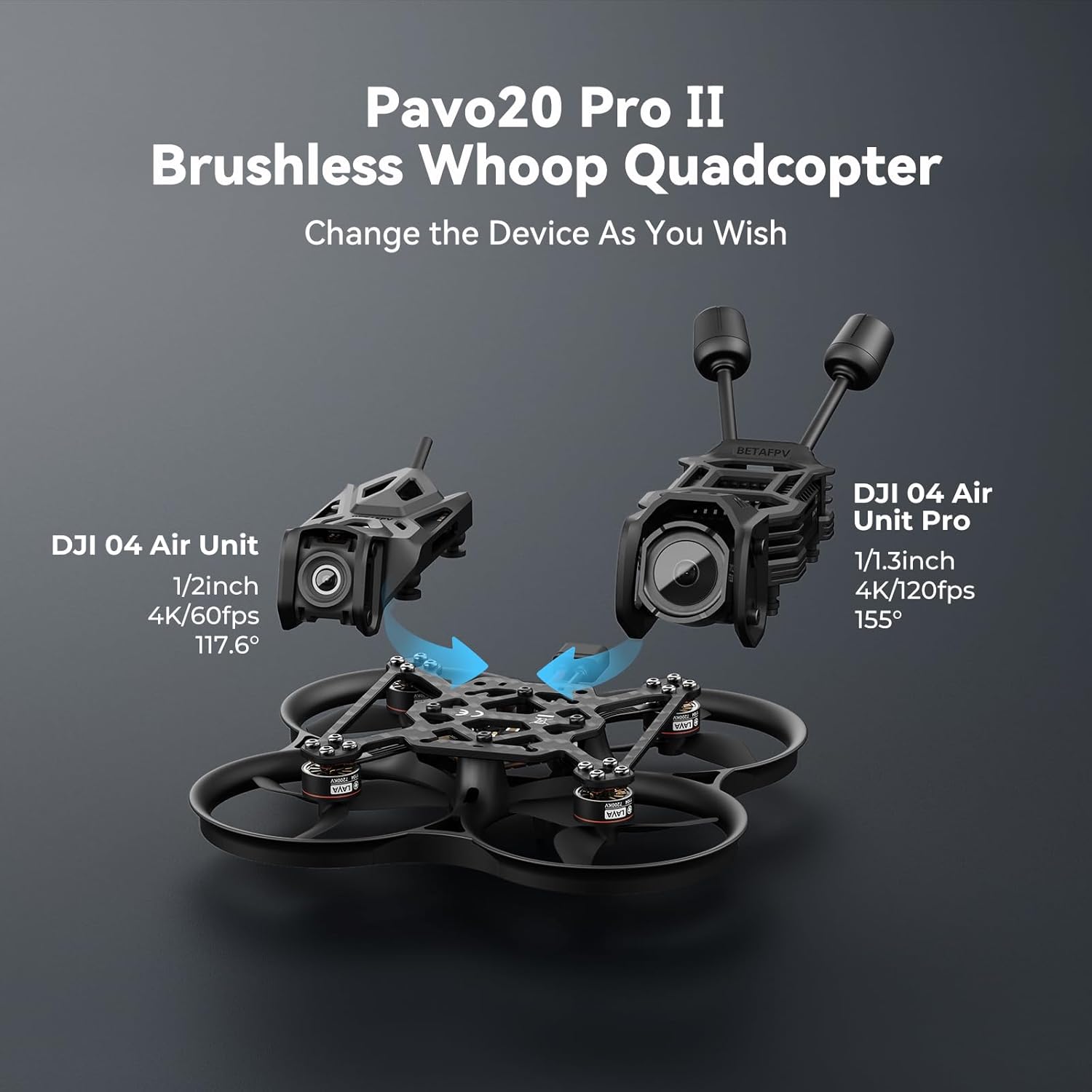
The Pavo20 Pro II is designed for seamless integration with DJI O4 Air Unit Pro. Follow these steps for proper installation:
- Prepare the necessary tools: H1.5 Hex wrench and tweezers.
- Unscrew the four screws of the O4 Pro camera module.
- Carefully insert the O4 Pro module into the bracket, ensuring the 'DJI' characters face upward. Avoid pulling on coaxial cables and antennas.
- Insert the antennas into their designated slots.
- Roll the coaxial cable to manage excess length.
- Install the O4 Pro camera in a forward direction, keeping the cable upward.
- Tighten the four original screws of the DJI O4 Pro module or four M2*4 screws in sequence. Adjust the camera to the desired angle (0-40° tilt).
- Ensure the coaxial cable is securely placed in the gap of the bracket to prevent pinching.
- Insert four rubber dampers into the installation holes of the Pavo20 Pro frame using tweezers.
- Insert four M2*10 screws into the holes of these four rubber dampers.
- Insert the 6-Pin cable of the flight controller into the connector of the O4 Pro module. Ensure correct targeting to avoid damaging the pin header.
- Tighten the four M2*10 screws with the bracket in sequence.


Video: Pavo20 Pro HD Camera Installation
This video demonstrates the step-by-step installation of the DJI O4 Pro camera module and bracket onto the BETAFPV Pavo20 Pro II quadcopter frame. It covers unscrewing the camera, inserting the module, routing cables, and securing the components.
പ്രവർത്തന നിർദ്ദേശങ്ങൾ
ഫ്ലൈറ്റ് കൺട്രോളർ
The Pavo20 Pro II features an F4 2-3S 20A AIO FC specifically designed for HD VTX systems. Key features include:
- Dual BEC solution providing stable power outputs: 9V 2A for the O4 system and 5V 3A for external devices.
- 20A ESC for agile and dynamic flight performance.
- Dedicated HD VTX 6-Pin connectors for simplified installation.
- Conveniently positioned USB ports for easy maintenance.
പ്രൊപ്പൽഷൻ സിസ്റ്റം
For optimal performance, the Pavo20 Pro II is equipped with:
- Recommended LAVA 3S 550mAh 75C Battery for explosive acceleration and up to 6.5 minutes of flight time.
- Gemfan 2218 3-Blade Propellers.
- LAVA 1104 7200KV Brushless Motors.
VTX Compatibility
The newly designed carbon plate and HD VTX Bracket ensure broad compatibility:
- Seamlessly supports both the DJI O4 Air Unit Pro and O4 Air Unit.
- Pre-tuned PID parameters optimized for both O4 systems, configurable via OSD.

Video: GEPRC DarkStar16 O4 Pro TinyWhoop Showcase
This video showcases the flight capabilities and video quality of a similar O4 Pro TinyWhoop, demonstrating the performance of the DJI O4 Air Unit Pro VTX system. Note: This video features the GEPRC DarkStar16, a related product, to illustrate the VTX performance.
മെയിൻ്റനൻസ്
Frame Durability
The Pavo20 Pro II features an upgraded frame designed for resilience and ease of maintenance:
- 93.9mm wheelbase with crash-proof thickened ducts.
- Revolutionary assembly using embedded nuts and just four screws for a fast, secure, and crash-resistant build.
- Advanced molding ensures perfect carbon plate alignment via three guided points, creating an ultra-rigid and stable platform.
Easy Assembly and Disassembly
The design prioritizes user-friendly maintenance:
- Simplified assembly process compared to previous models.
- Tool-free installation for quick antenna swaps on the HD VTX Bracket.
- Secure assembly with minimal screws for reduced complexity.

ട്രബിൾഷൂട്ടിംഗ്
For common issues, consider the following:
- ശക്തിയില്ല: Ensure the battery is fully charged and correctly connected. Check all power cables for secure connections.
- വീഡിയോ ഫീഡ് ഇല്ല: Verify the O4 Air Unit Pro or O4 Air Unit is properly installed and connected. Check antenna connections and ensure your FPV goggles are on the correct frequency.
- അസ്ഥിരമായ ഫ്ലൈറ്റ്: Inspect propellers for damage and replace if necessary. Ensure all screws are tightened appropriately, especially those securing the flight controller and frame. Check PID settings via OSD.
- മോട്ടോർ പ്രശ്നങ്ങൾ: Listen for unusual motor noises. Check for debris obstructing the motors or propellers. Ensure motor wires are securely soldered.
- ബൈൻഡിംഗ് പ്രശ്നങ്ങൾ: Refer to the DJI O4 Air Unit Pro or O4 Air Unit manual for specific binding procedures with your remote controller.
If issues persist, consult the official BETAFPV support resources or contact customer service.
ഉൽപ്പന്ന സവിശേഷതകൾ
| ഫീച്ചർ | വിശദാംശങ്ങൾ |
|---|---|
| നിർമ്മാതാവ് | ബീറ്റാഫ്പിവി |
| ഇനത്തിൻ്റെ ഭാരം | 10.2 ഔൺസ് |
| ഉൽപ്പന്ന അളവുകൾ | 6.5 x 6.5 x 2.8 ഇഞ്ച് |
| ASIN | B0G6KTGCJ6 |
| ഫ്ലൈറ്റ് കൺട്രോളർ | F4 2-3S 20A AIO FC (HD VTX specific) |
| മോട്ടോറുകൾ | LAVA 1104 7200KV Brushless Motors |
| പ്രൊപ്പല്ലറുകൾ | ജെംഫാൻ 2218 3-ബ്ലേഡ് പ്രൊപ്പല്ലറുകൾ |
| ശുപാർശ ചെയ്യുന്ന ബാറ്ററി | LAVA 3S 550mAh 75C Battery |
| VTX Compatibility | DJI O4 Air Unit Pro / O4 Air Unit |
| Frame Wheelbase | 93.9 മി.മീ |

വാറൻ്റിയും പിന്തുണയും
BETAFPV products are manufactured to high-quality standards. For warranty information, please refer to the official BETAFPV website or contact your retailer. For technical support, troubleshooting assistance, or to inquire about replacement parts, please visit the BETAFPV support page or contact their customer service team directly.
നിങ്ങൾക്ക് വാങ്ങുന്നതും പരിഗണിക്കാവുന്നതാണ്asing extended protection plans for your product, such as the 2-Year or 3-Year Protection Plans available from authorized retailers.


