1. ആമുഖം
Thank you for choosing the taopodo S18 Portable Bluetooth Speaker. This manual provides essential information for the safe and efficient operation of your device. The S18 speaker features Bluetooth 5.4 connectivity, 30W loud stereo sound, TWS (True Wireless Stereo) pairing capability, IPX7 waterproof rating, and colorful RGB lights, designed for an enhanced audio experience.
2. പാക്കേജ് ഉള്ളടക്കം
പാക്കേജിൽ ഇനിപ്പറയുന്ന ഇനങ്ങൾ ഉണ്ടോ എന്ന് പരിശോധിക്കുക:
- taopodo S18 Portable Bluetooth Speaker
- പവർ കേബിൾ
- ഉപയോക്തൃ മാനുവൽ
3. ഉൽപ്പന്നം കഴിഞ്ഞുview
സ്പീക്കറിന്റെ ഘടകങ്ങളും നിയന്ത്രണങ്ങളും സ്വയം പരിചയപ്പെടുത്തുക.
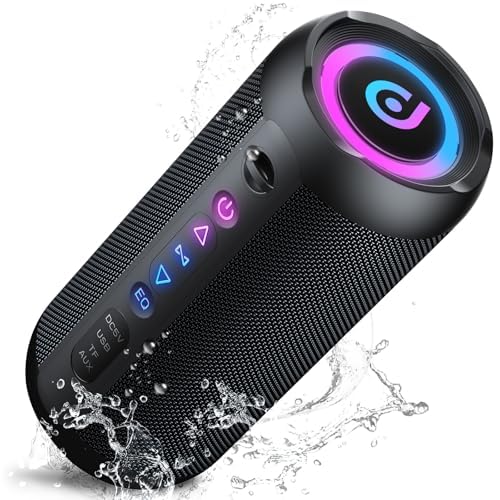
ചിത്രം 1: ഫ്രണ്ട് view of the taopodo S18 Portable Bluetooth Speaker. The speaker features a rectangular prism shape with a speaker grille on the front, indicating the audio output area. The overall design is compact and suitable for portability.
ബട്ടണുകളും പോർട്ടുകളും:
- പവർ ബട്ടൺ: Press and hold to power on/off. Short press to change RGB light modes.
- ശബ്ദം കുറയ്ക്കുക / മുമ്പത്തെ ട്രാക്ക് ബട്ടൺ: ശബ്ദം കുറയ്ക്കാൻ ഷോർട്ട് പ്രസ് ചെയ്യുക. മുമ്പത്തെ ട്രാക്കിലേക്ക് പോകാൻ ദീർഘനേരം അമർത്തുക.
- പ്ലേ/താൽക്കാലികമായി നിർത്തുക / കോൾ ബട്ടൺ: സംഗീതം പ്ലേ ചെയ്യാൻ/താൽക്കാലികമായി നിർത്താൻ ഷോർട്ട് പ്രസ്സ് ചെയ്യുക. കോളുകൾക്ക് മറുപടി നൽകാൻ/അവസാനിപ്പിക്കാൻ ഷോർട്ട് പ്രസ്സ് ചെയ്യുക. കോളുകൾ നിരസിക്കാൻ ദീർഘനേരം അമർത്തുക.
- വോളിയം കൂട്ടുക / അടുത്ത ട്രാക്ക് ബട്ടൺ: ശബ്ദം കൂട്ടാൻ ഷോർട്ട് പ്രസ് ചെയ്യുക. അടുത്ത ട്രാക്കിലേക്ക് പോകാൻ ദീർഘനേരം അമർത്തുക.
- TWS ബട്ടൺ: Short press to initiate TWS pairing.
- ചാർജിംഗ് പോർട്ട്: സ്പീക്കർ ചാർജ് ചെയ്യുന്നതിനുള്ള USB-C പോർട്ട്.
4. സജ്ജീകരണം
4.1 സ്പീക്കർ ചാർജ് ചെയ്യുന്നു
- Connect the provided power cable to the speaker's charging port.
- Connect the other end of the power cable to a suitable USB power adapter (not included) or a computer's USB port.
- ചാർജ് ചെയ്യുമ്പോൾ ചാർജിംഗ് ഇൻഡിക്കേറ്റർ ലൈറ്റ് പ്രകാശിക്കുകയും പൂർണ്ണമായി ചാർജ് ചെയ്യുമ്പോൾ ഓഫാകുകയും ചെയ്യും.
- ഒപ്റ്റിമൽ ബാറ്ററി ലൈഫിനായി, ആദ്യ ഉപയോഗത്തിന് മുമ്പ് സ്പീക്കർ പൂർണ്ണമായും ചാർജ് ചെയ്യുക.
4.2 First-Time Bluetooth Pairing
- സ്പീക്കർ പൂർണ്ണമായി ചാർജ്ജ് ചെയ്തിട്ടുണ്ടെന്ന് ഉറപ്പാക്കുക.
- അമർത്തിപ്പിടിക്കുക പവർ ബട്ടൺ for 2-3 seconds to turn on the speaker. A power-on tone will sound, and the Bluetooth indicator light will flash, indicating it's in pairing mode.
- നിങ്ങളുടെ ബ്ലൂടൂത്ത് പ്രാപ്തമാക്കിയ ഉപകരണത്തിൽ (സ്മാർട്ട്ഫോൺ, ടാബ്ലെറ്റ്, കമ്പ്യൂട്ടർ), ബ്ലൂടൂത്ത് ക്രമീകരണങ്ങളിലേക്ക് പോകുക.
- ഇതിനായി തിരയുക ലഭ്യമായ ഉപകരണങ്ങൾ തിരഞ്ഞെടുത്ത് "taopodo S18" പട്ടികയിൽ നിന്ന്.
- Once connected, the Bluetooth indicator light will stop flashing and remain solid, and a connection tone will sound.
- You can now play audio through your taopodo S18 speaker.
5. പ്രവർത്തന നിർദ്ദേശങ്ങൾ
5.1 പവർ ഓൺ/ഓഫ്
- പവർ ഓൺ: അമർത്തിപ്പിടിക്കുക പവർ ബട്ടൺ 2-3 സെക്കൻഡ് നേരത്തേക്ക്.
- പവർ ഓഫ്: അമർത്തിപ്പിടിക്കുക പവർ ബട്ടൺ 2-3 സെക്കൻഡ് നേരത്തേക്ക്.
5.2 ബ്ലൂടൂത്ത് കണക്ഷൻ
- After initial pairing, the speaker will automatically attempt to reconnect to the last paired device when powered on.
- If reconnection fails, manually select "taopodo S18" from your device's Bluetooth settings.
5.3 മ്യൂസിക് പ്ലേബാക്ക്
- പ്ലേ/താൽക്കാലികമായി നിർത്തുക: ഷോർട്ട് അമർത്തുക പ്ലേ ചെയ്യുക/താൽക്കാലികമായി നിർത്തുക ബട്ടൺ.
- വോളിയം കൂട്ടുക: ഷോർട്ട് അമർത്തുക വോളിയം അപ്പ് ബട്ടൺ.
- വോളിയം താഴേക്ക്: ഷോർട്ട് അമർത്തുക വോളിയം ഡൗൺ ബട്ടൺ.
- അടുത്ത ട്രാക്ക്: ദീർഘനേരം അമർത്തുക വോളിയം അപ്പ് ബട്ടൺ.
- മുമ്പത്തെ ട്രാക്ക്: ദീർഘനേരം അമർത്തുക വോളിയം ഡൗൺ ബട്ടൺ.
5.4 കോൾ കൈകാര്യം ചെയ്യൽ
- ഉത്തരം/അവസാന കോൾ: ഷോർട്ട് അമർത്തുക പ്ലേ ചെയ്യുക/താൽക്കാലികമായി നിർത്തുക ബട്ടൺ.
- കോൾ നിരസിക്കുക: ദീർഘനേരം അമർത്തുക പ്ലേ ചെയ്യുക/താൽക്കാലികമായി നിർത്തുക ബട്ടൺ.
5.5 RGB ലൈറ്റ് മോഡുകൾ
- ഷോർട്ട് അമർത്തുക പവർ ബട്ടൺ to cycle through different RGB light modes.
- Continue pressing to turn off the lights.
6. TWS (ട്രൂ വയർലെസ് സ്റ്റീരിയോ) ജോടിയാക്കൽ
TWS allows you to pair two taopodo S18 speakers together for a true stereo sound experience.
- Ensure both taopodo S18 speakers are powered on and not connected to any other Bluetooth device.
- സ്പീക്കറുകളിലൊന്നിൽ (ഇതായിരിക്കും പ്രാഥമിക സ്പീക്കർ), ഹ്രസ്വമായി അമർത്തുക TWS ബട്ടൺ. The speaker will emit a tone, and its TWS indicator light will flash.
- The primary speaker will automatically search for the secondary speaker. Once connected, both speakers will emit a confirmation tone, and their TWS indicator lights will remain solid.
- Now, connect your Bluetooth device to the primary speaker ("taopodo S18") as described in section 4.2.
- രണ്ട് സ്പീക്കറുകളിലൂടെയും ഓഡിയോ ഇപ്പോൾ സ്റ്റീരിയോയിൽ പ്ലേ ചെയ്യും.
- To disconnect TWS, short press the TWS ബട്ടൺ ഒന്നുകിൽ സ്പീക്കറിൽ.
7. പരിപാലനം
- വൃത്തിയാക്കൽ: മൃദുവായ സ്പീക്കർ തുടയ്ക്കുക, ഡിamp തുണി. ഉരച്ചിലുകളുള്ള ക്ലീനറുകളോ ലായകങ്ങളോ ഉപയോഗിക്കരുത്.
- ജല പ്രതിരോധം: The speaker is IPX7 waterproof, meaning it can be submerged in up to 1 meter of water for 30 minutes. Ensure the charging port cover is securely closed before exposure to water. Do not expose to saltwater or other chemicals.
- സംഭരണം: നേരിട്ടുള്ള സൂര്യപ്രകാശത്തിൽ നിന്നും കടുത്ത താപനിലയിൽ നിന്നും മാറി തണുത്തതും വരണ്ടതുമായ സ്ഥലത്ത് സ്പീക്കർ സൂക്ഷിക്കുക.
- ബാറ്ററി കെയർ: ബാറ്ററി ലൈഫ് വർദ്ധിപ്പിക്കുന്നതിന്, പതിവായി ഉപയോഗിക്കുന്നില്ലെങ്കിൽ, കുറഞ്ഞത് മൂന്ന് മാസത്തിലൊരിക്കൽ സ്പീക്കർ ചാർജ് ചെയ്യുക. ഇടയ്ക്കിടെ ബാറ്ററി പൂർണ്ണമായും ഡിസ്ചാർജ് ചെയ്യുന്നത് ഒഴിവാക്കുക.
8. പ്രശ്നപരിഹാരം
| പ്രശ്നം | സാധ്യമായ പരിഹാരം |
|---|---|
| സ്പീക്കർ പവർ ഓൺ ചെയ്യുന്നില്ല. | സ്പീക്കർ ചാർജ് ചെയ്തിട്ടുണ്ടെന്ന് ഉറപ്പാക്കുക. ഒരു പവർ സ്രോതസ്സിലേക്ക് കണക്റ്റ് ചെയ്ത് വീണ്ടും ശ്രമിക്കുക. |
| ബ്ലൂടൂത്ത് ഉപകരണവുമായി ജോടിയാക്കാൻ കഴിയില്ല. | Make sure the speaker is in pairing mode (flashing Bluetooth indicator). Turn off and on Bluetooth on your device. Ensure the speaker is not connected to another device. Move closer to the speaker. |
| ശബ്ദമില്ല അല്ലെങ്കിൽ കുറഞ്ഞ ശബ്ദമില്ല. | Increase volume on both the speaker and your connected device. Ensure the device is playing audio. Check if the speaker is properly connected via Bluetooth. |
| ശബ്ദ നിലവാരം മോശമാണ്. | Move the speaker closer to your Bluetooth device. Avoid obstacles between the speaker and device. Try playing a different audio source. |
| TWS ജോടിയാക്കൽ പരാജയപ്പെടുന്നു. | Ensure both speakers are not connected to any other Bluetooth device. Place speakers close to each other. Repeat the TWS pairing steps carefully. |
9 സ്പെസിഫിക്കേഷനുകൾ
| ഫീച്ചർ | വിശദാംശങ്ങൾ |
|---|---|
| മോഡലിൻ്റെ പേര് | എസ് 18 |
| ബ്രാൻഡ് | taopodo |
| കണക്റ്റിവിറ്റി ടെക്നോളജി | ബ്ലൂടൂത്ത് 5.4 |
| സ്പീക്കർ തരം | 3D |
| ഓഡിയോ put ട്ട്പുട്ട് മോഡ് | സ്റ്റീരിയോ |
| സ്പീക്കർ പരമാവധി ഔട്ട്പുട്ട് പവർ | 30 വാട്ട്സ് |
| സറൗണ്ട് സൗണ്ട് ചാനൽ കോൺഫിഗറേഷൻ | 2.0 |
| വാട്ടർപ്രൂഫ് റേറ്റിംഗ് | IPX7 |
| ഉൽപ്പന്ന അളവുകൾ | 4"D x 1.9"W x 2.5"H |
| ഇനത്തിൻ്റെ ഭാരം | 2.14 പൗണ്ട് |
| ഉൾപ്പെടുത്തിയ ഘടകങ്ങൾ | പവർ കേബിൾ |
| നിയന്ത്രണ രീതി | ആപ്പ് (Note: While 'App' is listed, primary control is via physical buttons.) |
| ശുപാർശ ചെയ്യുന്ന ഉപയോഗങ്ങൾ | For Smartphones or Tablets, For Music Players, For Computers, Outdoor/portable audio setups |
10. വാറൻ്റി വിവരങ്ങൾ
The taopodo S18 Portable Bluetooth Speaker comes with a limited warranty. Please refer to the warranty card included in your package or contact customer support for detailed terms and conditions. This warranty typically covers manufacturing defects and workmanship under normal use.
11. ഉപഭോക്തൃ പിന്തുണ
If you encounter any issues or have questions regarding your taopodo S18 speaker that are not addressed in this manual, please contact taopodo customer support. Contact information can typically be found on the product packaging, warranty card, or the official taopodo webസൈറ്റ്.


