1. ആമുഖം
The DEPSTECH DS320 Dual Lens Borescope Camera is an advanced inspection tool designed for examining hard-to-reach areas. It features a 4.3-inch IPS screen for clear viewing, dual lenses for versatile inspection angles, IP67 waterproofing for use in wet environments, and a 16.5ft semi-rigid cable for flexible maneuverability. This manual provides essential information for the safe and effective operation and maintenance of your borescope.
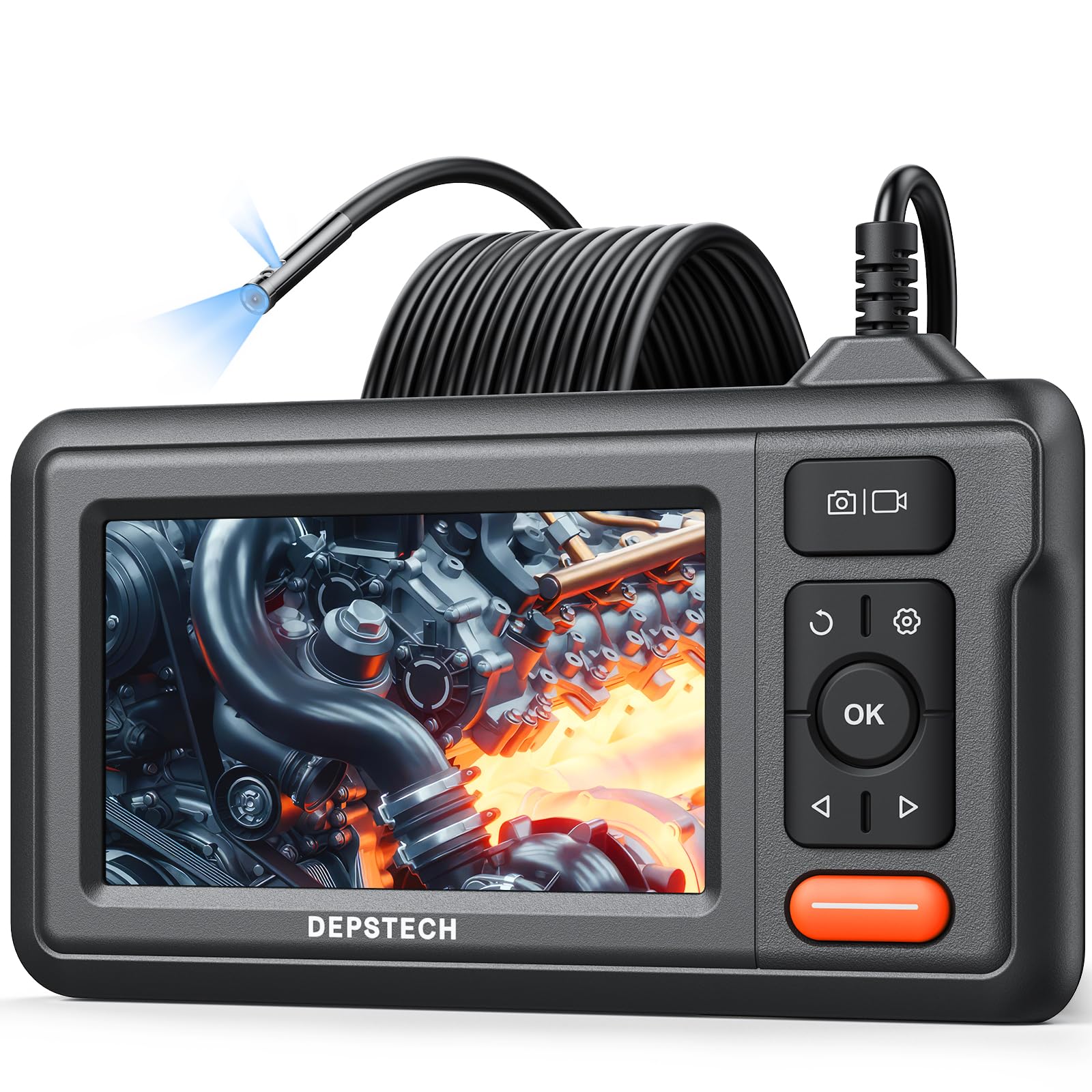
Figure 1: DEPSTECH DS320 Dual Lens Borescope Camera.
2 സുരക്ഷാ വിവരങ്ങൾ
ഈ ഉൽപ്പന്നം ഉപയോഗിക്കുന്നതിന് മുമ്പ് എല്ലാ സുരക്ഷാ നിർദ്ദേശങ്ങളും വായിച്ച് മനസ്സിലാക്കുക. ഈ നിർദ്ദേശങ്ങൾ പാലിക്കുന്നതിൽ പരാജയപ്പെടുന്നത് വൈദ്യുതാഘാതം, തീപിടുത്തം അല്ലെങ്കിൽ ഗുരുതരമായ പരിക്കിന് കാരണമായേക്കാം.
- കത്തുന്ന ദ്രാവകങ്ങൾ, വാതകങ്ങൾ അല്ലെങ്കിൽ പൊടി എന്നിവയുടെ സാന്നിധ്യം പോലെയുള്ള സ്ഫോടനാത്മകമായ അന്തരീക്ഷത്തിൽ ഉപകരണം ഉപയോഗിക്കരുത്.
- ഉപകരണം കുട്ടികളിൽ നിന്ന് അകറ്റി നിർത്തുക.
- Do not modify or disassemble the device. Repairs should only be performed by authorized personnel.
- Ensure the camera probe is clean and free from debris before and after use.
- ഉപകരണത്തെ ദീർഘനേരം തീവ്രമായ താപനിലയിലോ നേരിട്ടുള്ള സൂര്യപ്രകാശത്തിലോ തുറന്നുകാട്ടരുത്.
- The camera probe is IP67 waterproof, but the main unit is not. Avoid immersing the main unit in water.
3. പാക്കേജ് ഉള്ളടക്കം
നിങ്ങളുടെ പാക്കേജിൽ എല്ലാ ഇനങ്ങളും ഉണ്ടെന്ന് ഉറപ്പാക്കുക:
- DS320 Endoscope with 16.5ft Semi-Rigid Cable
- Accessory Kit (Hook and Magnet)
- ടൈപ്പ്-സി ചാർജിംഗ് കേബിൾ
- ഉപയോക്തൃ മാനുവൽ

Figure 2: Package contents including the borescope, cable, and accessories.
4. ഉൽപ്പന്നം കഴിഞ്ഞുview
The DEPSTECH DS320 is designed for ease of use and high performance in various inspection scenarios.
4.1. Main Unit Features
- 4.3-ഇഞ്ച് IPS സ്ക്രീൻ: Provides a clear, high-definition display with a 178° viewing angle for real-time inspection footage.
- അവബോധജന്യമായ നിയന്ത്രണങ്ങൾ: Easy-to-use buttons for navigation, image capture, video recording, and light adjustment.
- എർഗണോമിക് ഡിസൈൻ: Comfortable to hold for extended periods during inspections.
- നീണ്ട ബാറ്ററി ലൈഫ്: Equipped with a battery providing approximately 3 hours of continuous operation.

Figure 3: The 4.3-inch IPS color display for clear viewing.
4.2. Camera Probe Features
- ഡ്യുവൽ ലെൻസ് സിസ്റ്റം: Features a front-facing camera and a side-facing camera, allowing for comprehensive inspection without repositioning the probe.
- ബ്ലൂആർട്ട് 3.0 സാങ്കേതികവിദ്യ: Enhances image clarity, processing speed, and low-light performance for sharp and vivid images.
- IP67 വാട്ടർപ്രൂഫ്: The camera probe is resistant to water and dust, making it suitable for wet and dirty environments.
- ക്രമീകരിക്കാവുന്ന LED ലൈറ്റുകൾ: Seven adjustable LED lights provide optimal illumination in dark areas.
- 16.5ft Semi-Rigid Cable: Offers flexibility to navigate tight spaces while maintaining its shape for precise positioning.

Figure 4: The dual lens system with front and side cameras.

ചിത്രം 5: ഉദാample of 180° image rotation for easier viewing.
5. സജ്ജീകരണം
5.1 ഉപകരണം ചാർജ് ചെയ്യുന്നു
Before first use, fully charge the borescope. Connect the provided Type-C charging cable to the device's charging port and a suitable USB power adapter (not included). The charging indicator will show the charging status.
5.2. പ്രോബ് അറ്റാച്ചുചെയ്യുന്നു
The semi-rigid cable is pre-attached to the main unit. Ensure the connection is secure before use.
5.3. പവർ ഓൺ/ഓഫ്
Press and hold the power button (usually marked with a power symbol) for a few seconds to turn the device on or off. The screen will illuminate upon successful power-on.
6. പ്രവർത്തന നിർദ്ദേശങ്ങൾ
6.1. അടിസ്ഥാന പ്രവർത്തനം
Once powered on, the live feed from the camera will appear on the IPS screen. Use the navigation buttons (up/down/left/right) and the OK button to interact with the menu and settings.

Figure 6: The borescope ready for immediate use.
6.2. Using Dual Lenses
The DS320 features both a front camera and a side camera. Use the dedicated button (often labeled with a camera icon or 'M' for mode) to switch between the front view, വശം view, or a split-screen display if available. This allows for comprehensive inspection of an area without needing to rotate the probe.
6.3. LED തെളിച്ചം ക്രമീകരിക്കൽ
The camera probe is equipped with adjustable LED lights. Use the brightness adjustment buttons (often marked with '+' and '-' or arrow icons) on the main unit to increase or decrease the illumination level. This helps in achieving optimal visibility in varying light conditions.

Figure 7: IP67 waterproof camera head with adjustable LED lights.
6.4. ഫോട്ടോകളും വീഡിയോകളും ക്യാപ്ചർ ചെയ്യുന്നു
To capture an image, press the photo button (usually a camera icon). To record video, press the video button (usually a video camera icon). Ensure a compatible memory card (not included) is inserted for saving media. The device supports recording in 720p resolution.

Figure 8: Screen interface for capturing photos and recording videos.
6.5. ആക്സസറികൾ ഉപയോഗിക്കുന്നത്
The accessory kit includes a hook and a magnet. These can be attached to the camera probe to retrieve small objects or to maneuver the probe in difficult areas. Carefully attach them to the camera head as instructed in the accessory guide.

Figure 9: Included hook and magnet accessories.
6.6. ഉൽപ്പന്ന വീഡിയോ കഴിഞ്ഞുview
ഉൽപ്പന്നത്തിന്റെ സവിശേഷതകളെയും ഉപയോഗത്തെയും കുറിച്ചുള്ള ഒരു ദൃശ്യ ഗൈഡിനായി, ദയവായി താഴെയുള്ള ഔദ്യോഗിക ഉൽപ്പന്ന വീഡിയോ കാണുക.
Video 1: Official DEPSTECH Borescope Product Video, demonstrating key features and applications.
7. പരിപാലനം
7.1. വൃത്തിയാക്കൽ
After each use, especially in dirty or wet environments, clean the camera probe with a soft, damp cloth. For stubborn dirt, a mild detergent can be used. Ensure the probe is completely dry before storage. Do not use abrasive cleaners or solvents. The main unit should be wiped with a dry cloth.
7.2. സംഭരണം
Store the borescope in a cool, dry place, away from direct sunlight and extreme temperatures. Use the original packaging or a protective case to prevent damage to the screen and probe cable.
7.3. ബാറ്ററി പരിചരണം
To prolong battery life, avoid fully discharging the battery frequently. If storing the device for an extended period, charge it to approximately 50-70% every few months.
8. പ്രശ്നപരിഹാരം
| പ്രശ്നം | സാധ്യമായ കാരണം | പരിഹാരം |
|---|---|---|
| ഉപകരണം പവർ ഓണാക്കുന്നില്ല. | കുറഞ്ഞ ബാറ്ററി. | നൽകിയിരിക്കുന്ന ടൈപ്പ്-സി കേബിൾ ഉപയോഗിച്ച് ഉപകരണം ചാർജ് ചെയ്യുക. |
| സ്ക്രീനിൽ ചിത്രമൊന്നുമില്ല. | Camera cable not properly connected or damaged. | Ensure the camera cable is securely connected. If still no image, contact support. |
| ചിത്രം മങ്ങിയതോ അവ്യക്തമോ ആണ്. | Lens is dirty; insufficient lighting. | Clean the camera lens. Adjust the LED brightness using the controls on the main unit. |
| ഫോട്ടോകൾ/വീഡിയോകൾ സംരക്ഷിക്കാൻ കഴിയില്ല. | No memory card inserted; memory card full or corrupted. | Insert a compatible memory card. Check if the card has sufficient space or try formatting it (this will erase all data). |
9 സ്പെസിഫിക്കേഷനുകൾ
| ഫീച്ചർ | വിശദാംശങ്ങൾ |
|---|---|
| മോഡൽ നമ്പർ | DS320DL-5MM |
| പ്രദർശിപ്പിക്കുക | 4.3-ഇഞ്ച് IPS സ്ക്രീൻ |
| ക്യാമറ തരം | Dual Lens (Front & Side) |
| വാട്ടർപ്രൂഫ് റേറ്റിംഗ് | IP67 (പ്രോബ് മാത്രം) |
| കേബിൾ നീളം | 16.5 feet (Semi-Rigid) |
| പ്രകാശം | 7 ക്രമീകരിക്കാവുന്ന LED ലൈറ്റുകൾ |
| ചിത്രത്തിൻ്റെ ഗുണനിലവാരം | HD (720p for video recording) with Bluart 3.0 Technology |
| ബാറ്ററി | 1 A battery required (included), approx. 3 hours operating time |
| ഇനത്തിൻ്റെ ഭാരം | 1.46 പൗണ്ട് |
| പാക്കേജ് അളവുകൾ | 8.31 x 6.5 x 3.07 ഇഞ്ച് |
10. വാറൻ്റിയും പിന്തുണയും
This DEPSTECH product comes with a standard manufacturer's warranty. For detailed warranty information, product support, or technical assistance, please refer to the warranty card included in your package or visit the official DEPSTECH website. You may also contact DEPSTECH customer service directly for assistance.
DEPSTECH Authorized Store: സ്റ്റോർ സന്ദർശിക്കുക


