1. ആമുഖം
The WALFRONT REX C100 is a high-precision PID temperature controller designed for various industrial and commercial applications. It utilizes advanced self-tuning PID technology to ensure rapid temperature adjustments with minimal overshoot, providing accurate and stable temperature control. This manual provides essential information for the safe and efficient operation of your REX C100 controller.
Key applications include food processing, chemical industries, injection molding, and other environments requiring precise thermal monitoring and control.
2 സുരക്ഷാ വിവരങ്ങൾ
- വൈദ്യുത അപകടം: Always disconnect power before installation, wiring, or maintenance to prevent electric shock.
- ശരിയായ വയറിംഗ്: Ensure all wiring connections are secure and comply with local electrical codes. Incorrect wiring can cause damage to the device or pose a fire hazard.
- പരിസ്ഥിതി വ്യവസ്ഥകൾ: Operate the controller within the specified temperature and humidity ranges. Avoid exposure to corrosive gases, excessive dust, or moisture.
- യോഗ്യതയുള്ള ഉദ്യോഗസ്ഥർ: ഇൻസ്റ്റാളേഷനും വയറിംഗും യോഗ്യതയുള്ള ഉദ്യോഗസ്ഥർ മാത്രമേ നടത്താവൂ.
- ഉദ്ദേശിച്ച ഉപയോഗം: Use the device only for its intended purpose as a temperature controller. Do not modify the device.
3. പാക്കേജ് ഉള്ളടക്കം
പാക്കേജിൽ എല്ലാ ഇനങ്ങളും ഉണ്ടെന്ന് ഉറപ്പാക്കുക:
- 1 x WALFRONT REX C100 PID Temperature Controller
4. ഉൽപ്പന്നം കഴിഞ്ഞുview
The REX C100 features a clear digital display and intuitive controls for easy operation.

ചിത്രം 4.1: ഫ്രണ്ട് ആംഗിൾഡ് View of REX C100 Controller. This image displays the front panel of the REX C100 PID Temperature Controller from an angled perspective. It clearly shows the dual digital displays for Process Value (PV) and Set Value (SV), along with indicator lights for ALM1, ALM2, OUT1, and AT. The 'SET' button and arrow keys are visible at the bottom left.
ഫ്രണ്ട് പാനൽ വിവരണം
- PV Display (Upper): Shows the current Process Value (measured temperature).
- SV Display (Lower): Shows the Set Value (target temperature).
- ALM1 Indicator: Illuminates when Alarm 1 is active.
- ALM2 Indicator: Illuminates when Alarm 2 is active.
- OUT1 Indicator: Illuminates when the control output is active.
- AT സൂചകം: Illuminates during auto-tuning (self-tuning PID).
- SET ബട്ടൺ: പാരാമീറ്റർ ക്രമീകരണ മോഡിൽ പ്രവേശിച്ച് തിരഞ്ഞെടുപ്പുകൾ സ്ഥിരീകരിക്കാൻ ഉപയോഗിക്കുന്നു.
- Arrow Buttons (Up/Down/Left): മെനുകൾ നാവിഗേറ്റ് ചെയ്യുന്നതിനും മൂല്യങ്ങൾ ക്രമീകരിക്കുന്നതിനും ഉപയോഗിക്കുന്നു.
Rear Panel and Terminals
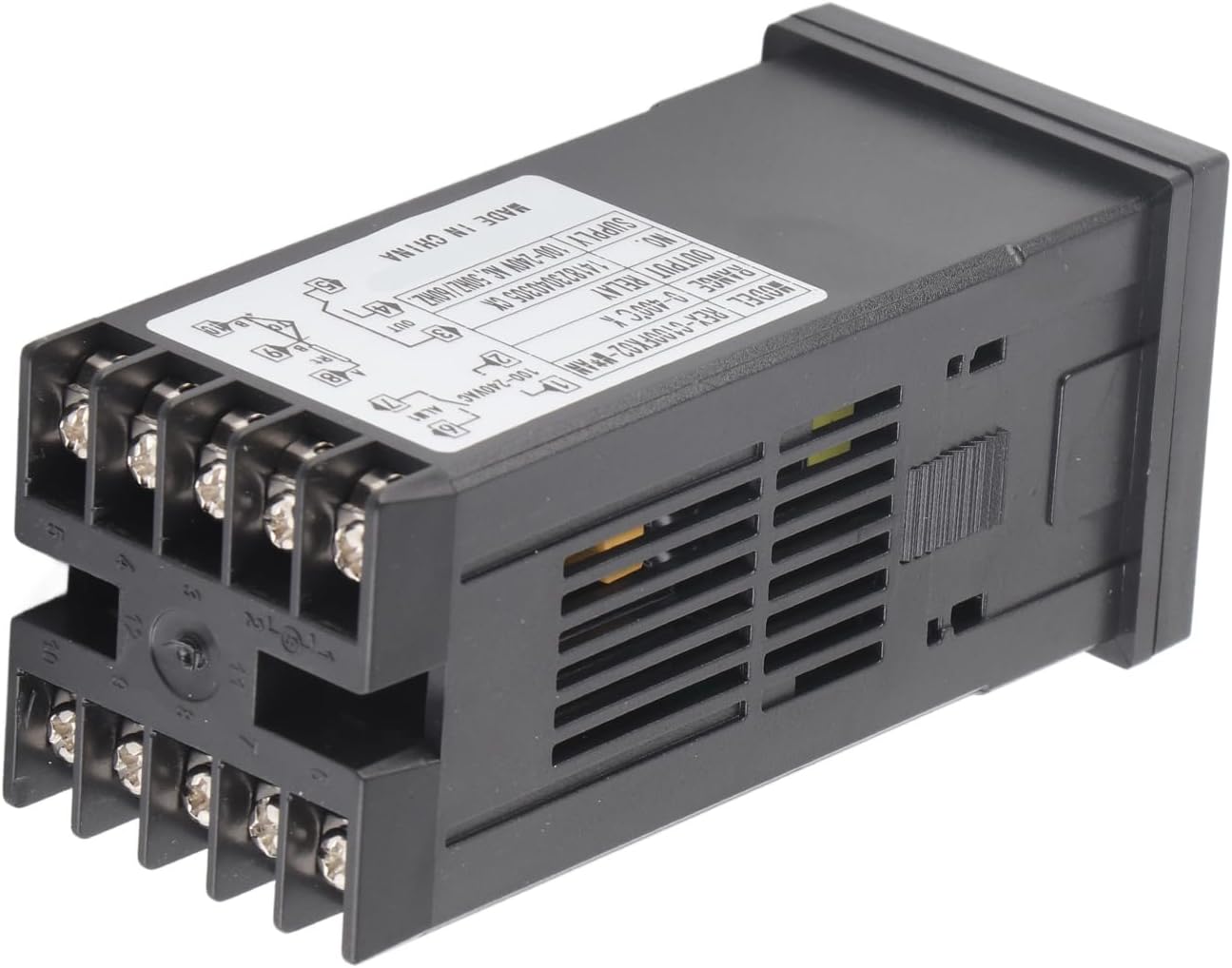
ചിത്രം 4.2: പിൻഭാഗം View with Wiring Terminals. This image shows the back of the REX C100 controller, highlighting the screw terminals for electrical connections and the product label with specifications and a basic wiring diagram.
The rear panel contains the screw terminals for power input, sensor input, and control outputs. Refer to the wiring diagram on the device label for precise connections.
5. സജ്ജീകരണം
5.1 മൗണ്ടിംഗ്
The REX C100 is designed for panel mounting. Cut an appropriate opening in your control panel according to the device dimensions. Insert the controller into the opening and secure it using the provided mounting brackets from the rear.

ചിത്രം 5.1: REX C100 with Mounting Bracket. This image shows the REX C100 controller with its black plastic mounting bracket, illustrating how the device is secured into a panel cutout.
5.2 വയറിംഗ്
WARNING: Ensure power is disconnected before performing any wiring.
Refer to the wiring diagram printed on the side label of the controller for accurate connections. A typical wiring configuration is as follows:

ചിത്രം 5.2: Wiring Diagram on Product Label. This image provides a close-up of the REX C100's side label, which includes a comprehensive wiring diagram for power, sensor input, and output connections.
- Power Supply (Terminals 1 & 2): Connect your 100-240VAC, 50/60Hz power source here.
- Output (OUT1) (Terminals 3, 4, 5): These are relay contacts. Connect your heating or cooling element through these terminals. The diagram shows Normally Open (NO) and Common (COM) connections.
- Alarm 1 (ALM1) (Terminals 6 & 7): Connect external alarm devices here.
- Alarm 2 (ALM2) (Terminals 8 & 9): Connect external alarm devices here.
- Sensor Input (Terminals 10 & 11): Connect your K-type thermocouple here. Ensure correct polarity for accurate readings.
After wiring, double-check all connections before applying power.
6. പ്രവർത്തന നിർദ്ദേശങ്ങൾ
6.1 പവർ ഓണാണ്
Once wired correctly, apply power to the controller. The PV display will show the current temperature measured by the thermocouple, and the SV display will show the set target temperature.
6.2 Setting the Target Temperature (SV)
- അമർത്തുക സെറ്റ് button once. The SV display will begin to flash.
- ഉപയോഗിക്കുക Up ഒപ്പം താഴേക്ക് arrow buttons to adjust the target temperature. The ഇടത് arrow button can be used to shift the cursor for faster adjustment of individual digits.
- അമർത്തുക സെറ്റ് button again to confirm the new SV. The display will stop flashing, and the controller will begin to regulate the temperature to the new set point.
6.3 PID Auto-Tuning
The REX C100 features an expert self-tuning PID function. Auto-tuning helps the controller learn the characteristics of your specific heating/cooling system to optimize control performance and minimize overshoot or undershoot.
To initiate auto-tuning:
- Ensure the system is at a stable temperature, preferably near your desired set point.
- അമർത്തിപ്പിടിക്കുക സെറ്റ് button for approximately 3-5 seconds until the controller enters the parameter setting menu.
- Navigate through the parameters (using arrow keys) until you find the auto-tuning parameter (often labeled 'AT' or similar).
- Set the auto-tuning parameter to '1' (or 'ON') and confirm with the സെറ്റ് button. The 'AT' indicator light on the front panel will illuminate.
- The controller will cycle the output to determine the optimal PID parameters. This process may take some time (e.g., several heating/cooling cycles).
- Once auto-tuning is complete, the 'AT' indicator will turn off, and the controller will operate with the newly optimized PID parameters.
Note: Specific parameter codes and navigation may vary slightly. Refer to the detailed programming manual (if available) for advanced settings.
6.4 അലാറം ക്രമീകരണങ്ങൾ
The REX C100 includes two alarm outputs (ALM1, ALM2). These can be configured for various alarm types (e.g., high limit, low limit, deviation) and hysteresis. Access these settings through the parameter menu by pressing and holding the സെറ്റ് ബട്ടൺ.
7. പരിപാലനം
- വൃത്തിയാക്കൽ: Clean the front panel with a soft, dry cloth. Do not use abrasive cleaners or solvents.
- പരിസ്ഥിതി പരിശോധന: Periodically inspect the operating environment to ensure it remains free of corrosive gases, excessive dust, and moisture.
- കണക്ഷൻ പരിശോധന: Occasionally check wiring connections for tightness, especially in environments with vibration.
- സെൻസർ പരിശോധന: Inspect the thermocouple for any signs of damage or corrosion that could affect accuracy.
8. പ്രശ്നപരിഹാരം
| പ്രശ്നം | സാധ്യമായ കാരണം | പരിഹാരം |
|---|---|---|
| കൺട്രോളർ പവർ ഓണാക്കുന്നില്ല. | വൈദ്യുതി ഇല്ല; തെറ്റായ വയറിംഗ്. | Check power connections (Terminals 1 & 2). Ensure voltage is within 100-240VAC. |
| PV display shows 'HHHH' or 'LLLL'. | Thermocouple open circuit or reverse connection. | Check thermocouple wiring (Terminals 10 & 11) for breaks or incorrect polarity. Ensure it is a K-type thermocouple. |
| താപനില വായന തെറ്റാണ്. | Incorrect sensor type selected (if configurable); sensor fault; environmental interference. | Verify sensor type. Check sensor for damage. Ensure proper shielding if in an electrically noisy environment. |
| Output (OUT1) not activating. | SV not reached; output parameter incorrect; wiring issue. | Check SV. Verify output control mode. Inspect output wiring (Terminals 3, 4, 5). |
| Temperature overshoots/undershoots target. | PID parameters not optimized. | Perform PID auto-tuning (refer to Section 6.3). |
9 സ്പെസിഫിക്കേഷനുകൾ
| ഫീച്ചർ | സ്പെസിഫിക്കേഷൻ |
|---|---|
| മോഡൽ | REX-C100 |
| നിയന്ത്രണ തരം | താപനില |
| നിയന്ത്രണ മോഡ് | RELAY (Output) |
| Measurement Objects | All objects (with compatible K-type thermocouple) |
| താപനില അളക്കൽ പിശക് | ±1% (℃) |
| വർക്കിംഗ് വോളിയംtage | 100-240VAC |
| അളക്കൽ കൃത്യത | ± 0.5%FS |
| റെസലൂഷൻ | 14 ബിറ്റ് |
| ഇൻസുലേഷൻ ശക്തി | 1500VAC/1 മിനിറ്റ് |
| ഭാരം | 164 ഗ്രാം (ഏകദേശം 6 ഔൺസ്) |
| Temperature Range (K-Type) | 0-400°C (32-752°F) |
| പ്രവർത്തന പരിസ്ഥിതി | 0-50℃ (32-122°F), 30-85% RH, free of corrosive gas |
| പാക്കേജ് അളവുകൾ | 5.51 x 2.76 x 2.36 ഇഞ്ച് |
10. വാറൻ്റിയും പിന്തുണയും
മെറ്റീരിയലുകളിലെയും വർക്ക്മാൻഷിപ്പിലെയും പിഴവുകൾക്കെതിരെ ഈ ഉൽപ്പന്നത്തിന് ഒരു സ്റ്റാൻഡേർഡ് നിർമ്മാതാവിന്റെ വാറണ്ടി ബാധകമാണ്. നിർദ്ദിഷ്ട വാറന്റി നിബന്ധനകൾക്കും ദൈർഘ്യത്തിനും ദയവായി നിങ്ങളുടെ വാങ്ങൽ ഡോക്യുമെന്റേഷൻ പരിശോധിക്കുക.
സാങ്കേതിക പിന്തുണ, ട്രബിൾഷൂട്ടിംഗ് സഹായം, അല്ലെങ്കിൽ വാറന്റി ക്ലെയിമുകൾ എന്നിവയ്ക്കായി, നിങ്ങളുടെ റീട്ടെയിലറെയോ നിർമ്മാതാവിനെയോ നേരിട്ട് ബന്ധപ്പെടുക. വാങ്ങിയതിന്റെ തെളിവായി നിങ്ങളുടെ വാങ്ങൽ രസീത് സൂക്ഷിക്കുക.


