1. ആമുഖം
This manual provides essential information for the proper installation, operation, and maintenance of your Sauermann KT 220-N Multi-Function Data Logger. Please read this manual thoroughly before using the device to ensure safe and efficient operation. Keep this manual for future reference.
2. ഉൽപ്പന്നം കഴിഞ്ഞുview
The Sauermann KT 220-N is a versatile multi-function data logger designed for various measurement applications, particularly temperature monitoring. It features a universal probe input, allowing connection of different types of probes (not included) to suit specific measurement needs. This model operates without an integrated display, relying on software for configuration and data retrieval.
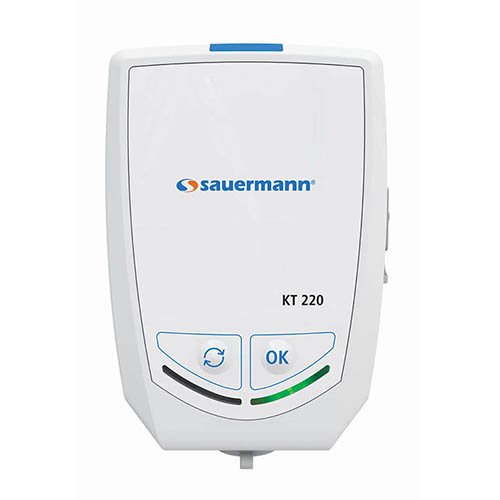
ചിത്രം 2.1: മുൻഭാഗം view of the Sauermann KT 220-N Data Logger. Note the 'OK' and 'Cycle' buttons at the bottom.
പ്രധാന സവിശേഷതകൾ:
- Multi-function data logging capabilities.
- Universal probe input for various sensor types.
- Compact and robust design.
- Internal temperature measurement.
- Battery-powered operation.
3. സജ്ജീകരണം
- അൺപാക്ക് ചെയ്യുന്നു: Carefully remove the data logger from its packaging. Verify that all components are present and undamaged.
- ബാറ്ററി ഇൻസ്റ്റാളേഷൻ: The KT 220-N typically comes with batteries pre-installed. If not, locate the battery compartment (usually on the rear or side) and insert the specified batteries, observing correct polarity.
- അന്വേഷണ കണക്ഷൻ: Connect your desired measurement probe (e.g., temperature, humidity) to the universal input port on the data logger. Ensure a secure connection.
- സോഫ്റ്റ്വെയർ ഇൻസ്റ്റാളേഷൻ: Install the Sauermann data logging software (e.g., KILOG) on your computer. This software is essential for configuring the logger, starting/stopping measurements, and downloading data. Refer to the software's specific manual for installation instructions.
- പ്രാരംഭ കോൺഫിഗറേഷൻ: Connect the data logger to your computer via the appropriate interface (e.g., USB). Use the software to set up logging parameters such as measurement interval, start mode, and alarm thresholds.
4. പ്രവർത്തന നിർദ്ദേശങ്ങൾ
The KT 220-N is primarily controlled and configured via its dedicated software. The physical buttons on the device provide basic control over logging status.
- Starting a Measurement Campക്രമീകരിക്കുക:
- Ensure the logger is configured via the software.
- Depending on the configured start mode (e.g., immediate, delayed, button press), the logger will begin recording data.
- If configured for button press start, press the 'OK' button (refer to Figure 2.1) to initiate logging.
- Stopping a Measurement Campക്രമീകരിക്കുക:
- Logging can be stopped via the software or, if configured, by pressing and holding the 'OK' button.
- The logger will automatically stop when its memory is full or if a programmed stop time is reached.
- Checking Status (if applicable): The KT 220-N does not have a display. Status indicators (LEDs) may provide basic information on logging activity or battery status. Consult the software for detailed status.
- ഡാറ്റ ഡൗൺലോഡ്: Connect the logger to your computer and use the software to download recorded data. Data can then be viewed, analyzed, and exported.
5. പരിപാലനം
- വൃത്തിയാക്കൽ: Clean the exterior of the data logger with a soft, damp തുണി. അബ്രാസീവ് ക്ലീനറുകളോ ലായകങ്ങളോ ഉപയോഗിക്കരുത്. ഉപകരണത്തിനുള്ളിൽ ദ്രാവകം പ്രവേശിക്കുന്നില്ലെന്ന് ഉറപ്പാക്കുക.
- ബാറ്ററി മാറ്റിസ്ഥാപിക്കൽ: When the battery indicator (if present, or via software) shows low battery, replace the batteries with new ones of the specified type. Ensure the device is off before replacing batteries.
- സംഭരണം: Store the data logger in a cool, dry place, away from direct sunlight and extreme temperatures. If storing for extended periods, remove the batteries to prevent leakage.
- പ്രോബ് കെയർ: Refer to the specific probe's manual for cleaning and maintenance instructions.
6. പ്രശ്നപരിഹാരം
| പ്രശ്നം | സാധ്യമായ കാരണം | പരിഹാരം |
|---|---|---|
| ഉപകരണം പ്രതികരിക്കുന്നില്ല | കുറഞ്ഞതോ ഡെഡ് ബാറ്ററികളോ; തെറ്റായ ബാറ്ററി ഇൻസ്റ്റാളേഷൻ. | ബാറ്ററികൾ മാറ്റിസ്ഥാപിക്കുക; പോളാരിറ്റി പരിശോധിക്കുക. |
| കമ്പ്യൂട്ടറുമായി ബന്ധിപ്പിക്കാൻ കഴിയില്ല | Incorrect USB cable; driver not installed; software not running. | Use correct cable; install drivers; open software. |
| No data being logged | Logging not started; incorrect configuration; full memory. | Start logging via software/button; reconfigure settings; download data and clear memory. |
| കൃത്യമല്ലാത്ത വായനകൾ | Faulty probe; probe not calibrated; environmental interference. | Check probe connection; calibrate probe; ensure stable environment. |
7 സ്പെസിഫിക്കേഷനുകൾ
- മോഡൽ: KT 220-N
- തരം: Multi-Function Data Logger
- ഇൻപുട്ട്: Universal Probe Input
- ഡിസ്പ്ലേ: ഒന്നുമില്ല
- ഊർജ്ജ സ്രോതസ്സ്: ബാറ്ററികൾ (ബാറ്ററി കമ്പാർട്ടുമെന്റിൽ വ്യക്തമാക്കിയ തരം)
- നിർമ്മാതാവ്: സോവർമാൻ
- ASIN: B06XC7G96T
- ആദ്യം ലഭ്യമായ തീയതി: 1 മാർച്ച് 2017
8. വാറൻ്റിയും പിന്തുണയും
Sauermann products are designed for reliability and performance. For information regarding warranty coverage, technical support, or service, please refer to the official Sauermann website or contact your authorized distributor. Keep your purchase receipt as proof of purchase for warranty claims.
കൂടുതൽ സഹായത്തിന്, ദയവായി സന്ദർശിക്കുക സോവർമാൻ ഗ്രൂപ്പ് webസൈറ്റ്.


